Notice: The Weights & Biases domain will change on September 30. This includes all websites and services that use a W&B domain. No action is needed today.
Collect and analyze feedback for LLM applications through UI and SDK
Evaluating LLM applications requires tooling to collect and analyze feedback. W&B Weave provides an integrated feedback system that lets you provide Call feedback directly through the UI or programmatically through the SDK. Weave supports several feedback types, including emoji reactions, textual comments, and structured data, so your team can:
Build evaluation datasets for performance monitoring.
Identify and resolve LLM content issues.
Gather examples for advanced tasks like fine-tuning.
This guide is for developers and reviewers working with LLM applications in Weave. It covers how to use Weave’s feedback functionality in both the UI and SDK, query and manage feedback, and use human annotations for detailed evaluations.
The following sections describe how to provide feedback in the Weave UI, either from the Call details panel or using the feedback icons.
Use the Call details panel
In the Weave project sidebar, navigate to Traces.
Find the row for the Call that you want to add feedback to.
Click the linked Trace name to open the trace tree and Call details panel.
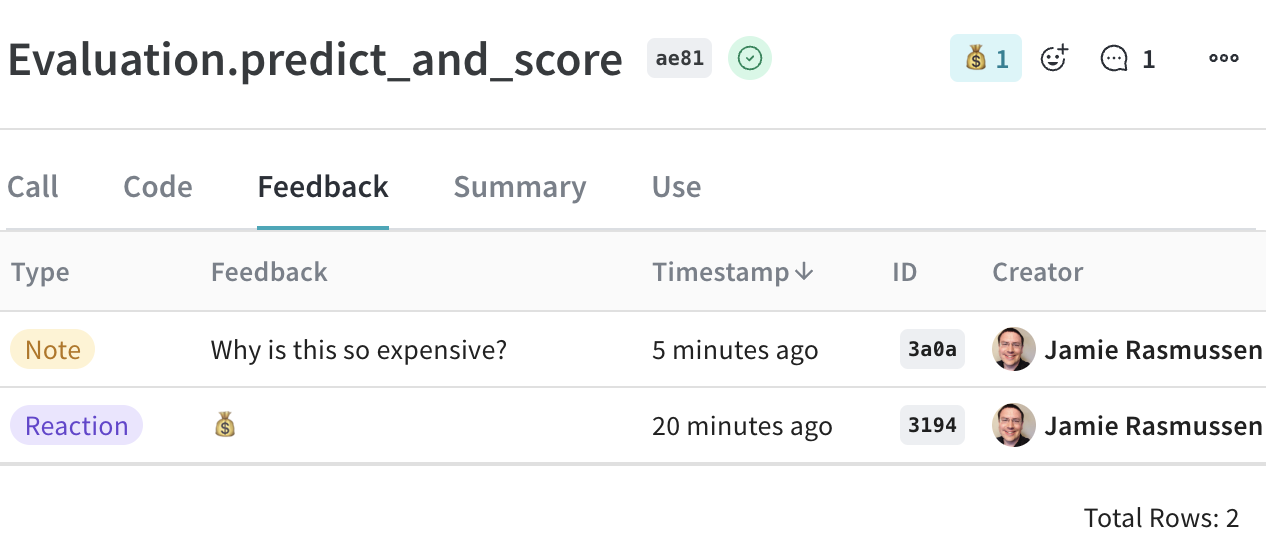
In the Call details tab bar, select Feedback.
Add, view, or delete feedback:
Add and view feedback using the icons located in the upper right corner of the Call details feedback view.
View and delete feedback from the Call details feedback table. Delete feedback by clicking the trashcan icon in the rightmost column of the appropriate feedback row.
Use the feedback icons
You can add or remove a reaction, and add a note using the icons that are located in both the Traces table and individual Call details panel.
Traces table: Located in Feedback column in the appropriate row in the Traces table.
Call details panel: Located in the upper right corner of each Call details panel.
To add a reaction:
Click the emoji icon.
Add a thumbs up, thumbs down, or click the + icon for more emojis.
In the text box, add your note. The maximum number of characters in a feedback note is 1024.
To save the note, press the Enter key. You can add more notes.
The maximum number of characters in a feedback note is 1024. If a note exceeds this limit, Weave doesn’t create it.
Provide feedback through the SDK
Use the SDK when you want to automate feedback collection or integrate it into evaluation pipelines, rather than entering feedback by hand in the UI.You can find SDK usage examples for feedback in the UI under the Use tab in the Call details panel.You can use the Weave Python SDK to programmatically add, remove, and query feedback on calls. The TypeScript SDK does not support feedback functionality.
Query a project’s feedback
You can query the feedback for your Weave project using the SDK. The SDK supports the following feedback query operations:
client.get_feedback(): Returns all feedback in a project.
client.get_feedback("[FEEDBACK-UUID]"): Returns a specific feedback object specified by [FEEDBACK-UUID] as a collection.
client.get_feedback(reaction="[REACTION-TYPE]"): Returns all feedback objects for a specific reaction type.
You can also get more information for each feedback object in client.get_feedback():
id: The feedback object ID.
created_at: The creation time information for the feedback object.
feedback_type: The type of feedback (reaction, note, custom).
payload: The feedback payload.
Python
TypeScript
import weaveclient = weave.init('intro-example')# Get all feedback in a projectall_feedback = client.get_feedback()# Fetch a specific feedback object by id.# The API returns a collection, which is expected to contain at most one item.one_feedback = client.get_feedback("[FEEDBACK-UUID]")[0]# Find all feedback objects with a specific reaction. You can specify offset and limit.thumbs_up = client.get_feedback(reaction="👍", limit=10)# After retrieval, view the details of individual feedback objects.for f in client.get_feedback(): print(f.id) print(f.created_at) print(f.feedback_type) print(f.payload)
This feature is not available in TypeScript yet.
Add feedback to a Call
You can add feedback to a Call using the Call’s UUID. To use the UUID to get a particular Call, retrieve it during or after Call execution. The SDK supports the following operations for adding feedback to a Call:
call.feedback.add_reaction("[REACTION-TYPE]"): Add one of the supported [REACTION-TYPE] values (emojis), such as 👍.
call.feedback.add_note("[NOTE]"): Add a note.
call.feedback.add("[LABEL]", [OBJECT]): Add a custom feedback [OBJECT] specified by [LABEL].
The maximum number of characters in a feedback note is 1024. If a note exceeds this limit, Weave doesn’t create it.
Python
TypeScript
import weaveclient = weave.init('intro-example')call = client.get_call("[CALL-UUID]")# Adding an emoji reactioncall.feedback.add_reaction("👍")# Adding a notecall.feedback.add_note("this is a note")# Adding custom key/value pairs.# The first argument is a user-defined "type" string.# Feedback must be JSON serializable and less than 1 KB when serialized.call.feedback.add("correctness", { "value": 5 })
This feature is not available in TypeScript yet.
Retrieve the Call UUID
For scenarios where you must add feedback immediately after a Call, you can retrieve the Call UUID programmatically during or after the Call execution.
During Call execution
To retrieve the UUID during Call execution, get the current Call, and return the ID.
Python
TypeScript
import weaveweave.init("uuid")@weave.op()def simple_operation(input_value): # Perform some simple operation output = f"Processed {input_value}" # Get the current call ID current_call = weave.require_current_call() call_id = current_call.id return output, call_id
This feature is not available in TypeScript yet.
After Call execution
Alternatively, you can use the call() method to execute the operation and retrieve the ID after Call execution:
Python
TypeScript
import weaveweave.init("uuid")@weave.op()def simple_operation(input_value): return f"Processed {input_value}"# Execute the operation and retrieve the result and call IDresult, call = simple_operation.call("example input")call_id = call.id
This feature is not available in TypeScript yet.
Delete feedback from a Call
You can delete feedback from a particular call by specifying a UUID.
Python
TypeScript
call.feedback.purge("[FEEDBACK-UUID]")
This feature is not available in TypeScript yet.
Add human annotations
Human annotations let you capture structured, human-reviewed judgments about Calls so that reviewers can score model output against your own criteria.Human annotations are supported in the Weave UI. This functionality lets you create custom fields to add human-entered data to your Traces as feedback. To make human annotations, you must first create a Human Annotation scorer using either the UI or the API. Then, you can use the scorer in the UI to make annotations, and modify your annotation scorers using the API.
Create a human annotation scorer in the UI
To create a human annotation scorer in the UI, do the following:
In the project sidebar, navigate to Assets.
In the Assets navigation panel, click Scorers.
In the Scorers panel header, click New scorer.
In the Create Scorer modal dialog, set:
Scorer type to Human annotation
Name
Description
Type, which determines the type of feedback to collect, such as boolean or integer.
Click Create scorer. Now, you can use your scorer to make annotations.
In the following example, a human annotator selects which type of document the LLM loaded. The Type for the score configuration is an enum that contains the possible document types.
Use the human annotation scorer in the UI
After you create a human annotation scorer, it becomes available to use on the Traces page.To use the scorer, do the following:
In the project sidebar, navigate to Traces.
Find the row for the Call that you want to add a human annotation to.
Click the linked Trace name to open the trace tree and Call details panel.
In the upper right corner of the Call details tab bar, click the Show feedback button.Your available human annotation scorers display in an Annotate panel.
Make an annotation.
Click Save.
In the Call details panel tab bar, click the Feedback tab to view the Feedback table. The new annotation displays in the table. You can also view the annotations in the Annotations column in the main Traces table.
Refresh the Traces table to view the most up-to-date information.
Create a human annotation scorer using the API
You can also create human annotation scorers through the API. Each scorer is its own object, which you create and update independently. To create a human annotation scorer programmatically, do the following:
Import the AnnotationSpec class from weave.flow.annotation_spec.
Use the publish method from weave to create the scorer.
The following example creates two scorers. The first scorer, Temperature, scores the perceived temperature of the LLM call. The second scorer, Tone, scores the tone of the LLM response. Each scorer uses save with an associated object ID (temperature-scorer and tone-scorer).
Python
TypeScript
import weavefrom weave.flow.annotation_spec import AnnotationSpecclient = weave.init("feedback-example")spec1 = AnnotationSpec( name="Temperature", description="The perceived temperature of the llm call", field_schema={ "type": "number", "minimum": -1, "maximum": 1, })spec2 = AnnotationSpec( name="Tone", description="The tone of the llm response", field_schema={ "type": "string", "enum": ["Aggressive", "Neutral", "Polite", "N/A"], },)weave.publish(spec1, "temperature-scorer")weave.publish(spec2, "tone-scorer")
This feature is not available in TypeScript yet.
Modify a human annotation scorer using the API
Expanding on creating a human annotation scorer using the API, the following example creates an updated version of the Temperature scorer, by using the original object ID (temperature-scorer) on publish. The result is an updated object, with a history of all versions.
You can view human annotation scorer object history in the Scorers tab under Human annotations.
Python
TypeScript
import weavefrom weave.flow.annotation_spec import AnnotationSpecclient = weave.init("feedback-example")# create a new version of the scorerspec1 = AnnotationSpec( name="Temperature", description="The perceived temperature of the llm call", field_schema={ "type": "integer", # <<- change type to integer "minimum": -1, "maximum": 1, })weave.publish(spec1, "temperature-scorer")
This feature is not available in TypeScript yet.
Use a human annotation scorer using the API
The feedback API lets you use a human annotation scorer by specifying a specially constructed name and an annotation_ref field. You can obtain the annotation_spec_ref from the UI by selecting the appropriate tab, or during the creation of the AnnotationSpec.
{"docsConfig":{"theme":"aspen","$schema":"https://mintlify.com/docs.json","name":"Weights \u0026 Biases Documentation","colors":{"primary":"#FCBC32","light":"#FCBC32","dark":"#FCBC32"},"logo":{"light":"https://mintcdn.com/wb-21fd5541/C7PMWo9Jl9GZ2Zki/icons/Endorsed_primary_blackwhite.svg?fit=max\u0026auto=format\u0026n=C7PMWo9Jl9GZ2Zki\u0026q=85\u0026s=a9d999235518399090dd8ddd0a9e1e4a","dark":"https://mintcdn.com/wb-21fd5541/C7PMWo9Jl9GZ2Zki/icons/Endorsed_primary_goldwhite.svg?fit=max\u0026auto=format\u0026n=C7PMWo9Jl9GZ2Zki\u0026q=85\u0026s=f4eaf37e934c12e5fd3e806fe2984c2e","href":"https://docs.wandb.ai/"},"favicon":"https://mintcdn.com/wb-21fd5541/HesivM0BUKMK8VeH/favicon.png?fit=max\u0026auto=format\u0026n=HesivM0BUKMK8VeH\u0026q=85\u0026s=0c96f60ed4edd2ece5e942ecde3c11fa","background":{"decoration":"gradient"},"navbar":{"links":[{"href":"https://app.wandb.ai/login?_gl=1*8ninq0*_ga*MTE3ODEwNDkyLjE3MzQwMjk0NjA.*_ga_JH1SJHJQXJ*MTczNDA2Mzc4OS4yLjEuMTczNDA2MzkxMC42MC4wLjA.*_ga_GMYDGNGKDT*MTczNDA2Mzc4OS4zLjEuMTczNDA2Mzg2Ny4wLjAuMA..*_gcl_au*MTc0Mjk3ODgzMi4xNzM0MDI5NDYw","label":"Log in"}],"primary":{"type":"button","label":"Sign Up","href":"https://app.wandb.ai/login?signup=true\u0026_gl=1*y15ckv*_ga*MTE3ODEwNDkyLjE3MzQwMjk0NjA.*_ga_JH1SJHJQXJ*MTczNDA2Mzc4OS4yLjEuMTczNDA2Mzk3MC42MC4wLjA.*_ga_GMYDGNGKDT*MTczNDA2Mzc4OS4zLjEuMTczNDA2Mzg2Ny4wLjAuMA..*_gcl_au*MTc0Mjk3ODgzMi4xNzM0MDI5NDYw"}},"footer":{"socials":{"discord":"https://discord.com/invite/RgB8CPk2ce","github":"https://github.com/wandb/docs","linkedin":"https://www.linkedin.com/company/wandb","x":"https://x.com/weights_biases?ref_src=twsrc%5Egoogle%7Ctwcamp%5Eserp%7Ctwgr%5Eauthor","youtube":"https://www.youtube.com/c/WeightsBiases"}},"seo":{"metatags":{"canonical":"https://docs.wandb.ai"},"indexing":"all"},"fonts":{"heading":{"family":"Source Serif 4","weight":400},"body":{"family":"Source Sans 3","weight":400}},"styling":{"eyebrows":"breadcrumbs","latex":true},"integrations":{"ga4":{"measurementId":"G-5JYCHZZP7K"},"gtm":{"tagId":"GTM-5BL5RTH"}},"banner":{"content":"**Notice:** The Weights \u0026 Biases domain [will change on September 30](https://wandb.ai/site/domain-update-faqs/). This includes all websites and services that use a W\u0026B domain. No action is needed today.","dismissible":true,"type":"warning"},"contextual":{"options":[{"title":"Install W\u0026B MCP","description":"Set up the W\u0026B MCP server in Claude Code, Codex, VS Code and or other LLM agents.","icon":"plug","href":"/platform/mcp-server"},{"title":"Install W\u0026B MCP in Cursor","description":"Automatically install W\u0026B MCP server to Cursor. Requires a W\u0026B API key.","icon":"plug","href":"cursor://anysphere.cursor-deeplink/mcp/install?name=wandb\u0026config=eyJ0cmFuc3BvcnQiOiJodHRwIiwidXJsIjoiaHR0cHM6Ly9tY3Aud2l0aHdhbmRiLmNvbS9tY3AiLCJoZWFkZXJzIjp7IkF1dGhvcml6YXRpb24iOiJCZWFyZXIgWU9VUl9XQU5EQl9BUElfS0VZIiwiQWNjZXB0IjoiYXBwbGljYXRpb24vanNvbiwgdGV4dC9ldmVudC1zdHJlYW0ifX0="},"chatgpt","claude","copy","view"],"display":"header"},"navigation":{"languages":[{"language":"en","href":""},{"language":"fr","href":"fr"},{"language":"ja","href":"ja"},{"language":"ko","href":"ko"}]}},"deployment":{"deploymentMetadataValue":{"subdomain":"wb-21fd5541","hasAudioNarration":false,"actualSubdomain":"wb-21fd5541","customDomains":["docs.wandb.ai"],"gitSource":{"type":"github","owner":"wandb","repo":"docs","deployBranch":"main","contentDirectory":"","isPrivate":false,"mountPath":"","label":""},"feedback":{"thumbs":true,"edits":true,"issues":true,"agentFeedback":true},"entitlements":{"AI_CHAT":{"status":"ENABLED"},"REMOVE_BRANDING":{"status":"ENABLED"},"CONTEXTUAL_FEEDBACK":{"status":"ENABLED"},"CODE_SNIPPET_FEEDBACK":{"status":"ENABLED"},"WEB_MCP":{"status":"ENABLED"},"NARRATION":{"status":"ENABLED"}},"buildId":"6abd16e4f7750a5210d47e77","clientVersion":"0.0.4271","searchFilterCounts":[{"language":"en","tag":"Products","count":420},{"language":"fr","tag":"Produits","count":420},{"language":"ja","tag":"プロダクト","count":420},{"language":"ko","tag":"제품","count":420},{"language":"en","tag":"Reference","count":397},{"language":"fr","tag":"Référence","count":397},{"language":"ja","tag":"リファレンス","count":397},{"language":"ko","tag":"레퍼런스","count":397},{"language":"en","tag":"W\u0026B Weave","count":356},{"language":"fr","tag":"W\u0026B Weave","count":356},{"language":"ja","tag":"W\u0026B Weave","count":356},{"language":"ko","tag":"W\u0026B Weave","count":356},{"language":"en","tag":"W\u0026B Models","count":333},{"language":"fr","tag":"W\u0026B Models","count":333},{"language":"ja","tag":"W\u0026B Models","count":333},{"language":"ko","tag":"W\u0026B Models","count":333},{"language":"en","tag":"Guides","count":259},{"language":"fr","tag":"Guides","count":259},{"language":"ja","tag":"ガイド","count":259},{"language":"ko","tag":"가이드","count":259},{"language":"en","tag":"Service API","count":113},{"language":"fr","tag":"API de service","count":113},{"language":"ja","tag":"サービス API","count":113},{"language":"ko","tag":"서비스 API","count":113},{"language":"en","tag":"Python","count":92},{"language":"fr","tag":"Python","count":92},{"language":"ja","tag":"Python","count":92},{"language":"ko","tag":"Python","count":92},{"language":"en","tag":"TypeScript SDK","count":88},{"language":"fr","tag":"SDK TypeScript","count":88},{"language":"ja","tag":"TypeScript SDK","count":88},{"language":"ko","tag":"TypeScript SDK","count":88},{"language":"en","tag":"Trace functions with Ops and Calls","count":64},{"language":"fr","tag":"Tracer des fonctions avec des Ops et des Calls","count":64},{"language":"ja","tag":"Ops と Calls を使用して関数をトレースする","count":64},{"language":"ko","tag":"Ops와 Calls로 함수 트레이스하기","count":64},{"language":"en","tag":"Docs Home","count":62},{"language":"fr","tag":"Accueil de la documentation","count":62},{"language":"ja","tag":"ドキュメント ホーム","count":62},{"language":"ko","tag":"문서 홈","count":62}],"searchSettings":{"maxResults":25}},"assistantConfig":{"enableAskAiButton":true,"enableAskAiSearchBar":false,"deflection":{"enabled":true,"email":"support@wandb.com"}},"basePath":"","hasChatPermissions":false,"hasWebMcpPermissions":true,"toggles":[{"name":"custom-rbac-roles","enabled":true,"variant":{"name":"disabled","enabled":false,"feature_enabled":true},"impressionData":false},{"name":"agent-mintlify-slack","enabled":true,"variant":{"name":"disabled","enabled":false,"feature_enabled":true},"impressionData":false},{"name":"agent-integrations-settings","enabled":true,"variant":{"name":"disabled","enabled":false,"feature_enabled":true},"impressionData":false},{"name":"rbac-expansion","enabled":true,"variant":{"name":"disabled","enabled":false,"feature_enabled":true},"impressionData":false},{"name":"automations-pr-grouping","enabled":true,"variant":{"name":"disabled","enabled":false,"feature_enabled":true},"impressionData":false},{"name":"custom-prefix","enabled":true,"variant":{"name":"disabled","enabled":false,"feature_enabled":true},"impressionData":false},{"name":"analytics-v7","enabled":true,"variant":{"name":"disabled","enabled":false,"feature_enabled":true},"impressionData":false},{"name":"user-flows-analytics","enabled":true,"variant":{"name":"disabled","enabled":false,"feature_enabled":true},"impressionData":false},{"name":"no-publish-flow","enabled":true,"variant":{"name":"disabled","enabled":false,"feature_enabled":true},"impressionData":false},{"name":"workos-onboarding","enabled":true,"variant":{"name":"disabled","enabled":false,"feature_enabled":true},"impressionData":false},{"name":"snapshot-serving-live","enabled":true,"variant":{"name":"disabled","enabled":false,"feature_enabled":true},"impressionData":false},{"name":"stripTemperatureMiddleware","enabled":true,"variant":{"name":"disabled","enabled":false,"feature_enabled":true},"impressionData":false},{"name":"support-platform-pylon-zendesk","enabled":true,"variant":{"name":"disabled","enabled":false,"feature_enabled":true},"impressionData":false},{"name":"snapshot-serving","enabled":true,"variant":{"name":"disabled","enabled":false,"feature_enabled":true},"impressionData":false},{"name":"instant-rollback","enabled":true,"variant":{"name":"disabled","enabled":false,"feature_enabled":true},"impressionData":false},{"name":"granular-notifications-server","enabled":true,"variant":{"name":"disabled","enabled":false,"feature_enabled":true},"impressionData":false},{"name":"granular-notifications","enabled":true,"variant":{"name":"disabled","enabled":false,"feature_enabled":true},"impressionData":false},{"name":"automations-fable","enabled":true,"variant":{"name":"disabled","enabled":false,"feature_enabled":true},"impressionData":false},{"name":"fixed-ai-action-pricing","enabled":true,"variant":{"name":"disabled","enabled":false,"feature_enabled":true},"impressionData":false},{"name":"site-roles","enabled":true,"variant":{"name":"disabled","enabled":false,"feature_enabled":true},"impressionData":false},{"name":"automation-resolve-merge-conflict","enabled":true,"variant":{"name":"disabled","enabled":false,"feature_enabled":true},"impressionData":false},{"name":"scoped-publishing","enabled":true,"variant":{"name":"disabled","enabled":false,"feature_enabled":true},"impressionData":false},{"name":"mintql","enabled":true,"variant":{"name":"disabled","enabled":false,"feature_enabled":true},"impressionData":false},{"name":"page-level-analytics","enabled":true,"variant":{"name":"disabled","enabled":false,"feature_enabled":true},"impressionData":false},{"name":"editor-version-history-v2","enabled":true,"variant":{"name":"disabled","enabled":false,"feature_enabled":true},"impressionData":false},{"name":"billing-page-v2","enabled":true,"variant":{"name":"disabled","enabled":false,"feature_enabled":true},"impressionData":false},{"name":"full-page-search","enabled":true,"variant":{"name":"disabled","enabled":false,"feature_enabled":true},"impressionData":false},{"name":"workspace-projects","enabled":true,"variant":{"name":"disabled","enabled":false,"feature_enabled":true},"impressionData":false},{"name":"assistant-v5","enabled":true,"variant":{"name":"disabled","enabled":false,"feature_enabled":true},"impressionData":false},{"name":"fork-pr-previews","enabled":true,"variant":{"name":"disabled","enabled":false,"feature_enabled":true},"impressionData":false},{"name":"revalidation-jwt","enabled":true,"variant":{"name":"disabled","enabled":false,"feature_enabled":true},"impressionData":false},{"name":"workos-sso-scim","enabled":true,"variant":{"name":"disabled","enabled":false,"feature_enabled":true},"impressionData":false},{"name":"hobby-abuse-scan","enabled":true,"variant":{"name":"disabled","enabled":false,"feature_enabled":true},"impressionData":false},{"name":"dashboard-inbox","enabled":true,"variant":{"name":"disabled","enabled":false,"feature_enabled":true},"impressionData":false},{"name":"workos-signup","enabled":true,"variant":{"name":"disabled","enabled":false,"feature_enabled":true},"impressionData":false},{"name":"turbopuffer-dual-write","enabled":true,"variant":{"name":"disabled","enabled":false,"feature_enabled":true},"impressionData":false},{"name":"workos-enabled","enabled":true,"variant":{"name":"disabled","enabled":false,"feature_enabled":true},"impressionData":false},{"name":"approve-review-flow","enabled":true,"variant":{"name":"disabled","enabled":false,"feature_enabled":true},"impressionData":false},{"name":"editor-metadata","enabled":true,"variant":{"name":"disabled","enabled":false,"feature_enabled":true},"impressionData":false},{"name":"sso-setup-deadline-banner","enabled":true,"variant":{"name":"disabled","enabled":false,"feature_enabled":true},"impressionData":false},{"name":"turbopuffer-serve","enabled":true,"variant":{"name":"disabled","enabled":false,"feature_enabled":true},"impressionData":false},{"name":"live-agents","enabled":true,"variant":{"name":"disabled","enabled":false,"feature_enabled":true},"impressionData":false},{"name":"starter-pricing","enabled":true,"variant":{"name":"treatment","enabled":true,"payload":{"type":"string","value":"treatment"},"feature_enabled":true},"impressionData":false},{"name":"llms-txt-v2","enabled":true,"variant":{"name":"disabled","enabled":false,"feature_enabled":true},"impressionData":false},{"name":"wildcard-email-auth","enabled":true,"variant":{"name":"disabled","enabled":false,"feature_enabled":true},"impressionData":false}],"googleFontsInlined":true},"customCss":[{"filePath":"css/styles.css","content":":root{--background-light:251 250 248;--background-dark:26 29 36;--primary-foreground:217 13% 19%;--page-texture:url(\"/css/assets/light-dots.png\")}:root{--color-page-bg:#FBFAF8;--color-card-hover:#FFFFFF;--color-stroke:#DFE0E2;--color-sidebar-bg:#F9F7F3;--color-sidebar-hover:#F5EDE1;--color-card-rest:#FBFAF8;--color-card-active:#FFFFFF;--color-icon:#D4870D;--color-button:#FCBC32;--color-button-fg:#2B3038;--color-text-primary:#2B3038;--color-text-secondary:#4B535C}.dark{--color-page-bg:#1A1D24;--color-card-hover:#363C44;--color-stroke:#2B3038;--color-sidebar-bg:#20242B;--color-sidebar-hover:#2B3038;--color-card-rest:#1A1D24;--color-card-active:#2B3038;--color-icon:#D4870D;--color-button:#FCBC32;--color-text-primary:#E8E8E9;--color-text-secondary:#C5C7CC;--page-texture:url(\"/css/assets/dark-dots.png\")}:root{--font-serif:\"Source Serif 4\",\"Times New Roman\",serif;--font-sans:\"Source Sans 3\",Calibri,sans-serif;--font-weight-regular:400;--font-weight-medium:500;--font-weight-bold:650;--font-size-xs:0.75rem;--font-size-sm:0.9375rem;--font-size-md:1rem;--font-size-xm:1.125rem;--font-size-lg:1.5rem;--font-size-xl:2.5rem}body{font-family:var(--font-sans)}h1,h2,h3,h4,h5,h6{font-family:var(--font-serif);font-weight:var(--font-weight-medium)!important;color:var(--color-text-primary)!important}h1{font-size:var(--font-size-xl)}b,strong{font-weight:var(--font-weight-bold)!important;font-synthesis-weight:auto}.prose :where(h2):not(:where([class~=not-prose],[class~=not-prose] *)){margin-top:2.5rem}h2:is([id^=january-2],[id^=february-2],[id^=march-2],[id^=april-2],[id^=may-2],[id^=june-2],[id^=july-2],[id^=august-2],[id^=september-2],[id^=october-2],[id^=november-2],[id^=december-2]){margin-top:3rem}.banner-body,.banner-body *,.banner-title{color:#e8e8e9!important}body,html{background-color:var(--color-page-bg)!important;background-image:var(--page-texture)!important;background-repeat:no-repeat!important;background-size:500px auto!important;background-position:calc(100% + 375px) 200px!important;background-attachment:fixed!important}main{background-color:transparent!important}#background-color{background-color:transparent!important}span[style*=radial-gradient]{background:0 0!important}img.nav-logo{height:62px!important;min-height:62px!important;max-height:62px!important;width:233px!important;min-width:233px!important;max-width:233px!important;flex-shrink:0!important;flex-grow:0!important}a:has(>img.nav-logo){flex-shrink:0;min-width:233px}a.nav-tabs-item.font-medium:not([data-active=true]),button.nav-tabs-item:not(.text-primary)>div:first-child{color:var(--color-text-secondary)}button.nav-tabs-item.text-primary>div:first-child svg,button.nav-tabs-item:hover>div:first-child svg{color:var(--color-text-primary)!important}.nav-tabs-item{font-size:var(--font-size-md)}[data-active=true].hover\\:text-primary:hover,[data-active=true].text-primary{color:var(--color-text-primary);text-shadow:none;font-weight:var(--font-weight-bold)}button.nav-tabs-item.text-primary,button.nav-tabs-item.text-primary>div:first-child{color:var(--color-text-primary)!important;font-weight:var(--font-weight-bold)!important}.nav-tabs-item .bg-primary{background-color:var(--color-text-primary);height:2px}.nav-dropdown-item:has(.text-primary){background-color:var(--color-sidebar-hover)}.nav-dropdown-item .text-primary{color:var(--color-text-primary);font-weight:var(--font-weight-medium)}.nav-dropdown-item.group:hover .group-hover\\:text-primary{color:var(--color-text-primary)}#assistant-entry,#assistant-entry span,#localization-select-trigger,#localization-select-trigger span,#search-bar-entry,#search-bar-entry>div>div,#topbar-cta-button a,#topbar-cta-button a span,.topbar-right-container nav,.topbar-right-container nav a{font-size:var(--font-size-sm)}#topbar-cta-button a,#topbar-cta-button a span,#topbar-cta-button a svg{color:var(--color-button-fg)}#assistant-entry{background-color:var(--color-button)!important}#assistant-entry:hover{background-color:var(--color-button)!important;opacity:.9}#assistant-entry,#assistant-entry span,#assistant-entry svg{color:var(--color-button-fg)!important}#banner,#banner *{color:var(--color-button-fg)!important}button[aria-label=\"Dismiss banner\"] svg{stroke:var(--color-button-fg)!important}#sidebar,#sidebar-content{background-color:var(--color-sidebar-bg)}.sidebar-group-header,.sidebar-group-header>h5{font-family:var(--font-sans)!important;font-size:var(--font-size-md);font-weight:var(--font-weight-medium)!important}.sidebar-group a,.sidebar-group button{font-family:var(--font-sans);font-size:var(--font-size-sm);font-weight:var(--font-weight-medium)}#sidebar-content a.text-primary{color:var(--color-text-primary);background-color:var(--color-sidebar-hover);text-shadow:none}.nav-tag-pill-text{color:var(--color-text-secondary)}#sidebar-content .sidebar-group a .justify-end{flex:none}.toc-item[data-active=true]>a,.toc-item[data-active=true]>a:hover{color:var(--color-text-primary);border-color:var(--color-text-primary)}.colab-link,.github-source-link,.try-product-link{display:flex;align-items:center;justify-content:center;gap:12px;padding:8px 14px;border:1px solid color-mix(in srgb,var(--color-stroke) 70%,transparent);border-radius:12px;font-size:var(--font-size-md);font-weight:var(--font-weight-regular);font-family:var(--font-sans);color:var(--color-text-secondary);background-color:color-mix(in srgb,var(--color-card-hover) 50%,transparent);text-decoration:none;line-height:24px;white-space:nowrap;cursor:pointer;transition:all .2s ease;margin-bottom:1.5rem;width:fit-content;min-width:fit-content}.colab-link:hover,.github-source-link:hover,.try-product-link:hover{background-color:color-mix(in srgb,var(--color-card-hover) 80%,transparent);border-color:var(--color-stroke)}.dark .colab-link,.dark .github-source-link,.dark .try-product-link{color:var(--color-text-primary)}.source-link{float:right;display:inline-block;padding:2px 8px;border:1px solid color-mix(in srgb,var(--color-stroke) 70%,transparent);border-radius:6px;font-size:var(--font-size-xs);font-weight:var(--font-weight-medium);color:var(--color-text-secondary);background-color:color-mix(in srgb,var(--color-card-hover) 50%,transparent);text-decoration:none;transition:all .15s ease}.source-link:hover{background-color:color-mix(in srgb,var(--color-card-hover) 80%,transparent);border-color:var(--color-stroke);text-decoration:none}.dark .source-link{color:var(--color-text-primary)}button[type=submit].bg-primary.mint-text-white{color:var(--color-button-fg)!important}button[type=submit].bg-primary.mint-text-white [fill=white]{fill:currentColor!important}button[type=submit].bg-primary.mint-text-white [stroke=white]{stroke:currentColor!important}button[type=submit].bg-primary.mint-text-white svg{color:var(--color-button-fg)!important}div:has(>div>textarea.chat-assistant-input):not(#chat-assistant-sheet *){box-shadow:0 8px 24px #00000026}div:has(>.chat-assistant-floating-input){overflow:visible!important}textarea.chat-assistant-input{min-height:2.5rem!important;max-height:2.5rem!important}button.chat-assistant-send-button{background-color:var(--color-button)!important}button.chat-assistant-send-button svg{color:var(--color-button-fg)!important}.product-card{background-color:var(--color-card-rest);border:1px solid var(--color-stroke)}.product-card:hover{background-color:var(--color-card-active)}.product-card-title{font-size:var(--font-size-lg);font-weight:var(--font-weight-medium)!important;margin-top:0}.home-h3,.product-card-subtitle{font-family:var(--font-sans)!important;font-size:var(--font-size-xm);font-weight:var(--font-weight-regular);color:var(--color-text-primary)}.product-card-body{font-family:var(--font-sans);font-size:var(--font-size-sm);font-weight:var(--font-weight-regular);color:var(--color-text-secondary)}.card.block{background-color:var(--color-card-rest)!important;border-color:var(--color-stroke)!important}.card.block:hover{background-color:var(--color-card-active)!important;border-color:var(--color-stroke)!important}.card.block h1,.card.block h2,.card.block h3,.card.block h4,.card.block h5,.card.block h6{font-family:var(--font-sans);font-weight:var(--font-weight-bold)!important}#pagination>a{background-color:var(--color-card-rest);border-color:var(--color-stroke)}#pagination>a:hover{background-color:var(--color-card-active);border-color:var(--color-stroke)}[data-component-part=update-label]{color:var(--color-text-secondary)}[data-badge=true][data-color=orange]{--color-bg:color-mix(in srgb, var(--color-button) 20%, transparent);--color-text:var(--color-icon);--color-bg-disabled:color-mix(in srgb, var(--color-button) 8%, transparent);--color-text-disabled:color-mix(in srgb, var(--color-icon) 50%, transparent)}[data-badge=true] a,[data-badge=true] a:hover{text-decoration:none!important;border-bottom:0!important}.dark [data-badge=true][data-color=orange]{--color-text:var(--color-button);--color-text-disabled:color-mix(in srgb, var(--color-button) 50%, transparent)}"}]}
{"page":{"pagePath":"weave/guides/tracking/feedback","slug":"/weave/guides/tracking/feedback","pageMetadata":{"title":"Collect feedback and use annotations","description":"Collect and analyze feedback for LLM applications through UI and SDK","keywords":["human annotations","AnnotationSpec","feedback API","reactions","scorers"],"href":"/weave/guides/tracking/feedback"},"description":{"compiledSource":"\"use strict\";\nconst {jsx: _jsx} = arguments[0];\nconst {useMDXComponents: _provideComponents} = arguments[0];\nfunction _createMdxContent(props) {\n const _components = {\n p: \"p\",\n ..._provideComponents(),\n ...props.components\n };\n return _jsx(_components.p, {\n children: \"Collect and analyze feedback for LLM applications through UI and SDK\"\n });\n}\nfunction MDXContent(props = {}) {\n const {wrapper: MDXLayout} = {\n ..._provideComponents(),\n ...props.components\n };\n return MDXLayout ? _jsx(MDXLayout, {\n ...props,\n children: _jsx(_createMdxContent, {\n ...props\n })\n }) : _createMdxContent(props);\n}\nreturn {\n default: MDXContent\n};\n","frontmatter":{},"scope":{}},"pageType":"default","mdx":{"mdxSource":{"compiledSource":"\"use strict\";const{Fragment:_Fragment,jsx:_jsx,jsxs:_jsxs}=arguments[0];const{useMDXComponents:_provideComponents}=arguments[0];function _createMdxContent(props){const _components={a:`a`,blockquote:`blockquote`,code:`code`,em:`em`,h5:`h5`,li:`li`,ol:`ol`,p:`p`,pre:`pre`,span:`span`,strong:`strong`,ul:`ul`,..._provideComponents(),...props.components},{CodeBlock,Frame,Heading,OptimizedImage,Tab,Tabs,Warning}=_components;if(!CodeBlock)_missingMdxReference(`CodeBlock`,true);if(!Frame)_missingMdxReference(`Frame`,true);if(!Heading)_missingMdxReference(`Heading`,true);if(!OptimizedImage)_missingMdxReference(`OptimizedImage`,true);if(!Tab)_missingMdxReference(`Tab`,true);if(!Tabs)_missingMdxReference(`Tabs`,true);if(!Warning)_missingMdxReference(`Warning`,true);return _jsxs(_Fragment,{children:[_jsx(_components.p,{children:`Evaluating LLM applications requires tooling to collect and analyze feedback. W\u0026B Weave provides an integrated feedback system that lets you provide Call feedback directly through the UI or programmatically through the SDK. Weave supports several feedback types, including emoji reactions, textual comments, and structured data, so your team can:`}),`\n`,_jsxs(_components.ul,{children:[`\n`,_jsx(_components.li,{children:`Build evaluation datasets for performance monitoring.`}),`\n`,_jsx(_components.li,{children:`Identify and resolve LLM content issues.`}),`\n`,_jsx(_components.li,{children:`Gather examples for advanced tasks like fine-tuning.`}),`\n`]}),`\n`,_jsx(_components.p,{children:`This guide is for developers and reviewers working with LLM applications in Weave. It covers how to use Weave’s feedback functionality in both the UI and SDK, query and manage feedback, and use human annotations for detailed evaluations.`}),`\n`,_jsxs(_components.ul,{children:[`\n`,_jsx(_components.li,{children:_jsx(_components.a,{href:`#provide-feedback-in-the-ui`,children:`Provide feedback in the UI`})}),`\n`,_jsx(_components.li,{children:_jsx(_components.a,{href:`#provide-feedback-through-the-sdk`,children:`Provide feedback through the SDK`})}),`\n`,_jsx(_components.li,{children:_jsx(_components.a,{href:`#add-human-annotations`,children:`Add human annotations`})}),`\n`]}),`\n`,_jsx(Heading,{level:`2`,id:`provide-feedback-in-the-ui`,children:`Provide feedback in the UI`}),`\n`,_jsx(_components.p,{children:`The following sections describe how to provide feedback in the Weave UI, either from the Call details panel or using the feedback icons.`}),`\n`,_jsx(Heading,{level:`3`,id:`use-the-call-details-panel`,children:`Use the Call details panel`}),`\n`,_jsxs(_components.ol,{children:[`\n`,_jsxs(_components.li,{children:[`In the Weave project sidebar, navigate to `,_jsx(_components.strong,{children:`Traces`}),`.`]}),`\n`,_jsx(_components.li,{children:`Find the row for the Call that you want to add feedback to.`}),`\n`,_jsx(_components.li,{children:`Click the linked Trace name to open the trace tree and Call details panel.`}),`\n`,_jsxs(_components.li,{children:[`In the Call details tab bar, select `,_jsx(_components.strong,{children:`Feedback`}),`.`]}),`\n`,_jsxs(_components.li,{children:[`Add, view, or delete feedback:`,`\n`,_jsxs(_components.ul,{children:[`\n`,_jsxs(_components.li,{children:[_jsx(_components.em,{children:`Add and view feedback using the icons`}),` located in the upper right corner of the Call details feedback view.`]}),`\n`,_jsxs(_components.li,{children:[_jsx(_components.em,{children:`View and delete feedback from the Call details feedback table.`}),` Delete feedback by clicking the trashcan icon in the rightmost column of the appropriate feedback row.`]}),`\n`]}),`\n`]}),`\n`]}),`\n`,_jsx(Frame,{children:_jsx(OptimizedImage,{src:`https://mintcdn.com/wb-21fd5541/4ANo4MV8FzCjYewG/weave/guides/tracking/imgs/feedback_tab.png?fit=max\u0026auto=format\u0026n=4ANo4MV8FzCjYewG\u0026q=85\u0026s=78d53f5ffac8949500ced6e95590acfe`,alt:`Feedback tab in Call details`,\"data-og-width\":`1266`,width:`1266`,\"data-og-height\":`548`,height:`548`,\"data-path\":`weave/guides/tracking/imgs/feedback_tab.png`,\"data-optimize\":`true`,\"data-opv\":`3`,srcset:`https://mintcdn.com/wb-21fd5541/4ANo4MV8FzCjYewG/weave/guides/tracking/imgs/feedback_tab.png?w=280\u0026fit=max\u0026auto=format\u0026n=4ANo4MV8FzCjYewG\u0026q=85\u0026s=797c8a18f50d0b10d818fb631b3e7dff 280w, https://mintcdn.com/wb-21fd5541/4ANo4MV8FzCjYewG/weave/guides/tracking/imgs/feedback_tab.png?w=560\u0026fit=max\u0026auto=format\u0026n=4ANo4MV8FzCjYewG\u0026q=85\u0026s=4906b6532fa257bb45c5432db93e704b 560w, https://mintcdn.com/wb-21fd5541/4ANo4MV8FzCjYewG/weave/guides/tracking/imgs/feedback_tab.png?w=840\u0026fit=max\u0026auto=format\u0026n=4ANo4MV8FzCjYewG\u0026q=85\u0026s=4e57770adb9553e290ff9d21b7889673 840w, https://mintcdn.com/wb-21fd5541/4ANo4MV8FzCjYewG/weave/guides/tracking/imgs/feedback_tab.png?w=1100\u0026fit=max\u0026auto=format\u0026n=4ANo4MV8FzCjYewG\u0026q=85\u0026s=f9aed41ec8b10df48c7db6b008066d27 1100w, https://mintcdn.com/wb-21fd5541/4ANo4MV8FzCjYewG/weave/guides/tracking/imgs/feedback_tab.png?w=1650\u0026fit=max\u0026auto=format\u0026n=4ANo4MV8FzCjYewG\u0026q=85\u0026s=08c5a9c935c2020ccf72d1c6760a06cd 1650w, https://mintcdn.com/wb-21fd5541/4ANo4MV8FzCjYewG/weave/guides/tracking/imgs/feedback_tab.png?w=2500\u0026fit=max\u0026auto=format\u0026n=4ANo4MV8FzCjYewG\u0026q=85\u0026s=a5bef23d7a5b812ffca4c829fb3af18a 2500w`})}),`\n`,_jsx(Heading,{level:`3`,id:`use-the-feedback-icons`,children:`Use the feedback icons`}),`\n`,_jsx(_components.p,{children:`You can add or remove a reaction, and add a note using the icons that are located in both the Traces table and individual Call details panel.`}),`\n`,_jsxs(_components.ul,{children:[`\n`,_jsxs(_components.li,{children:[_jsx(_components.em,{children:`Traces table`}),`: Located in `,_jsx(_components.strong,{children:`Feedback`}),` column in the appropriate row in the `,_jsx(_components.strong,{children:`Traces`}),` table.`]}),`\n`,_jsxs(_components.li,{children:[_jsx(_components.em,{children:`Call details panel`}),`: Located in the upper right corner of each Call details panel.`]}),`\n`]}),`\n`,_jsx(_components.p,{children:`To add a reaction:`}),`\n`,_jsxs(_components.ol,{children:[`\n`,_jsx(_components.li,{children:`Click the emoji icon.`}),`\n`,_jsxs(_components.li,{children:[`Add a thumbs up, thumbs down, or click the `,_jsx(_components.strong,{children:`+`}),` icon for more emojis.`]}),`\n`]}),`\n`,_jsx(_components.p,{children:`To remove a reaction:`}),`\n`,_jsxs(_components.ol,{children:[`\n`,_jsx(_components.li,{children:`Hover over the emoji reaction you want to remove.`}),`\n`,_jsx(_components.li,{children:`Click the reaction to remove it.`}),`\n`]}),`\n`,_jsxs(_components.blockquote,{children:[`\n`,_jsxs(_components.p,{children:[`You can also delete feedback from the `,_jsxs(_components.a,{href:`#use-the-call-details-panel`,children:[_jsx(_components.strong,{children:`Feedback`}),` column on the Call details panel`]}),`.`]}),`\n`]}),`\n`,_jsx(_components.p,{children:`To add a comment:`}),`\n`,_jsxs(_components.ol,{children:[`\n`,_jsx(_components.li,{children:`Click the comment bubble icon.`}),`\n`,_jsx(_components.li,{children:`In the text box, add your note. The maximum number of characters in a feedback note is 1024.`}),`\n`,_jsxs(_components.li,{children:[`To save the note, press the `,_jsx(_components.strong,{children:`Enter`}),` key. You can add more notes.`]}),`\n`]}),`\n`,_jsx(Warning,{children:_jsx(_components.p,{children:`The maximum number of characters in a feedback note is 1024. If a note exceeds this limit, Weave doesn’t create it.`})}),`\n`,_jsx(Frame,{children:_jsx(OptimizedImage,{src:`https://mintcdn.com/wb-21fd5541/1giY5HkcRVqOEnD3/weave/guides/tracking/imgs/feedback_calls.png?fit=max\u0026auto=format\u0026n=1giY5HkcRVqOEnD3\u0026q=85\u0026s=7c7036579e4875c2ab1d360f20dc6412`,alt:`Calls grid with feedback column`,\"data-og-width\":`3056`,width:`3056`,\"data-og-height\":`1589`,height:`1589`,\"data-path\":`weave/guides/tracking/imgs/feedback_calls.png`,\"data-optimize\":`true`,\"data-opv\":`3`,srcset:`https://mintcdn.com/wb-21fd5541/1giY5HkcRVqOEnD3/weave/guides/tracking/imgs/feedback_calls.png?w=280\u0026fit=max\u0026auto=format\u0026n=1giY5HkcRVqOEnD3\u0026q=85\u0026s=0a9635a1824300f54487dd8aa341688a 280w, https://mintcdn.com/wb-21fd5541/1giY5HkcRVqOEnD3/weave/guides/tracking/imgs/feedback_calls.png?w=560\u0026fit=max\u0026auto=format\u0026n=1giY5HkcRVqOEnD3\u0026q=85\u0026s=3b0f9841cdeed245eb460f5182f4da3a 560w, https://mintcdn.com/wb-21fd5541/1giY5HkcRVqOEnD3/weave/guides/tracking/imgs/feedback_calls.png?w=840\u0026fit=max\u0026auto=format\u0026n=1giY5HkcRVqOEnD3\u0026q=85\u0026s=d3a5bf5bdc889ec71e2cdc8fa56a8b4c 840w, https://mintcdn.com/wb-21fd5541/1giY5HkcRVqOEnD3/weave/guides/tracking/imgs/feedback_calls.png?w=1100\u0026fit=max\u0026auto=format\u0026n=1giY5HkcRVqOEnD3\u0026q=85\u0026s=71a38c070580a36b0ea57ffc101954ee 1100w, https://mintcdn.com/wb-21fd5541/1giY5HkcRVqOEnD3/weave/guides/tracking/imgs/feedback_calls.png?w=1650\u0026fit=max\u0026auto=format\u0026n=1giY5HkcRVqOEnD3\u0026q=85\u0026s=ebf1872fc4cc6905e4719b98c17862ec 1650w, https://mintcdn.com/wb-21fd5541/1giY5HkcRVqOEnD3/weave/guides/tracking/imgs/feedback_calls.png?w=2500\u0026fit=max\u0026auto=format\u0026n=1giY5HkcRVqOEnD3\u0026q=85\u0026s=3a53ca90242d5553978679971e3a6c05 2500w`})}),`\n`,_jsx(Heading,{level:`2`,id:`provide-feedback-through-the-sdk`,children:`Provide feedback through the SDK`}),`\n`,_jsx(_components.p,{children:`Use the SDK when you want to automate feedback collection or integrate it into evaluation pipelines, rather than entering feedback by hand in the UI.`}),`\n`,_jsxs(_components.p,{children:[`You can find SDK usage examples for feedback in the UI under the `,_jsx(_components.strong,{children:`Use`}),` tab in the Call details panel.`]}),`\n`,_jsxs(_components.p,{children:[`You can use the Weave Python SDK to programmatically `,_jsx(_components.a,{href:`/weave/reference/python-sdk/trace/feedback#method-add`,children:`add`}),`, `,_jsx(_components.a,{href:`/weave/reference/python-sdk/trace/feedback#method-purge`,children:`remove`}),`, and `,_jsx(_components.a,{href:`/weave/reference/python-sdk/trace/weave_client#method-get_feedback`,children:`query feedback`}),` on calls. The TypeScript SDK does not support feedback functionality.`]}),`\n`,_jsx(Heading,{level:`3`,id:`query-a-project’s-feedback`,children:`Query a project’s feedback`}),`\n`,_jsx(_components.p,{children:`You can query the feedback for your Weave project using the SDK. The SDK supports the following feedback query operations:`}),`\n`,_jsxs(_components.ul,{children:[`\n`,_jsxs(_components.li,{children:[_jsx(_components.code,{children:`client.get_feedback()`}),`: Returns all feedback in a project.`]}),`\n`,_jsxs(_components.li,{children:[_jsx(_components.code,{children:`client.get_feedback(\"[FEEDBACK-UUID]\")`}),`: Returns a specific feedback object specified by `,_jsx(_components.code,{children:`[FEEDBACK-UUID]`}),` as a collection.`]}),`\n`,_jsxs(_components.li,{children:[_jsx(_components.code,{children:`client.get_feedback(reaction=\"[REACTION-TYPE]\")`}),`: Returns all feedback objects for a specific reaction type.`]}),`\n`]}),`\n`,_jsxs(_components.p,{children:[`You can also get more information for each feedback object in `,_jsx(_components.code,{children:`client.get_feedback()`}),`:`]}),`\n`,_jsxs(_components.ul,{children:[`\n`,_jsxs(_components.li,{children:[_jsx(_components.code,{children:`id`}),`: The feedback object ID.`]}),`\n`,_jsxs(_components.li,{children:[_jsx(_components.code,{children:`created_at`}),`: The creation time information for the feedback object.`]}),`\n`,_jsxs(_components.li,{children:[_jsx(_components.code,{children:`feedback_type`}),`: The type of feedback (reaction, note, custom).`]}),`\n`,_jsxs(_components.li,{children:[_jsx(_components.code,{children:`payload`}),`: The feedback payload.`]}),`\n`]}),`\n`,_jsxs(Tabs,{children:[_jsx(Tab,{title:`Python`,id:`python`,children:_jsx(CodeBlock,{filename:``,lines:`true`,numberOfLines:`19`,language:`python`,children:_jsx(_components.pre,{className:`shiki shiki-themes github-light-default dark-plus`,style:{backgroundColor:`#ffffff`,\"--shiki-dark-bg\":`#0B0C0E`,color:`#1f2328`,\"--shiki-dark\":`#D4D4D4`},language:`python`,children:_jsxs(_components.code,{language:`python`,numberOfLines:`19`,children:[_jsxs(_components.span,{className:`line`,children:[_jsx(_components.span,{style:{color:`#CF222E`,\"--shiki-dark\":`#C586C0`},children:`import`}),_jsx(_components.span,{style:{color:`#1F2328`,\"--shiki-dark\":`#D4D4D4`},children:` weave`})]}),`\n`,_jsxs(_components.span,{className:`line`,children:[_jsx(_components.span,{style:{color:`#1F2328`,\"--shiki-dark\":`#D4D4D4`},children:`client = weave.init(`}),_jsx(_components.span,{style:{color:`#0A3069`,\"--shiki-dark\":`#CE9178`},children:`'intro-example'`}),_jsx(_components.span,{style:{color:`#1F2328`,\"--shiki-dark\":`#D4D4D4`},children:`)`})]}),`\n`,_jsx(_components.span,{className:`line`}),`\n`,_jsx(_components.span,{className:`line`,children:_jsx(_components.span,{style:{color:`#6E7781`,\"--shiki-dark\":`#6A9955`},children:`# Get all feedback in a project`})}),`\n`,_jsx(_components.span,{className:`line`,children:_jsx(_components.span,{style:{color:`#1F2328`,\"--shiki-dark\":`#D4D4D4`},children:`all_feedback = client.get_feedback()`})}),`\n`,_jsx(_components.span,{className:`line`}),`\n`,_jsx(_components.span,{className:`line`,children:_jsx(_components.span,{style:{color:`#6E7781`,\"--shiki-dark\":`#6A9955`},children:`# Fetch a specific feedback object by id.`})}),`\n`,_jsx(_components.span,{className:`line`,children:_jsx(_components.span,{style:{color:`#6E7781`,\"--shiki-dark\":`#6A9955`},children:`# The API returns a collection, which is expected to contain at most one item.`})}),`\n`,_jsxs(_components.span,{className:`line`,children:[_jsx(_components.span,{style:{color:`#1F2328`,\"--shiki-dark\":`#D4D4D4`},children:`one_feedback = client.get_feedback(`}),_jsx(_components.span,{style:{color:`#0A3069`,\"--shiki-dark\":`#CE9178`},children:`\"[FEEDBACK-UUID]\"`}),_jsx(_components.span,{style:{color:`#1F2328`,\"--shiki-dark\":`#D4D4D4`},children:`)[0]`})]}),`\n`,_jsx(_components.span,{className:`line`}),`\n`,_jsx(_components.span,{className:`line`,children:_jsx(_components.span,{style:{color:`#6E7781`,\"--shiki-dark\":`#6A9955`},children:`# Find all feedback objects with a specific reaction. You can specify offset and limit.`})}),`\n`,_jsxs(_components.span,{className:`line`,children:[_jsx(_components.span,{style:{color:`#1F2328`,\"--shiki-dark\":`#D4D4D4`},children:`thumbs_up = client.get_feedback(reaction=`}),_jsx(_components.span,{style:{color:`#0A3069`,\"--shiki-dark\":`#CE9178`},children:`\"👍\"`}),_jsx(_components.span,{style:{color:`#1F2328`,\"--shiki-dark\":`#D4D4D4`},children:`, limit=10)`})]}),`\n`,_jsx(_components.span,{className:`line`}),`\n`,_jsx(_components.span,{className:`line`,children:_jsx(_components.span,{style:{color:`#6E7781`,\"--shiki-dark\":`#6A9955`},children:`# After retrieval, view the details of individual feedback objects.`})}),`\n`,_jsxs(_components.span,{className:`line`,children:[_jsx(_components.span,{style:{color:`#CF222E`,\"--shiki-dark\":`#C586C0`},children:`for`}),_jsx(_components.span,{style:{color:`#1F2328`,\"--shiki-dark\":`#D4D4D4`},children:` f `}),_jsx(_components.span,{style:{color:`#CF222E`,\"--shiki-dark\":`#C586C0`},children:`in`}),_jsx(_components.span,{style:{color:`#1F2328`,\"--shiki-dark\":`#D4D4D4`},children:` client.get_feedback():`})]}),`\n`,_jsx(_components.span,{className:`line`,children:_jsx(_components.span,{style:{color:`#1F2328`,\"--shiki-dark\":`#D4D4D4`},children:` print(f.id)`})}),`\n`,_jsx(_components.span,{className:`line`,children:_jsx(_components.span,{style:{color:`#1F2328`,\"--shiki-dark\":`#D4D4D4`},children:` print(f.created_at)`})}),`\n`,_jsx(_components.span,{className:`line`,children:_jsx(_components.span,{style:{color:`#1F2328`,\"--shiki-dark\":`#D4D4D4`},children:` print(f.feedback_type)`})}),`\n`,_jsx(_components.span,{className:`line`,children:_jsx(_components.span,{style:{color:`#1F2328`,\"--shiki-dark\":`#D4D4D4`},children:` print(f.payload)`})}),`\n`]})})})}),_jsx(Tab,{title:`TypeScript`,id:`typescript`,children:_jsx(CodeBlock,{filename:``,numberOfLines:`2`,language:`text`,children:_jsx(_components.pre,{className:`shiki shiki-themes github-light-default dark-plus`,style:{backgroundColor:`#ffffff`,\"--shiki-dark-bg\":`#0B0C0E`,color:`#1f2328`,\"--shiki-dark\":`#D4D4D4`},language:`text`,children:_jsxs(_components.code,{language:`text`,numberOfLines:`2`,children:[_jsx(_components.span,{className:`line`,children:_jsx(_components.span,{children:`This feature is not available in TypeScript yet.`})}),`\n`,_jsx(_components.span,{className:`line`,children:_jsx(_components.span,{})})]})})})})]}),`\n`,_jsx(Heading,{level:`3`,id:`add-feedback-to-a-call`,children:`Add feedback to a Call`}),`\n`,_jsxs(_components.p,{children:[`You can add feedback to a Call using the Call’s UUID. To use the UUID to get a particular Call, `,_jsx(_components.a,{href:`#retrieve-the-call-uuid`,children:`retrieve it during or after Call execution`}),`. The SDK supports the following operations for adding feedback to a Call:`]}),`\n`,_jsxs(_components.ul,{children:[`\n`,_jsxs(_components.li,{children:[_jsx(_components.code,{children:`call.feedback.add_reaction(\"[REACTION-TYPE]\")`}),`: Add one of the supported `,_jsx(_components.code,{children:`[REACTION-TYPE]`}),` values (emojis), such as 👍.`]}),`\n`,_jsxs(_components.li,{children:[_jsx(_components.code,{children:`call.feedback.add_note(\"[NOTE]\")`}),`: Add a note.`]}),`\n`,_jsxs(_components.li,{children:[_jsx(_components.code,{children:`call.feedback.add(\"[LABEL]\", [OBJECT])`}),`: Add a custom feedback `,_jsx(_components.code,{children:`[OBJECT]`}),` specified by `,_jsx(_components.code,{children:`[LABEL]`}),`.`]}),`\n`]}),`\n`,_jsx(Warning,{children:_jsx(_components.p,{children:`The maximum number of characters in a feedback note is 1024. If a note exceeds this limit, Weave doesn’t create it.`})}),`\n`,_jsxs(Tabs,{children:[_jsx(Tab,{title:`Python`,id:`python-2`,children:_jsx(CodeBlock,{filename:``,lines:`true`,numberOfLines:`15`,language:`python`,children:_jsx(_components.pre,{className:`shiki shiki-themes github-light-default dark-plus`,style:{backgroundColor:`#ffffff`,\"--shiki-dark-bg\":`#0B0C0E`,color:`#1f2328`,\"--shiki-dark\":`#D4D4D4`},language:`python`,children:_jsxs(_components.code,{language:`python`,numberOfLines:`15`,children:[_jsxs(_components.span,{className:`line`,children:[_jsx(_components.span,{style:{color:`#CF222E`,\"--shiki-dark\":`#C586C0`},children:`import`}),_jsx(_components.span,{style:{color:`#1F2328`,\"--shiki-dark\":`#D4D4D4`},children:` weave`})]}),`\n`,_jsxs(_components.span,{className:`line`,children:[_jsx(_components.span,{style:{color:`#1F2328`,\"--shiki-dark\":`#D4D4D4`},children:`client = weave.init(`}),_jsx(_components.span,{style:{color:`#0A3069`,\"--shiki-dark\":`#CE9178`},children:`'intro-example'`}),_jsx(_components.span,{style:{color:`#1F2328`,\"--shiki-dark\":`#D4D4D4`},children:`)`})]}),`\n`,_jsx(_components.span,{className:`line`}),`\n`,_jsxs(_components.span,{className:`line`,children:[_jsx(_components.span,{style:{color:`#1F2328`,\"--shiki-dark\":`#D4D4D4`},children:`call = client.get_call(`}),_jsx(_components.span,{style:{color:`#0A3069`,\"--shiki-dark\":`#CE9178`},children:`\"[CALL-UUID]\"`}),_jsx(_components.span,{style:{color:`#1F2328`,\"--shiki-dark\":`#D4D4D4`},children:`)`})]}),`\n`,_jsx(_components.span,{className:`line`}),`\n`,_jsx(_components.span,{className:`line`,children:_jsx(_components.span,{style:{color:`#6E7781`,\"--shiki-dark\":`#6A9955`},children:`# Adding an emoji reaction`})}),`\n`,_jsxs(_components.span,{className:`line`,children:[_jsx(_components.span,{style:{color:`#1F2328`,\"--shiki-dark\":`#D4D4D4`},children:`call.feedback.add_reaction(`}),_jsx(_components.span,{style:{color:`#0A3069`,\"--shiki-dark\":`#CE9178`},children:`\"👍\"`}),_jsx(_components.span,{style:{color:`#1F2328`,\"--shiki-dark\":`#D4D4D4`},children:`)`})]}),`\n`,_jsx(_components.span,{className:`line`}),`\n`,_jsx(_components.span,{className:`line`,children:_jsx(_components.span,{style:{color:`#6E7781`,\"--shiki-dark\":`#6A9955`},children:`# Adding a note`})}),`\n`,_jsxs(_components.span,{className:`line`,children:[_jsx(_components.span,{style:{color:`#1F2328`,\"--shiki-dark\":`#D4D4D4`},children:`call.feedback.add_note(`}),_jsx(_components.span,{style:{color:`#0A3069`,\"--shiki-dark\":`#CE9178`},children:`\"this is a note\"`}),_jsx(_components.span,{style:{color:`#1F2328`,\"--shiki-dark\":`#D4D4D4`},children:`)`})]}),`\n`,_jsx(_components.span,{className:`line`}),`\n`,_jsx(_components.span,{className:`line`,children:_jsx(_components.span,{style:{color:`#6E7781`,\"--shiki-dark\":`#6A9955`},children:`# Adding custom key/value pairs.`})}),`\n`,_jsx(_components.span,{className:`line`,children:_jsx(_components.span,{style:{color:`#6E7781`,\"--shiki-dark\":`#6A9955`},children:`# The first argument is a user-defined \"type\" string.`})}),`\n`,_jsx(_components.span,{className:`line`,children:_jsx(_components.span,{style:{color:`#6E7781`,\"--shiki-dark\":`#6A9955`},children:`# Feedback must be JSON serializable and less than 1 KB when serialized.`})}),`\n`,_jsxs(_components.span,{className:`line`,children:[_jsx(_components.span,{style:{color:`#1F2328`,\"--shiki-dark\":`#D4D4D4`},children:`call.feedback.add(`}),_jsx(_components.span,{style:{color:`#0A3069`,\"--shiki-dark\":`#CE9178`},children:`\"correctness\"`}),_jsx(_components.span,{style:{color:`#1F2328`,\"--shiki-dark\":`#D4D4D4`},children:`, { `}),_jsx(_components.span,{style:{color:`#0A3069`,\"--shiki-dark\":`#CE9178`},children:`\"value\"`}),_jsx(_components.span,{style:{color:`#1F2328`,\"--shiki-dark\":`#D4D4D4`},children:`: 5 })`})]}),`\n`]})})})}),_jsx(Tab,{title:`TypeScript`,id:`typescript-2`,children:_jsx(CodeBlock,{filename:``,numberOfLines:`2`,language:`text`,children:_jsx(_components.pre,{className:`shiki shiki-themes github-light-default dark-plus`,style:{backgroundColor:`#ffffff`,\"--shiki-dark-bg\":`#0B0C0E`,color:`#1f2328`,\"--shiki-dark\":`#D4D4D4`},language:`text`,children:_jsxs(_components.code,{language:`text`,numberOfLines:`2`,children:[_jsx(_components.span,{className:`line`,children:_jsx(_components.span,{children:`This feature is not available in TypeScript yet.`})}),`\n`,_jsx(_components.span,{className:`line`,children:_jsx(_components.span,{})})]})})})})]}),`\n`,_jsx(Heading,{level:`4`,id:`retrieve-the-call-uuid`,children:`Retrieve the Call UUID`}),`\n`,_jsx(_components.p,{children:`For scenarios where you must add feedback immediately after a Call, you can retrieve the Call UUID programmatically during or after the Call execution.`}),`\n`,_jsx(_components.h5,{children:`During Call execution`}),`\n`,_jsx(_components.p,{children:`To retrieve the UUID during Call execution, get the current Call, and return the ID.`}),`\n`,_jsxs(Tabs,{children:[_jsx(Tab,{title:`Python`,id:`python-3`,children:_jsx(CodeBlock,{filename:``,lines:`true`,numberOfLines:`12`,language:`python`,children:_jsx(_components.pre,{className:`shiki shiki-themes github-light-default dark-plus`,style:{backgroundColor:`#ffffff`,\"--shiki-dark-bg\":`#0B0C0E`,color:`#1f2328`,\"--shiki-dark\":`#D4D4D4`},language:`python`,children:_jsxs(_components.code,{language:`python`,numberOfLines:`12`,children:[_jsx(_components.span,{className:`line`}),`\n`,_jsxs(_components.span,{className:`line`,children:[_jsx(_components.span,{style:{color:`#CF222E`,\"--shiki-dark\":`#C586C0`},children:`import`}),_jsx(_components.span,{style:{color:`#1F2328`,\"--shiki-dark\":`#D4D4D4`},children:` weave`})]}),`\n`,_jsxs(_components.span,{className:`line`,children:[_jsx(_components.span,{style:{color:`#1F2328`,\"--shiki-dark\":`#D4D4D4`},children:`weave.init(`}),_jsx(_components.span,{style:{color:`#0A3069`,\"--shiki-dark\":`#CE9178`},children:`\"uuid\"`}),_jsx(_components.span,{style:{color:`#1F2328`,\"--shiki-dark\":`#D4D4D4`},children:`)`})]}),`\n`,_jsx(_components.span,{className:`line`}),`\n`,_jsx(_components.span,{className:`line`,children:_jsx(_components.span,{style:{color:`#1F2328`,\"--shiki-dark\":`#D4D4D4`},children:`@weave.op()`})}),`\n`,_jsxs(_components.span,{className:`line`,children:[_jsx(_components.span,{style:{color:`#CF222E`,\"--shiki-dark\":`#C586C0`},children:`def`}),_jsx(_components.span,{style:{color:`#1F2328`,\"--shiki-dark\":`#D4D4D4`},children:` simple_operation(input_value):`})]}),`\n`,_jsx(_components.span,{className:`line`,children:_jsx(_components.span,{style:{color:`#6E7781`,\"--shiki-dark\":`#6A9955`},children:` # Perform some simple operation`})}),`\n`,_jsxs(_components.span,{className:`line`,children:[_jsx(_components.span,{style:{color:`#1F2328`,\"--shiki-dark\":`#D4D4D4`},children:` output = f`}),_jsx(_components.span,{style:{color:`#0A3069`,\"--shiki-dark\":`#CE9178`},children:`\"Processed {input_value}\"`})]}),`\n`,_jsx(_components.span,{className:`line`,children:_jsx(_components.span,{style:{color:`#6E7781`,\"--shiki-dark\":`#6A9955`},children:` # Get the current call ID`})}),`\n`,_jsx(_components.span,{className:`line`,children:_jsx(_components.span,{style:{color:`#1F2328`,\"--shiki-dark\":`#D4D4D4`},children:` current_call = weave.require_current_call()`})}),`\n`,_jsx(_components.span,{className:`line`,children:_jsx(_components.span,{style:{color:`#1F2328`,\"--shiki-dark\":`#D4D4D4`},children:` call_id = current_call.id`})}),`\n`,_jsxs(_components.span,{className:`line`,children:[_jsx(_components.span,{style:{color:`#CF222E`,\"--shiki-dark\":`#C586C0`},children:` return`}),_jsx(_components.span,{style:{color:`#1F2328`,\"--shiki-dark\":`#D4D4D4`},children:` output, call_id`})]}),`\n`]})})})}),_jsx(Tab,{title:`TypeScript`,id:`typescript-3`,children:_jsx(CodeBlock,{filename:``,numberOfLines:`2`,language:`text`,children:_jsx(_components.pre,{className:`shiki shiki-themes github-light-default dark-plus`,style:{backgroundColor:`#ffffff`,\"--shiki-dark-bg\":`#0B0C0E`,color:`#1f2328`,\"--shiki-dark\":`#D4D4D4`},language:`text`,children:_jsxs(_components.code,{language:`text`,numberOfLines:`2`,children:[_jsx(_components.span,{className:`line`,children:_jsx(_components.span,{children:`This feature is not available in TypeScript yet.`})}),`\n`,_jsx(_components.span,{className:`line`,children:_jsx(_components.span,{})})]})})})})]}),`\n`,_jsx(_components.h5,{children:`After Call execution`}),`\n`,_jsxs(_components.p,{children:[`Alternatively, you can use the `,_jsx(_components.code,{children:`call()`}),` method to execute the operation and retrieve the ID after Call execution:`]}),`\n`,_jsxs(Tabs,{children:[_jsx(Tab,{title:`Python`,id:`python-4`,children:_jsx(CodeBlock,{filename:``,lines:`true`,numberOfLines:`10`,language:`python`,children:_jsx(_components.pre,{className:`shiki shiki-themes github-light-default dark-plus`,style:{backgroundColor:`#ffffff`,\"--shiki-dark-bg\":`#0B0C0E`,color:`#1f2328`,\"--shiki-dark\":`#D4D4D4`},language:`python`,children:_jsxs(_components.code,{language:`python`,numberOfLines:`10`,children:[_jsxs(_components.span,{className:`line`,children:[_jsx(_components.span,{style:{color:`#CF222E`,\"--shiki-dark\":`#C586C0`},children:`import`}),_jsx(_components.span,{style:{color:`#1F2328`,\"--shiki-dark\":`#D4D4D4`},children:` weave`})]}),`\n`,_jsxs(_components.span,{className:`line`,children:[_jsx(_components.span,{style:{color:`#1F2328`,\"--shiki-dark\":`#D4D4D4`},children:`weave.init(`}),_jsx(_components.span,{style:{color:`#0A3069`,\"--shiki-dark\":`#CE9178`},children:`\"uuid\"`}),_jsx(_components.span,{style:{color:`#1F2328`,\"--shiki-dark\":`#D4D4D4`},children:`)`})]}),`\n`,_jsx(_components.span,{className:`line`}),`\n`,_jsx(_components.span,{className:`line`,children:_jsx(_components.span,{style:{color:`#1F2328`,\"--shiki-dark\":`#D4D4D4`},children:`@weave.op()`})}),`\n`,_jsxs(_components.span,{className:`line`,children:[_jsx(_components.span,{style:{color:`#CF222E`,\"--shiki-dark\":`#C586C0`},children:`def`}),_jsx(_components.span,{style:{color:`#1F2328`,\"--shiki-dark\":`#D4D4D4`},children:` simple_operation(input_value):`})]}),`\n`,_jsxs(_components.span,{className:`line`,children:[_jsx(_components.span,{style:{color:`#CF222E`,\"--shiki-dark\":`#C586C0`},children:` return`}),_jsx(_components.span,{style:{color:`#1F2328`,\"--shiki-dark\":`#D4D4D4`},children:` f`}),_jsx(_components.span,{style:{color:`#0A3069`,\"--shiki-dark\":`#CE9178`},children:`\"Processed {input_value}\"`})]}),`\n`,_jsx(_components.span,{className:`line`}),`\n`,_jsx(_components.span,{className:`line`,children:_jsx(_components.span,{style:{color:`#6E7781`,\"--shiki-dark\":`#6A9955`},children:`# Execute the operation and retrieve the result and call ID`})}),`\n`,_jsxs(_components.span,{className:`line`,children:[_jsx(_components.span,{style:{color:`#1F2328`,\"--shiki-dark\":`#D4D4D4`},children:`result, call = simple_operation.call(`}),_jsx(_components.span,{style:{color:`#0A3069`,\"--shiki-dark\":`#CE9178`},children:`\"example input\"`}),_jsx(_components.span,{style:{color:`#1F2328`,\"--shiki-dark\":`#D4D4D4`},children:`)`})]}),`\n`,_jsx(_components.span,{className:`line`,children:_jsx(_components.span,{style:{color:`#1F2328`,\"--shiki-dark\":`#D4D4D4`},children:`call_id = call.id`})}),`\n`]})})})}),_jsx(Tab,{title:`TypeScript`,id:`typescript-4`,children:_jsx(CodeBlock,{filename:``,numberOfLines:`2`,language:`text`,children:_jsx(_components.pre,{className:`shiki shiki-themes github-light-default dark-plus`,style:{backgroundColor:`#ffffff`,\"--shiki-dark-bg\":`#0B0C0E`,color:`#1f2328`,\"--shiki-dark\":`#D4D4D4`},language:`text`,children:_jsxs(_components.code,{language:`text`,numberOfLines:`2`,children:[_jsx(_components.span,{className:`line`,children:_jsx(_components.span,{children:`This feature is not available in TypeScript yet.`})}),`\n`,_jsx(_components.span,{className:`line`,children:_jsx(_components.span,{})})]})})})})]}),`\n`,_jsx(Heading,{level:`3`,id:`delete-feedback-from-a-call`,children:`Delete feedback from a Call`}),`\n`,_jsx(_components.p,{children:`You can delete feedback from a particular call by specifying a UUID.`}),`\n`,_jsxs(Tabs,{children:[_jsx(Tab,{title:`Python`,id:`python-5`,children:_jsx(CodeBlock,{filename:``,lines:`true`,numberOfLines:`1`,language:`python`,children:_jsx(_components.pre,{className:`shiki shiki-themes github-light-default dark-plus`,style:{backgroundColor:`#ffffff`,\"--shiki-dark-bg\":`#0B0C0E`,color:`#1f2328`,\"--shiki-dark\":`#D4D4D4`},language:`python`,children:_jsxs(_components.code,{language:`python`,numberOfLines:`1`,children:[_jsxs(_components.span,{className:`line`,children:[_jsx(_components.span,{style:{color:`#1F2328`,\"--shiki-dark\":`#D4D4D4`},children:`call.feedback.purge(`}),_jsx(_components.span,{style:{color:`#0A3069`,\"--shiki-dark\":`#CE9178`},children:`\"[FEEDBACK-UUID]\"`}),_jsx(_components.span,{style:{color:`#1F2328`,\"--shiki-dark\":`#D4D4D4`},children:`)`})]}),`\n`]})})})}),_jsx(Tab,{title:`TypeScript`,id:`typescript-5`,children:_jsx(CodeBlock,{filename:``,numberOfLines:`2`,language:`text`,children:_jsx(_components.pre,{className:`shiki shiki-themes github-light-default dark-plus`,style:{backgroundColor:`#ffffff`,\"--shiki-dark-bg\":`#0B0C0E`,color:`#1f2328`,\"--shiki-dark\":`#D4D4D4`},language:`text`,children:_jsxs(_components.code,{language:`text`,numberOfLines:`2`,children:[_jsx(_components.span,{className:`line`,children:_jsx(_components.span,{children:`This feature is not available in TypeScript yet.`})}),`\n`,_jsx(_components.span,{className:`line`,children:_jsx(_components.span,{})})]})})})})]}),`\n`,_jsx(Heading,{level:`2`,id:`add-human-annotations`,children:`Add human annotations`}),`\n`,_jsx(_components.p,{children:`Human annotations let you capture structured, human-reviewed judgments about Calls so that reviewers can score model output against your own criteria.`}),`\n`,_jsxs(_components.p,{children:[`Human annotations are supported in the Weave UI. This functionality lets you create custom fields to add human-entered data to your Traces as feedback. To make human annotations, you must first create a Human Annotation scorer using either the `,_jsx(_components.a,{href:`#create-a-human-annotation-scorer-in-the-ui`,children:`UI`}),` or the `,_jsx(_components.a,{href:`#create-a-human-annotation-scorer-using-the-api`,children:`API`}),`. Then, you can `,_jsx(_components.a,{href:`#use-the-human-annotation-scorer-in-the-ui`,children:`use the scorer in the UI to make annotations`}),`, and `,_jsx(_components.a,{href:`#modify-a-human-annotation-scorer-using-the-api`,children:`modify your annotation scorers using the API`}),`.`]}),`\n`,_jsx(Heading,{level:`3`,id:`create-a-human-annotation-scorer-in-the-ui`,children:`Create a human annotation scorer in the UI`}),`\n`,_jsx(_components.p,{children:`To create a human annotation scorer in the UI, do the following:`}),`\n`,_jsxs(_components.ol,{children:[`\n`,_jsxs(_components.li,{children:[`In the project sidebar, navigate to `,_jsx(_components.strong,{children:`Assets`}),`.`]}),`\n`,_jsxs(_components.li,{children:[`In the Assets navigation panel, click `,_jsx(_components.strong,{children:`Scorers`}),`.`]}),`\n`,_jsxs(_components.li,{children:[`In the `,_jsx(_components.strong,{children:`Scorers`}),` panel header, click `,_jsx(_components.strong,{children:`New scorer`}),`.`]}),`\n`,_jsxs(_components.li,{children:[`In the `,_jsx(_components.strong,{children:`Create Scorer`}),` modal dialog, set:`,`\n`,_jsxs(_components.ul,{children:[`\n`,_jsxs(_components.li,{children:[_jsx(_components.code,{children:`Scorer type`}),` to `,_jsx(_components.code,{children:`Human annotation`})]}),`\n`,_jsx(_components.li,{children:_jsx(_components.code,{children:`Name`})}),`\n`,_jsx(_components.li,{children:_jsx(_components.code,{children:`Description`})}),`\n`,_jsxs(_components.li,{children:[_jsx(_components.code,{children:`Type`}),`, which determines the type of feedback to collect, such as `,_jsx(_components.code,{children:`boolean`}),` or `,_jsx(_components.code,{children:`integer`}),`.`]}),`\n`]}),`\n`]}),`\n`,_jsxs(_components.li,{children:[`Click `,_jsx(_components.strong,{children:`Create scorer`}),`. Now, you can use your scorer to make annotations.`]}),`\n`]}),`\n`,_jsxs(_components.p,{children:[`In the following example, a human annotator selects which type of document the LLM loaded. The `,_jsx(_components.code,{children:`Type`}),` for the score configuration is an `,_jsx(_components.code,{children:`enum`}),` that contains the possible document types.`]}),`\n`,_jsx(Frame,{children:_jsx(OptimizedImage,{src:`https://mintcdn.com/wb-21fd5541/1giY5HkcRVqOEnD3/weave/guides/tracking/imgs/human-annotation-scorer-form.png?fit=max\u0026auto=format\u0026n=1giY5HkcRVqOEnD3\u0026q=85\u0026s=ab2269813c219e087f580b9e6a717ba5`,alt:`Create Scorer modal dialog`,\"data-og-width\":`3342`,width:`3342`,\"data-og-height\":`1862`,height:`1862`,\"data-path\":`weave/guides/tracking/imgs/human-annotation-scorer-form.png`,\"data-optimize\":`true`,\"data-opv\":`3`,srcset:`https://mintcdn.com/wb-21fd5541/1giY5HkcRVqOEnD3/weave/guides/tracking/imgs/human-annotation-scorer-form.png?w=280\u0026fit=max\u0026auto=format\u0026n=1giY5HkcRVqOEnD3\u0026q=85\u0026s=3bd9c6eb60d3f5c196a6c6a3a6cf1da6 280w, https://mintcdn.com/wb-21fd5541/1giY5HkcRVqOEnD3/weave/guides/tracking/imgs/human-annotation-scorer-form.png?w=560\u0026fit=max\u0026auto=format\u0026n=1giY5HkcRVqOEnD3\u0026q=85\u0026s=5ff4393941ebcb4d08207c8513e10f8e 560w, https://mintcdn.com/wb-21fd5541/1giY5HkcRVqOEnD3/weave/guides/tracking/imgs/human-annotation-scorer-form.png?w=840\u0026fit=max\u0026auto=format\u0026n=1giY5HkcRVqOEnD3\u0026q=85\u0026s=04760e06b557a8c034c46bab8a5897a0 840w, https://mintcdn.com/wb-21fd5541/1giY5HkcRVqOEnD3/weave/guides/tracking/imgs/human-annotation-scorer-form.png?w=1100\u0026fit=max\u0026auto=format\u0026n=1giY5HkcRVqOEnD3\u0026q=85\u0026s=916d134ccfea71f725ea9ee6507b3f7d 1100w, https://mintcdn.com/wb-21fd5541/1giY5HkcRVqOEnD3/weave/guides/tracking/imgs/human-annotation-scorer-form.png?w=1650\u0026fit=max\u0026auto=format\u0026n=1giY5HkcRVqOEnD3\u0026q=85\u0026s=fb93680c49f42ed148a56d277c638629 1650w, https://mintcdn.com/wb-21fd5541/1giY5HkcRVqOEnD3/weave/guides/tracking/imgs/human-annotation-scorer-form.png?w=2500\u0026fit=max\u0026auto=format\u0026n=1giY5HkcRVqOEnD3\u0026q=85\u0026s=c2c5b23e74c379075f4ffefc2b465aa7 2500w`})}),`\n`,_jsx(Heading,{level:`3`,id:`use-the-human-annotation-scorer-in-the-ui`,children:`Use the human annotation scorer in the UI`}),`\n`,_jsx(_components.p,{children:`After you create a human annotation scorer, it becomes available to use on the Traces page.`}),`\n`,_jsx(_components.p,{children:`To use the scorer, do the following:`}),`\n`,_jsxs(_components.ol,{children:[`\n`,_jsxs(_components.li,{children:[`\n`,_jsxs(_components.p,{children:[`In the project sidebar, navigate to `,_jsx(_components.strong,{children:`Traces`}),`.`]}),`\n`]}),`\n`,_jsxs(_components.li,{children:[`\n`,_jsx(_components.p,{children:`Find the row for the Call that you want to add a human annotation to.`}),`\n`]}),`\n`,_jsxs(_components.li,{children:[`\n`,_jsx(_components.p,{children:`Click the linked Trace name to open the trace tree and Call details panel.`}),`\n`]}),`\n`,_jsxs(_components.li,{children:[`\n`,_jsxs(_components.p,{children:[`In the upper right corner of the Call details tab bar, click the `,_jsx(_components.strong,{children:`Show feedback`}),` button.`]}),`\n`,_jsx(OptimizedImage,{src:`https://mintcdn.com/wb-21fd5541/4ANo4MV8FzCjYewG/weave/guides/tracking/imgs/marker-icon.png?fit=max\u0026auto=format\u0026n=4ANo4MV8FzCjYewG\u0026q=85\u0026s=cae1b79d0eec7f3310d6b1d928cea24d`,alt:`Marker icon in Call header`,\"data-og-width\":`306`,width:`306`,\"data-og-height\":`84`,height:`84`,\"data-path\":`weave/guides/tracking/imgs/marker-icon.png`,\"data-optimize\":`true`,\"data-opv\":`3`,srcset:`https://mintcdn.com/wb-21fd5541/4ANo4MV8FzCjYewG/weave/guides/tracking/imgs/marker-icon.png?w=280\u0026fit=max\u0026auto=format\u0026n=4ANo4MV8FzCjYewG\u0026q=85\u0026s=267f231594f294ba3f0eb2e2fe352efc 280w, https://mintcdn.com/wb-21fd5541/4ANo4MV8FzCjYewG/weave/guides/tracking/imgs/marker-icon.png?w=560\u0026fit=max\u0026auto=format\u0026n=4ANo4MV8FzCjYewG\u0026q=85\u0026s=06ccc3d44857180365aa3dfe01a64743 560w, https://mintcdn.com/wb-21fd5541/4ANo4MV8FzCjYewG/weave/guides/tracking/imgs/marker-icon.png?w=840\u0026fit=max\u0026auto=format\u0026n=4ANo4MV8FzCjYewG\u0026q=85\u0026s=b3ee14986791accd84e1841f36f2b219 840w, https://mintcdn.com/wb-21fd5541/4ANo4MV8FzCjYewG/weave/guides/tracking/imgs/marker-icon.png?w=1100\u0026fit=max\u0026auto=format\u0026n=4ANo4MV8FzCjYewG\u0026q=85\u0026s=0a4d2a86bb2fc639357df733d8e641b3 1100w, https://mintcdn.com/wb-21fd5541/4ANo4MV8FzCjYewG/weave/guides/tracking/imgs/marker-icon.png?w=1650\u0026fit=max\u0026auto=format\u0026n=4ANo4MV8FzCjYewG\u0026q=85\u0026s=094aeff64bcae375570dcd1f5aef3d7a 1650w, https://mintcdn.com/wb-21fd5541/4ANo4MV8FzCjYewG/weave/guides/tracking/imgs/marker-icon.png?w=2500\u0026fit=max\u0026auto=format\u0026n=4ANo4MV8FzCjYewG\u0026q=85\u0026s=32f953845bcf8e46924bea9b1132b1f9 2500w`}),`\n`,_jsxs(_components.p,{children:[`Your available human annotation scorers display in an `,_jsx(_components.strong,{children:`Annotate`}),` panel.`]}),`\n`,_jsx(OptimizedImage,{src:`https://mintcdn.com/wb-21fd5541/1giY5HkcRVqOEnD3/weave/guides/tracking/imgs/full-feedback-sidebar.png?fit=max\u0026auto=format\u0026n=1giY5HkcRVqOEnD3\u0026q=85\u0026s=a4c827e1918ecb34870334ef142e9e78`,alt:`Human Annotation scorer feedback panel`,\"data-og-width\":`3342`,width:`3342`,\"data-og-height\":`1862`,height:`1862`,\"data-path\":`weave/guides/tracking/imgs/full-feedback-sidebar.png`,\"data-optimize\":`true`,\"data-opv\":`3`,srcset:`https://mintcdn.com/wb-21fd5541/1giY5HkcRVqOEnD3/weave/guides/tracking/imgs/full-feedback-sidebar.png?w=280\u0026fit=max\u0026auto=format\u0026n=1giY5HkcRVqOEnD3\u0026q=85\u0026s=910494c5a53160d2d0c1fb199503d07b 280w, https://mintcdn.com/wb-21fd5541/1giY5HkcRVqOEnD3/weave/guides/tracking/imgs/full-feedback-sidebar.png?w=560\u0026fit=max\u0026auto=format\u0026n=1giY5HkcRVqOEnD3\u0026q=85\u0026s=7da91f4dda6e326f6f6c068eb4d99493 560w, https://mintcdn.com/wb-21fd5541/1giY5HkcRVqOEnD3/weave/guides/tracking/imgs/full-feedback-sidebar.png?w=840\u0026fit=max\u0026auto=format\u0026n=1giY5HkcRVqOEnD3\u0026q=85\u0026s=c407af0281be8e5d4a20dbb5e08dcbbb 840w, https://mintcdn.com/wb-21fd5541/1giY5HkcRVqOEnD3/weave/guides/tracking/imgs/full-feedback-sidebar.png?w=1100\u0026fit=max\u0026auto=format\u0026n=1giY5HkcRVqOEnD3\u0026q=85\u0026s=89aee34543112be842bc1ee4d5623960 1100w, https://mintcdn.com/wb-21fd5541/1giY5HkcRVqOEnD3/weave/guides/tracking/imgs/full-feedback-sidebar.png?w=1650\u0026fit=max\u0026auto=format\u0026n=1giY5HkcRVqOEnD3\u0026q=85\u0026s=772c2ee88bd4f035b7610282a50b3fdc 1650w, https://mintcdn.com/wb-21fd5541/1giY5HkcRVqOEnD3/weave/guides/tracking/imgs/full-feedback-sidebar.png?w=2500\u0026fit=max\u0026auto=format\u0026n=1giY5HkcRVqOEnD3\u0026q=85\u0026s=4a337b25efe347ca1dd7a93c6602a41d 2500w`}),`\n`]}),`\n`,_jsxs(_components.li,{children:[`\n`,_jsx(_components.p,{children:`Make an annotation.`}),`\n`]}),`\n`,_jsxs(_components.li,{children:[`\n`,_jsxs(_components.p,{children:[`Click `,_jsx(_components.strong,{children:`Save`}),`.`]}),`\n`]}),`\n`,_jsxs(_components.li,{children:[`\n`,_jsxs(_components.p,{children:[`In the Call details panel tab bar, click the `,_jsx(_components.strong,{children:`Feedback`}),` tab to view the Feedback table. The new annotation displays in the table. You can also view the annotations in the `,_jsx(_components.strong,{children:`Annotations`}),` column in the main Traces table.`]}),`\n`,_jsxs(_components.blockquote,{children:[`\n`,_jsx(_components.p,{children:`Refresh the Traces table to view the most up-to-date information.`}),`\n`]}),`\n`]}),`\n`]}),`\n`,_jsx(Frame,{children:_jsx(OptimizedImage,{src:`https://mintcdn.com/wb-21fd5541/1giY5HkcRVqOEnD3/weave/guides/tracking/imgs/feedback-in-the-table.png?fit=max\u0026auto=format\u0026n=1giY5HkcRVqOEnD3\u0026q=85\u0026s=9a181e8260e6afbafa58ef453f60746b`,alt:`Human Annotation scorer feedback in Traces table`,\"data-og-width\":`3342`,width:`3342`,\"data-og-height\":`1569`,height:`1569`,\"data-path\":`weave/guides/tracking/imgs/feedback-in-the-table.png`,\"data-optimize\":`true`,\"data-opv\":`3`,srcset:`https://mintcdn.com/wb-21fd5541/1giY5HkcRVqOEnD3/weave/guides/tracking/imgs/feedback-in-the-table.png?w=280\u0026fit=max\u0026auto=format\u0026n=1giY5HkcRVqOEnD3\u0026q=85\u0026s=4608fdddbfa9b3e8264f2c9e84aecd17 280w, https://mintcdn.com/wb-21fd5541/1giY5HkcRVqOEnD3/weave/guides/tracking/imgs/feedback-in-the-table.png?w=560\u0026fit=max\u0026auto=format\u0026n=1giY5HkcRVqOEnD3\u0026q=85\u0026s=6d299fd3855c1df6e27e4c8097bfd3c3 560w, https://mintcdn.com/wb-21fd5541/1giY5HkcRVqOEnD3/weave/guides/tracking/imgs/feedback-in-the-table.png?w=840\u0026fit=max\u0026auto=format\u0026n=1giY5HkcRVqOEnD3\u0026q=85\u0026s=8888b065446556d94fedbd40bfb8d78c 840w, https://mintcdn.com/wb-21fd5541/1giY5HkcRVqOEnD3/weave/guides/tracking/imgs/feedback-in-the-table.png?w=1100\u0026fit=max\u0026auto=format\u0026n=1giY5HkcRVqOEnD3\u0026q=85\u0026s=8d170c533d205eb9aa0cb8fefa7d8175 1100w, https://mintcdn.com/wb-21fd5541/1giY5HkcRVqOEnD3/weave/guides/tracking/imgs/feedback-in-the-table.png?w=1650\u0026fit=max\u0026auto=format\u0026n=1giY5HkcRVqOEnD3\u0026q=85\u0026s=3da9c87d24cb8e07ce91e655e4b59dae 1650w, https://mintcdn.com/wb-21fd5541/1giY5HkcRVqOEnD3/weave/guides/tracking/imgs/feedback-in-the-table.png?w=2500\u0026fit=max\u0026auto=format\u0026n=1giY5HkcRVqOEnD3\u0026q=85\u0026s=c96096780aa48a5e8cf1efd6214162e9 2500w`})}),`\n`,_jsx(Heading,{level:`3`,id:`create-a-human-annotation-scorer-using-the-api`,children:`Create a human annotation scorer using the API`}),`\n`,_jsx(_components.p,{children:`You can also create human annotation scorers through the API. Each scorer is its own object, which you create and update independently. To create a human annotation scorer programmatically, do the following:`}),`\n`,_jsxs(_components.ol,{children:[`\n`,_jsxs(_components.li,{children:[`Import the `,_jsx(_components.code,{children:`AnnotationSpec`}),` class from `,_jsx(_components.code,{children:`weave.flow.annotation_spec`}),`.`]}),`\n`,_jsxs(_components.li,{children:[`Use the `,_jsx(_components.code,{children:`publish`}),` method from `,_jsx(_components.code,{children:`weave`}),` to create the scorer.`]}),`\n`]}),`\n`,_jsxs(_components.p,{children:[`The following example creates two scorers. The first scorer, `,_jsx(_components.code,{children:`Temperature`}),`, scores the perceived temperature of the LLM call. The second scorer, `,_jsx(_components.code,{children:`Tone`}),`, scores the tone of the LLM response. Each scorer uses `,_jsx(_components.code,{children:`save`}),` with an associated object ID (`,_jsx(_components.code,{children:`temperature-scorer`}),` and `,_jsx(_components.code,{children:`tone-scorer`}),`).`]}),`\n`,_jsxs(Tabs,{children:[_jsx(Tab,{title:`Python`,id:`python-6`,children:_jsx(CodeBlock,{filename:``,lines:`true`,numberOfLines:`24`,language:`python`,children:_jsx(_components.pre,{className:`shiki shiki-themes github-light-default dark-plus`,style:{backgroundColor:`#ffffff`,\"--shiki-dark-bg\":`#0B0C0E`,color:`#1f2328`,\"--shiki-dark\":`#D4D4D4`},language:`python`,children:_jsxs(_components.code,{language:`python`,numberOfLines:`24`,children:[_jsxs(_components.span,{className:`line`,children:[_jsx(_components.span,{style:{color:`#CF222E`,\"--shiki-dark\":`#C586C0`},children:`import`}),_jsx(_components.span,{style:{color:`#1F2328`,\"--shiki-dark\":`#D4D4D4`},children:` weave`})]}),`\n`,_jsxs(_components.span,{className:`line`,children:[_jsx(_components.span,{style:{color:`#CF222E`,\"--shiki-dark\":`#C586C0`},children:`from`}),_jsx(_components.span,{style:{color:`#1F2328`,\"--shiki-dark\":`#D4D4D4`},children:` weave.flow.annotation_spec `}),_jsx(_components.span,{style:{color:`#CF222E`,\"--shiki-dark\":`#C586C0`},children:`import`}),_jsx(_components.span,{style:{color:`#1F2328`,\"--shiki-dark\":`#D4D4D4`},children:` AnnotationSpec`})]}),`\n`,_jsx(_components.span,{className:`line`}),`\n`,_jsxs(_components.span,{className:`line`,children:[_jsx(_components.span,{style:{color:`#1F2328`,\"--shiki-dark\":`#D4D4D4`},children:`client = weave.init(`}),_jsx(_components.span,{style:{color:`#0A3069`,\"--shiki-dark\":`#CE9178`},children:`\"feedback-example\"`}),_jsx(_components.span,{style:{color:`#1F2328`,\"--shiki-dark\":`#D4D4D4`},children:`)`})]}),`\n`,_jsx(_components.span,{className:`line`}),`\n`,_jsx(_components.span,{className:`line`,children:_jsx(_components.span,{style:{color:`#1F2328`,\"--shiki-dark\":`#D4D4D4`},children:`spec1 = AnnotationSpec(`})}),`\n`,_jsxs(_components.span,{className:`line`,children:[_jsx(_components.span,{style:{color:`#1F2328`,\"--shiki-dark\":`#D4D4D4`},children:` name=`}),_jsx(_components.span,{style:{color:`#0A3069`,\"--shiki-dark\":`#CE9178`},children:`\"Temperature\"`}),_jsx(_components.span,{style:{color:`#1F2328`,\"--shiki-dark\":`#D4D4D4`},children:`,`})]}),`\n`,_jsxs(_components.span,{className:`line`,children:[_jsx(_components.span,{style:{color:`#1F2328`,\"--shiki-dark\":`#D4D4D4`},children:` description=`}),_jsx(_components.span,{style:{color:`#0A3069`,\"--shiki-dark\":`#CE9178`},children:`\"The perceived temperature of the llm call\"`}),_jsx(_components.span,{style:{color:`#1F2328`,\"--shiki-dark\":`#D4D4D4`},children:`,`})]}),`\n`,_jsx(_components.span,{className:`line`,children:_jsx(_components.span,{style:{color:`#1F2328`,\"--shiki-dark\":`#D4D4D4`},children:` field_schema={`})}),`\n`,_jsxs(_components.span,{className:`line`,children:[_jsx(_components.span,{style:{color:`#0A3069`,\"--shiki-dark\":`#CE9178`},children:` \"type\"`}),_jsx(_components.span,{style:{color:`#1F2328`,\"--shiki-dark\":`#D4D4D4`},children:`: `}),_jsx(_components.span,{style:{color:`#0A3069`,\"--shiki-dark\":`#CE9178`},children:`\"number\"`}),_jsx(_components.span,{style:{color:`#1F2328`,\"--shiki-dark\":`#D4D4D4`},children:`,`})]}),`\n`,_jsxs(_components.span,{className:`line`,children:[_jsx(_components.span,{style:{color:`#0A3069`,\"--shiki-dark\":`#CE9178`},children:` \"minimum\"`}),_jsx(_components.span,{style:{color:`#1F2328`,\"--shiki-dark\":`#D4D4D4`},children:`: -1,`})]}),`\n`,_jsxs(_components.span,{className:`line`,children:[_jsx(_components.span,{style:{color:`#0A3069`,\"--shiki-dark\":`#CE9178`},children:` \"maximum\"`}),_jsx(_components.span,{style:{color:`#1F2328`,\"--shiki-dark\":`#D4D4D4`},children:`: 1,`})]}),`\n`,_jsx(_components.span,{className:`line`,children:_jsx(_components.span,{style:{color:`#1F2328`,\"--shiki-dark\":`#D4D4D4`},children:` }`})}),`\n`,_jsx(_components.span,{className:`line`,children:_jsx(_components.span,{style:{color:`#1F2328`,\"--shiki-dark\":`#D4D4D4`},children:`)`})}),`\n`,_jsx(_components.span,{className:`line`,children:_jsx(_components.span,{style:{color:`#1F2328`,\"--shiki-dark\":`#D4D4D4`},children:`spec2 = AnnotationSpec(`})}),`\n`,_jsxs(_components.span,{className:`line`,children:[_jsx(_components.span,{style:{color:`#1F2328`,\"--shiki-dark\":`#D4D4D4`},children:` name=`}),_jsx(_components.span,{style:{color:`#0A3069`,\"--shiki-dark\":`#CE9178`},children:`\"Tone\"`}),_jsx(_components.span,{style:{color:`#1F2328`,\"--shiki-dark\":`#D4D4D4`},children:`,`})]}),`\n`,_jsxs(_components.span,{className:`line`,children:[_jsx(_components.span,{style:{color:`#1F2328`,\"--shiki-dark\":`#D4D4D4`},children:` description=`}),_jsx(_components.span,{style:{color:`#0A3069`,\"--shiki-dark\":`#CE9178`},children:`\"The tone of the llm response\"`}),_jsx(_components.span,{style:{color:`#1F2328`,\"--shiki-dark\":`#D4D4D4`},children:`,`})]}),`\n`,_jsx(_components.span,{className:`line`,children:_jsx(_components.span,{style:{color:`#1F2328`,\"--shiki-dark\":`#D4D4D4`},children:` field_schema={`})}),`\n`,_jsxs(_components.span,{className:`line`,children:[_jsx(_components.span,{style:{color:`#0A3069`,\"--shiki-dark\":`#CE9178`},children:` \"type\"`}),_jsx(_components.span,{style:{color:`#1F2328`,\"--shiki-dark\":`#D4D4D4`},children:`: `}),_jsx(_components.span,{style:{color:`#0A3069`,\"--shiki-dark\":`#CE9178`},children:`\"string\"`}),_jsx(_components.span,{style:{color:`#1F2328`,\"--shiki-dark\":`#D4D4D4`},children:`,`})]}),`\n`,_jsxs(_components.span,{className:`line`,children:[_jsx(_components.span,{style:{color:`#0A3069`,\"--shiki-dark\":`#CE9178`},children:` \"enum\"`}),_jsx(_components.span,{style:{color:`#1F2328`,\"--shiki-dark\":`#D4D4D4`},children:`: [`}),_jsx(_components.span,{style:{color:`#0A3069`,\"--shiki-dark\":`#CE9178`},children:`\"Aggressive\"`}),_jsx(_components.span,{style:{color:`#1F2328`,\"--shiki-dark\":`#D4D4D4`},children:`, `}),_jsx(_components.span,{style:{color:`#0A3069`,\"--shiki-dark\":`#CE9178`},children:`\"Neutral\"`}),_jsx(_components.span,{style:{color:`#1F2328`,\"--shiki-dark\":`#D4D4D4`},children:`, `}),_jsx(_components.span,{style:{color:`#0A3069`,\"--shiki-dark\":`#CE9178`},children:`\"Polite\"`}),_jsx(_components.span,{style:{color:`#1F2328`,\"--shiki-dark\":`#D4D4D4`},children:`, `}),_jsx(_components.span,{style:{color:`#0A3069`,\"--shiki-dark\":`#CE9178`},children:`\"N/A\"`}),_jsx(_components.span,{style:{color:`#1F2328`,\"--shiki-dark\":`#D4D4D4`},children:`],`})]}),`\n`,_jsx(_components.span,{className:`line`,children:_jsx(_components.span,{style:{color:`#1F2328`,\"--shiki-dark\":`#D4D4D4`},children:` },`})}),`\n`,_jsx(_components.span,{className:`line`,children:_jsx(_components.span,{style:{color:`#1F2328`,\"--shiki-dark\":`#D4D4D4`},children:`)`})}),`\n`,_jsxs(_components.span,{className:`line`,children:[_jsx(_components.span,{style:{color:`#1F2328`,\"--shiki-dark\":`#D4D4D4`},children:`weave.publish(spec1, `}),_jsx(_components.span,{style:{color:`#0A3069`,\"--shiki-dark\":`#CE9178`},children:`\"temperature-scorer\"`}),_jsx(_components.span,{style:{color:`#1F2328`,\"--shiki-dark\":`#D4D4D4`},children:`)`})]}),`\n`,_jsxs(_components.span,{className:`line`,children:[_jsx(_components.span,{style:{color:`#1F2328`,\"--shiki-dark\":`#D4D4D4`},children:`weave.publish(spec2, `}),_jsx(_components.span,{style:{color:`#0A3069`,\"--shiki-dark\":`#CE9178`},children:`\"tone-scorer\"`}),_jsx(_components.span,{style:{color:`#1F2328`,\"--shiki-dark\":`#D4D4D4`},children:`)`})]}),`\n`]})})})}),_jsx(Tab,{title:`TypeScript`,id:`typescript-6`,children:_jsx(CodeBlock,{filename:``,numberOfLines:`2`,language:`text`,children:_jsx(_components.pre,{className:`shiki shiki-themes github-light-default dark-plus`,style:{backgroundColor:`#ffffff`,\"--shiki-dark-bg\":`#0B0C0E`,color:`#1f2328`,\"--shiki-dark\":`#D4D4D4`},language:`text`,children:_jsxs(_components.code,{language:`text`,numberOfLines:`2`,children:[_jsx(_components.span,{className:`line`,children:_jsx(_components.span,{children:`This feature is not available in TypeScript yet.`})}),`\n`,_jsx(_components.span,{className:`line`,children:_jsx(_components.span,{})})]})})})})]}),`\n`,_jsx(Heading,{level:`3`,id:`modify-a-human-annotation-scorer-using-the-api`,children:`Modify a human annotation scorer using the API`}),`\n`,_jsxs(_components.p,{children:[`Expanding on `,_jsx(_components.a,{href:`#create-a-human-annotation-scorer-using-the-api`,children:`creating a human annotation scorer using the API`}),`, the following example creates an updated version of the `,_jsx(_components.code,{children:`Temperature`}),` scorer, by using the original object ID (`,_jsx(_components.code,{children:`temperature-scorer`}),`) on `,_jsx(_components.code,{children:`publish`}),`. The result is an updated object, with a history of all versions.`]}),`\n`,_jsxs(_components.blockquote,{children:[`\n`,_jsxs(_components.p,{children:[`You can view human annotation scorer object history in the `,_jsx(_components.strong,{children:`Scorers`}),` tab under `,_jsx(_components.strong,{children:`Human annotations`}),`.`]}),`\n`]}),`\n`,_jsxs(Tabs,{children:[_jsx(Tab,{title:`Python`,id:`python-7`,children:_jsx(CodeBlock,{filename:``,lines:`true`,numberOfLines:`16`,language:`python`,children:_jsx(_components.pre,{className:`shiki shiki-themes github-light-default dark-plus`,style:{backgroundColor:`#ffffff`,\"--shiki-dark-bg\":`#0B0C0E`,color:`#1f2328`,\"--shiki-dark\":`#D4D4D4`},language:`python`,children:_jsxs(_components.code,{language:`python`,numberOfLines:`16`,children:[_jsxs(_components.span,{className:`line`,children:[_jsx(_components.span,{style:{color:`#CF222E`,\"--shiki-dark\":`#C586C0`},children:`import`}),_jsx(_components.span,{style:{color:`#1F2328`,\"--shiki-dark\":`#D4D4D4`},children:` weave`})]}),`\n`,_jsxs(_components.span,{className:`line`,children:[_jsx(_components.span,{style:{color:`#CF222E`,\"--shiki-dark\":`#C586C0`},children:`from`}),_jsx(_components.span,{style:{color:`#1F2328`,\"--shiki-dark\":`#D4D4D4`},children:` weave.flow.annotation_spec `}),_jsx(_components.span,{style:{color:`#CF222E`,\"--shiki-dark\":`#C586C0`},children:`import`}),_jsx(_components.span,{style:{color:`#1F2328`,\"--shiki-dark\":`#D4D4D4`},children:` AnnotationSpec`})]}),`\n`,_jsx(_components.span,{className:`line`}),`\n`,_jsxs(_components.span,{className:`line`,children:[_jsx(_components.span,{style:{color:`#1F2328`,\"--shiki-dark\":`#D4D4D4`},children:`client = weave.init(`}),_jsx(_components.span,{style:{color:`#0A3069`,\"--shiki-dark\":`#CE9178`},children:`\"feedback-example\"`}),_jsx(_components.span,{style:{color:`#1F2328`,\"--shiki-dark\":`#D4D4D4`},children:`)`})]}),`\n`,_jsx(_components.span,{className:`line`}),`\n`,_jsx(_components.span,{className:`line`,children:_jsx(_components.span,{style:{color:`#6E7781`,\"--shiki-dark\":`#6A9955`},children:`# create a new version of the scorer`})}),`\n`,_jsx(_components.span,{className:`line`,children:_jsx(_components.span,{style:{color:`#1F2328`,\"--shiki-dark\":`#D4D4D4`},children:`spec1 = AnnotationSpec(`})}),`\n`,_jsxs(_components.span,{className:`line`,children:[_jsx(_components.span,{style:{color:`#1F2328`,\"--shiki-dark\":`#D4D4D4`},children:` name=`}),_jsx(_components.span,{style:{color:`#0A3069`,\"--shiki-dark\":`#CE9178`},children:`\"Temperature\"`}),_jsx(_components.span,{style:{color:`#1F2328`,\"--shiki-dark\":`#D4D4D4`},children:`,`})]}),`\n`,_jsxs(_components.span,{className:`line`,children:[_jsx(_components.span,{style:{color:`#1F2328`,\"--shiki-dark\":`#D4D4D4`},children:` description=`}),_jsx(_components.span,{style:{color:`#0A3069`,\"--shiki-dark\":`#CE9178`},children:`\"The perceived temperature of the llm call\"`}),_jsx(_components.span,{style:{color:`#1F2328`,\"--shiki-dark\":`#D4D4D4`},children:`,`})]}),`\n`,_jsx(_components.span,{className:`line`,children:_jsx(_components.span,{style:{color:`#1F2328`,\"--shiki-dark\":`#D4D4D4`},children:` field_schema={`})}),`\n`,_jsxs(_components.span,{className:`line`,children:[_jsx(_components.span,{style:{color:`#0A3069`,\"--shiki-dark\":`#CE9178`},children:` \"type\"`}),_jsx(_components.span,{style:{color:`#1F2328`,\"--shiki-dark\":`#D4D4D4`},children:`: `}),_jsx(_components.span,{style:{color:`#0A3069`,\"--shiki-dark\":`#CE9178`},children:`\"integer\"`}),_jsx(_components.span,{style:{color:`#1F2328`,\"--shiki-dark\":`#D4D4D4`},children:`, `}),_jsx(_components.span,{style:{color:`#6E7781`,\"--shiki-dark\":`#6A9955`},children:`# \u003c\u003c- change type to integer`})]}),`\n`,_jsxs(_components.span,{className:`line`,children:[_jsx(_components.span,{style:{color:`#0A3069`,\"--shiki-dark\":`#CE9178`},children:` \"minimum\"`}),_jsx(_components.span,{style:{color:`#1F2328`,\"--shiki-dark\":`#D4D4D4`},children:`: -1,`})]}),`\n`,_jsxs(_components.span,{className:`line`,children:[_jsx(_components.span,{style:{color:`#0A3069`,\"--shiki-dark\":`#CE9178`},children:` \"maximum\"`}),_jsx(_components.span,{style:{color:`#1F2328`,\"--shiki-dark\":`#D4D4D4`},children:`: 1,`})]}),`\n`,_jsx(_components.span,{className:`line`,children:_jsx(_components.span,{style:{color:`#1F2328`,\"--shiki-dark\":`#D4D4D4`},children:` }`})}),`\n`,_jsx(_components.span,{className:`line`,children:_jsx(_components.span,{style:{color:`#1F2328`,\"--shiki-dark\":`#D4D4D4`},children:`)`})}),`\n`,_jsxs(_components.span,{className:`line`,children:[_jsx(_components.span,{style:{color:`#1F2328`,\"--shiki-dark\":`#D4D4D4`},children:`weave.publish(spec1, `}),_jsx(_components.span,{style:{color:`#0A3069`,\"--shiki-dark\":`#CE9178`},children:`\"temperature-scorer\"`}),_jsx(_components.span,{style:{color:`#1F2328`,\"--shiki-dark\":`#D4D4D4`},children:`)`})]}),`\n`]})})})}),_jsx(Tab,{title:`TypeScript`,id:`typescript-7`,children:_jsx(CodeBlock,{filename:``,numberOfLines:`2`,language:`text`,children:_jsx(_components.pre,{className:`shiki shiki-themes github-light-default dark-plus`,style:{backgroundColor:`#ffffff`,\"--shiki-dark-bg\":`#0B0C0E`,color:`#1f2328`,\"--shiki-dark\":`#D4D4D4`},language:`text`,children:_jsxs(_components.code,{language:`text`,numberOfLines:`2`,children:[_jsx(_components.span,{className:`line`,children:_jsx(_components.span,{children:`This feature is not available in TypeScript yet.`})}),`\n`,_jsx(_components.span,{className:`line`,children:_jsx(_components.span,{})})]})})})})]}),`\n`,_jsx(Frame,{children:_jsx(OptimizedImage,{src:`https://mintcdn.com/wb-21fd5541/1giY5HkcRVqOEnD3/weave/guides/tracking/imgs/human-annotation-scorer-history.png?fit=max\u0026auto=format\u0026n=1giY5HkcRVqOEnD3\u0026q=85\u0026s=7631cfd5a18b699f6a5e26334b40caa5`,alt:`Human Annotation scorer history`,\"data-og-width\":`2574`,width:`2574`,\"data-og-height\":`1434`,height:`1434`,\"data-path\":`weave/guides/tracking/imgs/human-annotation-scorer-history.png`,\"data-optimize\":`true`,\"data-opv\":`3`,srcset:`https://mintcdn.com/wb-21fd5541/1giY5HkcRVqOEnD3/weave/guides/tracking/imgs/human-annotation-scorer-history.png?w=280\u0026fit=max\u0026auto=format\u0026n=1giY5HkcRVqOEnD3\u0026q=85\u0026s=11b78b8d6ab071c41e313ebe4bae1d6d 280w, https://mintcdn.com/wb-21fd5541/1giY5HkcRVqOEnD3/weave/guides/tracking/imgs/human-annotation-scorer-history.png?w=560\u0026fit=max\u0026auto=format\u0026n=1giY5HkcRVqOEnD3\u0026q=85\u0026s=fad34523afeca7362460ec952c933aa0 560w, https://mintcdn.com/wb-21fd5541/1giY5HkcRVqOEnD3/weave/guides/tracking/imgs/human-annotation-scorer-history.png?w=840\u0026fit=max\u0026auto=format\u0026n=1giY5HkcRVqOEnD3\u0026q=85\u0026s=fe8106347a9be5a22403b7e402809cba 840w, https://mintcdn.com/wb-21fd5541/1giY5HkcRVqOEnD3/weave/guides/tracking/imgs/human-annotation-scorer-history.png?w=1100\u0026fit=max\u0026auto=format\u0026n=1giY5HkcRVqOEnD3\u0026q=85\u0026s=41cd0ba5c7dbf6921e3dba60d6b0e8a8 1100w, https://mintcdn.com/wb-21fd5541/1giY5HkcRVqOEnD3/weave/guides/tracking/imgs/human-annotation-scorer-history.png?w=1650\u0026fit=max\u0026auto=format\u0026n=1giY5HkcRVqOEnD3\u0026q=85\u0026s=a9180dd624c0b507545a616471bf5c1f 1650w, https://mintcdn.com/wb-21fd5541/1giY5HkcRVqOEnD3/weave/guides/tracking/imgs/human-annotation-scorer-history.png?w=2500\u0026fit=max\u0026auto=format\u0026n=1giY5HkcRVqOEnD3\u0026q=85\u0026s=4e4d98b5b2e7f4c83430f71c78a9470f 2500w`})}),`\n`,_jsx(Heading,{level:`3`,id:`use-a-human-annotation-scorer-using-the-api`,children:`Use a human annotation scorer using the API`}),`\n`,_jsxs(_components.p,{children:[`The feedback API lets you use a human annotation scorer by specifying a specially constructed name and an `,_jsx(_components.code,{children:`annotation_ref`}),` field. You can obtain the `,_jsx(_components.code,{children:`annotation_spec_ref`}),` from the UI by selecting the appropriate tab, or during the creation of the `,_jsx(_components.code,{children:`AnnotationSpec`}),`.`]}),`\n`,_jsx(Tabs,{children:_jsx(Tab,{title:`Python`,id:`python-8`,children:_jsx(CodeBlock,{filename:``,lines:`true`,numberOfLines:`12`,language:`python`,children:_jsx(_components.pre,{className:`shiki shiki-themes github-light-default dark-plus`,style:{backgroundColor:`#ffffff`,\"--shiki-dark-bg\":`#0B0C0E`,color:`#1f2328`,\"--shiki-dark\":`#D4D4D4`},language:`python`,children:_jsxs(_components.code,{language:`python`,numberOfLines:`12`,children:[_jsxs(_components.span,{className:`line`,children:[_jsx(_components.span,{style:{color:`#CF222E`,\"--shiki-dark\":`#C586C0`},children:`import`}),_jsx(_components.span,{style:{color:`#1F2328`,\"--shiki-dark\":`#D4D4D4`},children:` weave`})]}),`\n`,_jsx(_components.span,{className:`line`}),`\n`,_jsxs(_components.span,{className:`line`,children:[_jsx(_components.span,{style:{color:`#1F2328`,\"--shiki-dark\":`#D4D4D4`},children:`client = weave.init(`}),_jsx(_components.span,{style:{color:`#0A3069`,\"--shiki-dark\":`#CE9178`},children:`\"feedback-example\"`}),_jsx(_components.span,{style:{color:`#1F2328`,\"--shiki-dark\":`#D4D4D4`},children:`)`})]}),`\n`,_jsx(_components.span,{className:`line`}),`\n`,_jsxs(_components.span,{className:`line`,children:[_jsx(_components.span,{style:{color:`#1F2328`,\"--shiki-dark\":`#D4D4D4`},children:`call = client.get_call(`}),_jsx(_components.span,{style:{color:`#0A3069`,\"--shiki-dark\":`#CE9178`},children:`\"[CALL-ID]\"`}),_jsx(_components.span,{style:{color:`#1F2328`,\"--shiki-dark\":`#D4D4D4`},children:`)`})]}),`\n`,_jsxs(_components.span,{className:`line`,children:[_jsx(_components.span,{style:{color:`#1F2328`,\"--shiki-dark\":`#D4D4D4`},children:`annotation_spec = weave.ref(`}),_jsx(_components.span,{style:{color:`#0A3069`,\"--shiki-dark\":`#CE9178`},children:`\"[ANNOTATION-SPEC-REF-URI]\"`}),_jsx(_components.span,{style:{color:`#1F2328`,\"--shiki-dark\":`#D4D4D4`},children:`)`})]}),`\n`,_jsx(_components.span,{className:`line`}),`\n`,_jsx(_components.span,{className:`line`,children:_jsx(_components.span,{style:{color:`#1F2328`,\"--shiki-dark\":`#D4D4D4`},children:`call.feedback.add(`})}),`\n`,_jsxs(_components.span,{className:`line`,children:[_jsx(_components.span,{style:{color:`#1F2328`,\"--shiki-dark\":`#D4D4D4`},children:` feedback_type=`}),_jsx(_components.span,{style:{color:`#0A3069`,\"--shiki-dark\":`#CE9178`},children:`\"wandb.annotation.\"`}),_jsx(_components.span,{style:{color:`#1F2328`,\"--shiki-dark\":`#D4D4D4`},children:` + annotation_spec.name,`})]}),`\n`,_jsxs(_components.span,{className:`line`,children:[_jsx(_components.span,{style:{color:`#1F2328`,\"--shiki-dark\":`#D4D4D4`},children:` payload={`}),_jsx(_components.span,{style:{color:`#0A3069`,\"--shiki-dark\":`#CE9178`},children:`\"value\"`}),_jsx(_components.span,{style:{color:`#1F2328`,\"--shiki-dark\":`#D4D4D4`},children:`: 1},`})]}),`\n`,_jsx(_components.span,{className:`line`,children:_jsx(_components.span,{style:{color:`#1F2328`,\"--shiki-dark\":`#D4D4D4`},children:` annotation_ref=annotation_spec.uri(),`})}),`\n`,_jsx(_components.span,{className:`line`,children:_jsx(_components.span,{style:{color:`#1F2328`,\"--shiki-dark\":`#D4D4D4`},children:`)`})}),`\n`]})})})})})]})}function MDXContent(props={}){const{wrapper:MDXLayout}={..._provideComponents(),...props.components};return MDXLayout?_jsx(MDXLayout,{...props,children:_jsx(_createMdxContent,{...props})}):_createMdxContent(props)}return{default:MDXContent};function _missingMdxReference(id,component){throw new Error(`Expected `+(component?`component`:`object`)+\" `\"+id+\"` to be defined: you likely forgot to import, pass, or provide it.\")}","frontmatter":{},"scope":{"config":{},"pageMetadata":{"title":"Collect feedback and use annotations","description":"Collect and analyze feedback for LLM applications through UI and SDK","keywords":["human annotations","AnnotationSpec","feedback API","reactions","scorers"],"href":"/weave/guides/tracking/feedback"}}},"mdxSourceWithNoJs":null},"mdxExtracts":{"tableOfContents":[{"title":"Provide feedback in the UI","slug":"provide-feedback-in-the-ui","depth":2,"children":[{"title":"Use the Call details panel","slug":"use-the-call-details-panel","depth":3,"children":[]},{"title":"Use the feedback icons","slug":"use-the-feedback-icons","depth":3,"children":[]}]},{"title":"Provide feedback through the SDK","slug":"provide-feedback-through-the-sdk","depth":2,"children":[{"title":"Query a project’s feedback","slug":"query-a-project’s-feedback","depth":3,"children":[]},{"title":"Add feedback to a Call","slug":"add-feedback-to-a-call","depth":3,"children":[]},{"title":"Retrieve the Call UUID","slug":"retrieve-the-call-uuid","depth":4,"children":[]},{"title":"Delete feedback from a Call","slug":"delete-feedback-from-a-call","depth":3,"children":[]}]},{"title":"Add human annotations","slug":"add-human-annotations","depth":2,"children":[{"title":"Create a human annotation scorer in the UI","slug":"create-a-human-annotation-scorer-in-the-ui","depth":3,"children":[]},{"title":"Use the human annotation scorer in the UI","slug":"use-the-human-annotation-scorer-in-the-ui","depth":3,"children":[]},{"title":"Create a human annotation scorer using the API","slug":"create-a-human-annotation-scorer-using-the-api","depth":3,"children":[]},{"title":"Modify a human annotation scorer using the API","slug":"modify-a-human-annotation-scorer-using-the-api","depth":3,"children":[]},{"title":"Use a human annotation scorer using the API","slug":"use-a-human-annotation-scorer-using-the-api","depth":3,"children":[]}]}],"codeExamples":{}},"jsLinks":["/_mintlify/custom/wb-21fd5541/62b2917cd8d8869b/analytics.js","/_mintlify/custom/wb-21fd5541/1d706ba09a39aeb0/local-links-same-tab.js","/_mintlify/custom/wb-21fd5541/b496d1b047524c5a/dropdown-tabs-navigate.js","/_mintlify/custom/wb-21fd5541/ca910ce06377c00d/code-group-language-persist.js","/_mintlify/custom/wb-21fd5541/6e7fd8bf6d924ed7/kapa-widget.js"],"subdomain":"wb-21fd5541","siteName":"Weights \u0026 Biases Documentation","title":"Collect feedback and use annotations - Weights \u0026 Biases Documentation","navMaps":{"firstHrefInVersion":{},"firstHrefInLanguage":{"en":{"href":"/weave/guides/tracking/feedback","matchLevel":0},"fr":{"href":"/fr/weave/guides/tracking/feedback","matchLevel":1},"ja":{"href":"/ja/weave/guides/tracking/feedback","matchLevel":1},"ko":{"href":"/ko/weave/guides/tracking/feedback","matchLevel":1}}},"lastModified":"2026-08-31T18:08:45.589Z","originalFileLocation":"weave/guides/tracking/feedback.mdx","locale":"en"},"headHtml":"\u003cscript data-mint-head>(function(){var d=document.documentElement,p=null;if(!p){try{p=localStorage.getItem(\"isDarkMode\")}catch(e){}if(p==='true')p='dark';else if(p==='false')p='light';if(p!=='light'\u0026\u0026p!=='dark'\u0026\u0026p!=='system')p=\"system\"}var r=p==='system'?(matchMedia(\"(prefers-color-scheme: dark)\").matches?'dark':'light'):p;d.classList.remove(r==='dark'?'light':'dark');d.classList.add(r);d.setAttribute(\"data-theme-preference\",p)})();\u003c/script>\u003cmeta data-mint-head name=\"description\" content=\"Collect and analyze feedback for LLM applications through UI and SDK\">\u003cmeta data-mint-head name=\"application-name\" content=\"Weights \u0026amp; Biases Documentation\">\u003cmeta data-mint-head name=\"generator\" content=\"Mintlify\">\u003clink data-mint-head rel=\"icon\" type=\"image/png\" sizes=\"192x192\" href=\"/mintlify-assets/_mintlify/favicons/wb-21fd5541/5Z9xPfvPzDMWig23/_generated/favicon/android-chrome-192x192.png\" media=\"(prefers-color-scheme: light)\">\u003clink data-mint-head rel=\"apple-touch-icon\" type=\"image/png\" sizes=\"180x180\" href=\"/mintlify-assets/_mintlify/favicons/wb-21fd5541/5Z9xPfvPzDMWig23/_generated/favicon/apple-touch-icon.png\">\u003clink data-mint-head rel=\"icon\" type=\"image/png\" sizes=\"16x16\" href=\"/mintlify-assets/_mintlify/favicons/wb-21fd5541/5Z9xPfvPzDMWig23/_generated/favicon/favicon-16x16.png\" media=\"(prefers-color-scheme: light)\">\u003clink data-mint-head rel=\"icon\" type=\"image/png\" sizes=\"32x32\" href=\"/mintlify-assets/_mintlify/favicons/wb-21fd5541/5Z9xPfvPzDMWig23/_generated/favicon/favicon-32x32.png\" media=\"(prefers-color-scheme: light)\">\u003clink data-mint-head rel=\"shortcut icon\" type=\"image/x-icon\" href=\"/mintlify-assets/_mintlify/favicons/wb-21fd5541/5Z9xPfvPzDMWig23/_generated/favicon/favicon.ico\" media=\"(prefers-color-scheme: light)\">\u003clink data-mint-head rel=\"icon\" type=\"image/png\" sizes=\"192x192\" href=\"/mintlify-assets/_mintlify/favicons/wb-21fd5541/5Z9xPfvPzDMWig23/_generated/favicon-dark/android-chrome-192x192.png\" media=\"(prefers-color-scheme: dark)\">\u003clink data-mint-head rel=\"icon\" type=\"image/png\" sizes=\"16x16\" href=\"/mintlify-assets/_mintlify/favicons/wb-21fd5541/5Z9xPfvPzDMWig23/_generated/favicon-dark/favicon-16x16.png\" media=\"(prefers-color-scheme: dark)\">\u003clink data-mint-head rel=\"icon\" type=\"image/png\" sizes=\"32x32\" href=\"/mintlify-assets/_mintlify/favicons/wb-21fd5541/5Z9xPfvPzDMWig23/_generated/favicon-dark/favicon-32x32.png\" media=\"(prefers-color-scheme: dark)\">\u003clink data-mint-head rel=\"shortcut icon\" type=\"image/x-icon\" href=\"/mintlify-assets/_mintlify/favicons/wb-21fd5541/5Z9xPfvPzDMWig23/_generated/favicon-dark/favicon.ico\" media=\"(prefers-color-scheme: dark)\">\u003cmeta data-mint-head property=\"og:title\" content=\"Collect feedback and use annotations - Weights \u0026amp; Biases Documentation\">\u003cmeta data-mint-head property=\"og:description\" content=\"Collect and analyze feedback for LLM applications through UI and SDK\">\u003cmeta data-mint-head property=\"og:site_name\" content=\"Weights \u0026amp; Biases Documentation\">\u003cmeta data-mint-head property=\"og:url\" content=\"https://docs.wandb.ai/weave/guides/tracking/feedback\">\u003cmeta data-mint-head property=\"og:type\" content=\"website\">\u003cmeta data-mint-head property=\"og:image\" content=\"https://wb-21fd5541.mintlify.site/_mintlify/api/og/v2?division=Annotate\u0026amp;title=Collect+feedback+and+use+annotations\u0026amp;description=Collect+and+analyze+feedback+for+LLM+applications+through+UI+and+SDK\u0026amp;theme=b2b0182ac5551ece3d862622\u0026amp;signature=b45bdb03f28d193c3e3f9db97dca93be3e8d2911d2febae5208cd87b65b7f569\">\u003cmeta data-mint-head property=\"og:image:width\" content=\"1200\">\u003cmeta data-mint-head property=\"og:image:height\" content=\"630\">\u003cmeta data-mint-head name=\"twitter:card\" content=\"summary_large_image\">\u003cmeta data-mint-head name=\"twitter:title\" content=\"Collect feedback and use annotations - Weights \u0026amp; Biases Documentation\">\u003cmeta data-mint-head name=\"twitter:description\" content=\"Collect and analyze feedback for LLM applications through UI and SDK\">\u003cmeta data-mint-head name=\"twitter:image\" content=\"https://wb-21fd5541.mintlify.site/_mintlify/api/og/v2?division=Annotate\u0026amp;title=Collect+feedback+and+use+annotations\u0026amp;description=Collect+and+analyze+feedback+for+LLM+applications+through+UI+and+SDK\u0026amp;theme=b2b0182ac5551ece3d862622\u0026amp;signature=b45bdb03f28d193c3e3f9db97dca93be3e8d2911d2febae5208cd87b65b7f569\">\u003cmeta data-mint-head name=\"twitter:image:width\" content=\"1200\">\u003cmeta data-mint-head name=\"twitter:image:height\" content=\"630\">\u003cmeta data-mint-head name=\"msapplication-config\" content=\"/mintlify-assets/_mintlify/favicons/wb-21fd5541/5Z9xPfvPzDMWig23/_generated/favicon/browserconfig.xml\">\u003cmeta data-mint-head name=\"apple-mobile-web-app-title\" content=\"Weights \u0026amp; Biases Documentation\">\u003cmeta data-mint-head name=\"msapplication-TileColor\" content=\"#FCBC32\">\u003clink data-mint-head rel=\"canonical\" href=\"https://docs.wandb.ai/weave/guides/tracking/feedback\">\u003clink data-mint-head rel=\"alternate\" type=\"application/xml\" href=\"/sitemap.xml\">\u003clink data-mint-head rel=\"alternate\" type=\"text/markdown\" href=\"/weave/guides/tracking/feedback.md\">\u003clink data-mint-head rel=\"alternate\" hreflang=\"en\" href=\"https://docs.wandb.ai/weave/guides/tracking/feedback\">\u003clink data-mint-head rel=\"alternate\" hreflang=\"fr\" href=\"https://docs.wandb.ai/fr/weave/guides/tracking/feedback\">\u003clink data-mint-head rel=\"alternate\" hreflang=\"ja\" href=\"https://docs.wandb.ai/ja/weave/guides/tracking/feedback\">\u003clink data-mint-head rel=\"alternate\" hreflang=\"ko\" href=\"https://docs.wandb.ai/ko/weave/guides/tracking/feedback\">\u003clink data-mint-head rel=\"alternate\" hreflang=\"x-default\" href=\"https://docs.wandb.ai/weave/guides/tracking/feedback\">\u003cscript data-mint-head type=\"application/ld+json\">{\"@context\":\"https://schema.org\",\"@graph\":[{\"@type\":\"Organization\",\"@id\":\"https://docs.wandb.ai/#organization\",\"name\":\"Weights \u0026 Biases Documentation\",\"url\":\"https://docs.wandb.ai\",\"logo\":{\"@type\":\"ImageObject\",\"url\":\"https://mintcdn.com/wb-21fd5541/C7PMWo9Jl9GZ2Zki/icons/Endorsed_primary_blackwhite.svg?fit=max\u0026auto=format\u0026n=C7PMWo9Jl9GZ2Zki\u0026q=85\u0026s=a9d999235518399090dd8ddd0a9e1e4a\"}},{\"@type\":\"WebSite\",\"@id\":\"https://docs.wandb.ai#website\",\"name\":\"Weights \u0026 Biases Documentation\",\"url\":\"https://docs.wandb.ai\",\"publisher\":{\"@id\":\"https://docs.wandb.ai/#organization\"}},{\"@type\":\"WebPage\",\"@id\":\"https://docs.wandb.ai/weave/guides/tracking/feedback#webpage\",\"url\":\"https://docs.wandb.ai/weave/guides/tracking/feedback\",\"name\":\"Collect feedback and use annotations\",\"description\":\"Collect and analyze feedback for LLM applications through UI and SDK\",\"dateModified\":\"2026-08-31T18:08:45.589Z\",\"isPartOf\":{\"@id\":\"https://docs.wandb.ai#website\"},\"breadcrumb\":{\"@id\":\"https://docs.wandb.ai/weave/guides/tracking/feedback#breadcrumb\"}},{\"@type\":\"BreadcrumbList\",\"@id\":\"https://docs.wandb.ai/weave/guides/tracking/feedback#breadcrumb\",\"itemListElement\":[{\"@type\":\"ListItem\",\"position\":1,\"name\":\"Guides\",\"item\":\"https://docs.wandb.ai/weave/concepts/what-is-weave\"},{\"@type\":\"ListItem\",\"position\":2,\"name\":\"Monitor and collect feedback\",\"item\":\"https://docs.wandb.ai/weave/guides/tracking/annotation-queues\"},{\"@type\":\"ListItem\",\"position\":3,\"name\":\"Annotate\",\"item\":\"https://docs.wandb.ai/weave/guides/tracking/annotation-queues\"},{\"@type\":\"ListItem\",\"position\":4,\"name\":\"Collect feedback and use annotations\",\"item\":\"https://docs.wandb.ai/weave/guides/tracking/feedback\"}]},{\"@type\":[\"Article\",\"TechArticle\"],\"@id\":\"https://docs.wandb.ai/weave/guides/tracking/feedback#article\",\"headline\":\"Collect feedback and use annotations\",\"name\":\"Collect feedback and use annotations\",\"description\":\"Collect and analyze feedback for LLM applications through UI and SDK\",\"url\":\"https://docs.wandb.ai/weave/guides/tracking/feedback\",\"mainEntityOfPage\":{\"@id\":\"https://docs.wandb.ai/weave/guides/tracking/feedback#webpage\"},\"dateModified\":\"2026-08-31T18:08:45.589Z\",\"keywords\":\"human annotations, AnnotationSpec, feedback API, reactions, scorers\",\"publisher\":{\"@id\":\"https://docs.wandb.ai/#organization\"},\"isPartOf\":{\"@id\":\"https://docs.wandb.ai#website\"}}]}\u003c/script>","agentPointerHref":"/weave/guides/tracking/feedback.md","siteName":"Weights \u0026 Biases Documentation","nav":{"global":null,"languages":[{"language":"en","tabs":[{"tab":"Products","menu":[{"item":"Docs Home","pages":[{"title":"Docs Home","href":""}]},{"item":"W\u0026B Models","pages":[{"title":"W\u0026B Models","href":"/models"}]},{"item":"W\u0026B Weave","pages":[{"title":"W\u0026B Weave","mode":"wide","href":"/weave"},{"group":"Get Started","pages":[{"title":"Choose an agent integration","href":"/weave/agent-integration-quickstart"},{"title":"Quickstart: Set up custom agent observability","href":"/weave/custom-agents-quickstart"},{"title":"Evaluate your AI agent with Weave","href":"/weave/agent-evals"},{"title":"Send OpenTelemetry spans to the Agents view","href":"/weave/guides/tracking/trace-agents-otel"},{"title":"Quickstart: Instrument and trace functions","mode":"wide","href":"/weave/quickstart"}]},{"group":"Guides","pages":[{"title":"What is Weave?","href":"/weave/concepts/what-is-weave"},{"group":"Trace your agents","pages":[{"group":"Integrate Weave with agents","pages":[{"title":"Google ADK","href":"/weave/guides/integrations/agents/google-adk"},{"title":"OpenAI Agents SDK","href":"/weave/guides/integrations/agents/openai-agents-sdk"},{"title":"Claude Agent SDK","href":"/weave/guides/integrations/agents/claude-agents-sdk"},{"title":"Claude Code plugin","href":"/weave/guides/integrations/agents/claude-code-harness"},{"title":"Codex plugin","href":"/weave/guides/integrations/agents/codex-harness"},{"title":"OpenClaw plugin","href":"/weave/guides/integrations/agents/openclaw-harness"},{"title":"Pi extension","href":"/weave/guides/integrations/agents/pi-dev-harness"}]},{"title":"Trace your agents","href":"/weave/guides/tracking/trace-agents"},{"title":"Send OpenTelemetry spans to the Agents view","href":"/weave/guides/tracking/trace-agents-otel"},{"title":"View agent activity","href":"/weave/guides/tracking/view-agent-activity"},{"title":"Monitor your agents with signals","href":"/weave/guides/tracking/view-agent-signals"},{"title":"Create a custom signal","href":"/weave/guides/tracking/create-custom-signal"},{"title":"Score agent turns with a remote scorer","href":"/weave/guides/tracking/remote-scorer-signals"},{"title":"Set attributes and events on agent spans","href":"/weave/guides/tracking/trace-agents-attributes"},{"title":"Batch logging for your agent","href":"/weave/guides/tracking/trace-agents-batch"},{"title":"Trace sub-agents","href":"/weave/guides/tracking/trace-sub-agents"},{"title":"Reference media in your own bucket (BYOB) using agent spans","sidebarTitle":"Reference media in your own bucket","href":"/weave/guides/tracking/agents-byob-references"}]},{"group":"Trace functions with Ops and Calls","pages":[{"group":"Integrate with your LLM provider and frameworks","pages":[{"title":"Integrations overview","href":"/weave/guides/integrations"},{"title":"Control automatic LLM call tracking","href":"/weave/guides/integrations/autopatching"},{"title":"TypeScript SDK: third-party integration guide","href":"/weave/guides/integrations/js"},{"group":"LLM Providers","pages":[{"title":"Serverless Inference","href":"/weave/guides/integrations/inference"},{"title":"Bedrock","href":"/weave/guides/integrations/bedrock"},{"title":"Anthropic","href":"/weave/guides/integrations/anthropic"},{"title":"Cerebras","href":"/weave/guides/integrations/cerebras"},{"title":"Cohere","href":"/weave/guides/integrations/cohere"},{"title":"Google","href":"/weave/guides/integrations/google"},{"title":"Groq","href":"/weave/guides/integrations/groq"},{"title":"Hugging Face Hub","href":"/weave/guides/integrations/huggingface"},{"title":"LiteLLM","href":"/weave/guides/integrations/litellm"},{"title":"Microsoft Azure","href":"/weave/guides/integrations/azure"},{"title":"MistralAI","href":"/weave/guides/integrations/mistral"},{"title":"Neon AI Gateway","href":"/weave/guides/integrations/neon"},{"title":"NVIDIA NIM","href":"/weave/guides/integrations/nvidia_nim"},{"title":"OpenAI","href":"/weave/guides/integrations/openai"},{"title":"OpenRouter","href":"/weave/guides/integrations/openrouter"},{"title":"Together AI","href":"/weave/guides/integrations/together_ai"}]},{"group":"Frameworks","pages":[{"title":"OpenAI Realtime API","href":"/weave/guides/integrations/openai-realtime-audio"},{"title":"Bedrock Agents","href":"/weave/guides/integrations/bedrock_agents"},{"title":"LangChain","href":"/weave/guides/integrations/langchain"},{"title":"LlamaIndex","href":"/weave/guides/integrations/llamaindex"},{"title":"DSPy","href":"/weave/guides/integrations/dspy"},{"title":"Instructor","href":"/weave/guides/integrations/instructor"},{"title":"CrewAI","href":"/weave/guides/integrations/crewai"},{"title":"Smolagents","href":"/weave/guides/integrations/smolagents"},{"title":"PydanticAI","href":"/weave/guides/integrations/pydantic_ai"},{"title":"Vercel AI SDK","href":"/weave/guides/integrations/vercel_ai_sdk"},{"title":"Haystack","href":"/weave/guides/integrations/haystack"},{"title":"Agno","href":"/weave/guides/integrations/agno"},{"title":"Koog","href":"/weave/guides/integrations/koog"},{"title":"AutoGen","href":"/weave/guides/integrations/autogen"},{"title":"Verdict","href":"/weave/guides/integrations/verdict"},{"title":"Verifiers","href":"/weave/guides/integrations/verifiers"},{"title":"VERL","href":"/weave/guides/integrations/verl"}]},{"group":"Protocols","pages":[{"title":"Model Context Protocol (MCP) and Weave","href":"/weave/guides/integrations/mcp"},{"title":"Send OpenTelemetry Traces to Weave","href":"/weave/guides/tracking/otel"}]},{"title":"Local Models","href":"/weave/guides/integrations/local_models"}]},{"group":"Tracing basics","pages":[{"title":"Quickstart: Instrument and trace functions","mode":"wide","href":"/weave/quickstart"},{"title":"Understand Ops, Calls, and Traces","href":"/weave/guides/tracking/tracing"},{"title":"Trace your code","href":"/weave/guides/tracking/create-call"},{"title":"Navigate the Weave Trace view","href":"/weave/guides/tracking/trace-tree"},{"title":"Compare traces and other logged information","href":"/weave/guides/tools/comparison"},{"title":"Query and export Calls","href":"/weave/guides/tracking/querying-calls"}]},{"group":"Advanced Ops","pages":[{"title":"Trace generator functions","href":"/weave/guides/tracking/trace-generator-func"},{"title":"Trace nested functions","href":"/weave/tutorial-tracing_2"},{"title":"Trace threads","href":"/weave/guides/tracking/threads"},{"title":"Customize Ops","href":"/weave/guides/tracking/ops"},{"title":"Define and log attributes","href":"/weave/guides/tools/attributes"},{"title":"Log media","href":"/weave/guides/core-types/media"},{"title":"Reference media in your own bucket (BYOB) using Weave Op","sidebarTitle":"Reference media in your own bucket","href":"/weave/guides/tracking/byob-references"},{"title":"View and customize trace display","href":"/weave/guides/tracking/view-call"},{"title":"Disable tracing","href":"/weave/guides/tracking/trace-disable"},{"title":"Write-ahead log","href":"/weave/guides/tracking/write-ahead-log"}]},{"group":"Work with Calls","pages":[{"title":"Update and delete Calls","href":"/weave/guides/tracking/update-call"},{"title":"Call schema reference","href":"/weave/guides/tracking/call-schema-reference"},{"title":"Get a handle to the Call object during execution","href":"/weave/guides/tracking/get-call-object"},{"title":"Set Call display name","href":"/weave/guides/tracking/set-call-display"}]},{"title":"Track costs","href":"/weave/guides/tracking/costs"},{"title":"Create and manage saved views","href":"/weave/guides/tools/saved-views"},{"title":"Use trace plots","href":"/weave/guides/tracking/trace-plots"},{"title":"Link a W\u0026B run to trace function calls","href":"/weave/guides/tracking/trace-to-run"},{"title":"Use Weave with W\u0026B training runs","href":"/weave/guides/tools/weave-in-workspaces"}]},{"group":"Evaluate your agents and functions","pages":[{"title":"Evaluations overview","href":"/weave/guides/core-types/evaluations"},{"title":"Build an evaluation","href":"/weave/tutorial-eval"},{"title":"Evaluate RAG applications","href":"/weave/tutorial-rag"},{"title":"Collect and track datasets","href":"/weave/guides/core-types/datasets"},{"title":"Scoring overview","href":"/weave/guides/evaluation/scorers"},{"title":"Use builtin scorers","href":"/weave/guides/evaluation/builtin_scorers"},{"title":"Evaluate using local scorers","href":"/weave/guides/evaluation/weave_local_scorers"},{"title":"Log evaluation data from your code","href":"/weave/guides/evaluation/evaluation_logger"},{"title":"Export evaluation data","href":"/weave/guides/evaluation/export_eval"},{"title":"Compare evaluations","href":"/weave/guides/evaluation/compare_evals"},{"title":"Compare and rank models","href":"/weave/guides/core-types/leaderboards"},{"title":"Map columns in datasets","href":"/weave/guides/tools/column-mapping"},{"title":"Create dynamic Leaderboards in Evaluations","href":"/weave/guides/evaluation/dynamic_leaderboards"}]},{"group":"Experiment with prompts and models","pages":[{"title":"Use the Playground to experiment with prompts","href":"/weave/guides/tools/playground"},{"title":"Compare model performance using the Evaluation Playground","href":"/weave/guides/tools/evaluation_playground"},{"title":"Add custom runtimes","href":"/weave/guides/tools/custom-runtimes"},{"title":"Learn Weave with Serverless Inference","href":"/weave/quickstart-inference"}]},{"group":"Version your work","pages":[{"title":"Tutorial: App versioning","href":"/weave/tutorial-weave_models"},{"title":"Track application versions with models","href":"/weave/guides/core-types/models"},{"title":"Create prompt objects","href":"/weave/guides/core-types/prompts"},{"title":"Store and track versions of prompts","href":"/weave/guides/core-types/prompts-version"},{"title":"Track and version objects","href":"/weave/guides/tracking/objects"}]},{"group":"Monitor and collect feedback","pages":[{"group":"Annotate","pages":[{"title":"Set up annotation queues","href":"/weave/guides/tracking/annotation-queues"},{"title":"Review items in an annotation queue","description":"Evaluate trace items and submit structured feedback using a simplified review interface.","href":"/weave/guides/tracking/annotation-review"},{"title":"Collect feedback and use annotations","href":"/weave/guides/tracking/feedback"}]},{"title":"Redact PII from traces","description":"Automatically redact Personally Identifiable Information from traces","href":"/weave/guides/tracking/redact-pii"},{"title":"Monitor using built-in signals","href":"/weave/guides/evaluation/monitors"},{"title":"Set up custom monitors","href":"/weave/guides/evaluation/custom-monitors"},{"title":"Score Calls with remote scorers","href":"/weave/guides/evaluation/remote-scorers"},{"title":"Set up automations","href":"/weave/guides/evaluation/automations"},{"title":"Set up guardrails","href":"/weave/guides/evaluation/guardrails"}]},{"group":"Deploy and scale","pages":[{"title":"Deployment options and security features","href":"/weave/guides/platform"},{"title":"Set up a self-managed W\u0026B Weave instance","href":"/weave/guides/platform/weave-self-managed"},{"title":"Configure ingest sampling for Weave Self-Managed","href":"/weave/guides/platform/ingest-sampling"},{"title":"Server response caching","href":"/weave/guides/platform/server-caching"}]},{"title":"Manage Weave projects","href":"/weave/guides/platform/weave-projects"},{"title":"Configure Weave environment variables","href":"/weave/guides/core-types/env-vars"}]},{"group":"Cookbooks","pages":[{"title":"Overview","mode":"wide","href":"/weave/cookbooks"},{"group":"Weave fundamentals","pages":[{"title":"Introduction to Traces","href":"/weave/cookbooks/Intro_to_Weave_Hello_Trace"},{"title":"Introduction to Evaluations","href":"/weave/cookbooks/Intro_to_Weave_Hello_Eval"}]},{"group":"Evaluations \u0026 Datasets","pages":[{"title":"Leaderboard Quickstart","href":"/weave/cookbooks/leaderboard_quickstart"},{"title":"HuggingFace Dataset Evaluations","href":"/weave/cookbooks/hf_dataset_evals"},{"title":"Import from CSV","href":"/weave/cookbooks/import_from_csv"}]},{"group":"Models \u0026 Prompts","pages":[{"title":"Use Weave with W\u0026B Models","href":"/weave/cookbooks/Models_and_Weave_Integration_Demo"},{"title":"Chain Of Density","href":"/weave/cookbooks/chain_of_density"},{"title":"DSPy Prompt Optimization","href":"/weave/cookbooks/dspy_prompt_optimization"},{"title":"Not Diamond custom routing","href":"/weave/cookbooks/notdiamond_custom_routing"}]},{"group":"Advanced Topics","pages":[{"title":"Multi-agent structured output","href":"/weave/cookbooks/multi-agent-structured-output"},{"title":"Codegen","href":"/weave/cookbooks/codegen"},{"title":"Trace and Evaluate a Computer Vision Pipeline with Weave","href":"/weave/cookbooks/ocr-pipeline"},{"title":"Audio with Weave","href":"/weave/cookbooks/audio_with_weave"}]},{"group":"Production \u0026 Monitoring","pages":[{"title":"Online Monitoring","href":"/weave/cookbooks/online_monitoring"},{"title":"Feedback Prod","href":"/weave/cookbooks/feedback_prod"},{"title":"Scorers as guardrails","href":"/weave/cookbooks/scorers_as_guardrails"},{"title":"Custom Model Cost","href":"/weave/cookbooks/custom_model_cost"},{"title":"PII Data Handling","href":"/weave/cookbooks/pii"}]}]},{"group":"Reference","pages":[{"title":"Python SDK","url":"/weave/reference/python-sdk","href":"/weave/ref-link-python"},{"title":"TypeScript SDK","url":"/weave/reference/typescript-sdk","href":"/weave/ref-link-typescript"},{"title":"Service API","url":"/weave/reference/service-api","href":"/weave/ref-link-service-api"}]},{"group":"Details \u0026 Support","pages":[{"title":"Limits and expected behaviors","href":"/weave/details/limits"},{"title":"Support: Weave","url":"/support/weave","href":"/weave/details/support-weave"}]}]},{"item":"Serverless Inference","pages":[{"title":"Serverless Inference","href":"/inference"}]},{"item":"Serverless Training","pages":[{"title":"Serverless Training","href":"/serverless-training"}]},{"item":"Serverless Sandboxes","pages":[{"title":"Serverless Sandboxes","href":"/sandboxes"}]}]},{"tab":"Get Started","pages":[{"title":"Get Started","href":"/get-started"}]},{"tab":"Reference","pages":[{"title":"Reference","href":"/reference"}]},{"tab":"Release Notes","pages":[{"title":"Release Notes","href":"/release-notes"}]},{"tab":"Support","menu":[{"item":"Support Home","pages":[{"title":"Support Home","href":"/support"}]},{"item":"W\u0026B Models","pages":[{"title":"W\u0026B Models","href":"/support/models"}]},{"item":"W\u0026B Weave","pages":[{"title":"W\u0026B Weave","href":"/support/weave"}]},{"item":"Serverless Inference","pages":[{"title":"Serverless Inference","href":"/support/inference"}]}],"pages":[{"title":"Support","href":"/support"}]},{"tab":"W\u0026B Launch","hidden":true,"pages":[{"title":"W\u0026B Launch","href":"/platform/launch"}]},{"tab":"Support: W\u0026B Models","hidden":true,"pages":[{"title":"Support: W\u0026B Models","href":"/support/models"}]},{"tab":"Support: W\u0026B Weave","hidden":true,"pages":[{"title":"Support: W\u0026B Weave","href":"/support/weave"}]},{"tab":"Support: W\u0026B Inference","hidden":true,"pages":[{"title":"Support: W\u0026B Inference","href":"/support/inference"}]}]},{"language":"fr","pages":[{"title":"fr","href":"/fr/weave/guides/tracking/feedback"}]},{"language":"ja","pages":[{"title":"ja","href":"/ja/weave/guides/tracking/feedback"}]},{"language":"ko","pages":[{"title":"ko","href":"/ko/weave/guides/tracking/feedback"}]}]},"basePath":"","title":"Collect feedback and use annotations - Weights \u0026 Biases Documentation","deploymentId":"dpl_Em2U4NQQ2N2DE3HPbPUJVZLnAtvc","buildId":"dpl_Em2U4NQQ2N2DE3HPbPUJVZLnAtvc","dynamics":["10e4515597","07c022d89b","a74be98ba7"],"chunks":["BannerMarkdown-CVKwuln2.js","dist-CXMB3QQU.js","lib-DMeTj1gb.js","lib-B8HbPgcC.js","katex-Dbtb6Wk7.js","html-void-elements-mCSPHezU.js","marked.esm-CZWythHk.js","Frame-DMn5ZJp6.js","DynamicMarkdown-5yMTCLas.js","zoom-image-lightbox-BUkqX3JF.js","lightbox-handle-r17bVUz3.js"]}