> ## Documentation Index
> Fetch the complete documentation index at: https://docs.wandb.ai/llms.txt
> Use this file to discover all available pages before exploring further.
# Manage Weave projects
> Use Weave projects to organize related assets like traces, prompts, evaluations, models, and dashboards.
Weave projects organize related assets, including traces, evaluations, models, datasets, and other Weave assets. Projects keep your team organized, streamline collaboration and sharing, and help you track the evolution of your LLM applications over time.
This page explains what resources a Weave project contains, how project paths work, and how to create, view, and delete projects using either the W\&B UI or the Weave SDK.
## Project resources
Projects store the following resources:
| Resource | Description |
| ---------------- | ------------------------------------------------------------------------------------------------------------------------------------------------------------------------------------------------------------------------------------------------------------------------------------------------------------------------------------------------------------------------------------------------------------------------------------------------------------------------------------------------------------------------------------------------------------------------------------------------------------------------------------------------------------------------------------------------------------------------------------------------------------------------------------------------------------------------------------------------------------------------------------------------------------------------------------------------------------------------------------------------------------------------------------------------------------------------------------------------------------------------------------------------------------------------------ |
| **Traces** | Individual LLM calls, function executions, and application flows that capture inputs, outputs, latency, and token usage for debugging and analysis. See [Traces](/weave/guides/tracking/tracing). |
| **Evaluations** | Test results that compare model performance against datasets using scoring functions to measure quality, accuracy, and other metrics. See [Evaluations](/weave/guides/core-types/evaluations). |
| **Monitors** | Background processes that automatically score a subset of function calls using LLM-as-a-judge scorers to track quality metrics over time in production. See [Monitors](/weave/guides/evaluation/monitors). |
| **Leaderboards** | Ranked comparisons of model performance across different evaluation runs that help you identify the best-performing configurations. See [Leaderboards](/weave/guides/core-types/leaderboards). |
| **Threads** | Multi-turn conversations and session-based workflows that group related calls under a shared thread ID to analyze complete user interactions. See [Threads](/weave/guides/tracking/threads). |
| **Assets** | The **Assets** tab stores and organizes versioned objects in your project: - **Models**: Versioned model definitions that capture prompts, parameters, and configuration, and automatically track changes for reproducibility and comparison. See [Models](/weave/guides/core-types/models).
- **Datasets**: Collections of test examples stored as Weave objects that you can download, browse, and use to run evaluations. See [Datasets](/weave/guides/core-types/datasets).
- **Prompts**: Versioned system prompts that you can test and reuse in your model configurations. See [Prompts](/weave/guides/core-types/prompts).
- **Scorers**: Functions that evaluate model inputs and outputs to measure quality, safety, or custom metrics. See [Scorers](/weave/guides/evaluation/scorers).
- **Ops**: Automatically versioned and tracked functions decorated with `@weave.op()` that produce calls and maintain a record of function modifications. See [Ops](/weave/guides/tracking/ops).
- **Other objects and metadata**: Additional Weave objects, custom types, and associated metadata stored within the project.
|
## Project paths
[Teams](/platform/hosting/iam/org_team_struct#team) (also called entities) own and manage projects in your W\&B organization. Your team name and project name make up the path to your project in the W\&B UI. You also use this path in your code to associate your Weave resources with the project.
For example, if your team's name is `my-team` and your project's name is `my-project`, the path to your project is:
```text theme={null}
my-team/my-project
```
Use this path when you initialize Weave in your code to associate your app's data with the project:
```python theme={null}
weave.init('my-team/my-project')
```
## Create and find projects
You can create a Weave project using the W\&B UI or by setting a new project path in your code.
To create a new project using the W\&B UI:
1. Navigate to [wandb.ai](https://wandb.ai).
2. Select **New project**. This opens the **Create a new project** modal dialog.
3. In the modal, configure the following fields:
* **Team**: The existing team to associate the project with.
* **Name**: A name for your project.
* **Project visibility**: The scope of who can view and edit the project.
* **Description**: (Optional) A short description of the project to help you track and organize its purpose.
4. After you configure the necessary fields, select **Create project**. W\&B creates the project and opens its workspace.
To locate your newly created project, select the **Weights & Biases logo** in the upper-left corner to open the **Global navigation** menu. The menu lists your most recent projects and the teams you belong to, so you can switch context. Select your project to open the project's workspace.
Alternatively, open your **Profile** from the menu under your name in the upper-right corner. The **Projects** tab lists all of your projects.
When you open the new project's workspace, the UI offers quickstarts for both W\&B Models and W\&B Weave. The project's toolbar also contains tools for each product. After you associate Weave data with your project through your code, the sidebar shows only Weave tools and the Weave dashboard becomes available.
To create a Weave project directly from your code, provide a new project path as an argument to `weave.init()`:
```python Python theme={null}
import weave
weave.init('my-team/my-llm-app')
```
```typescript twoslash TypeScript theme={null}
// @noErrors
import * as weave from 'weave';
await weave.init('my-team/my-llm-app');
```
When you run the code, Weave creates the new project in your W\&B account and uploads any applicable data from the run to the project. Weave also configures the project as a Weave project (not a W\&B Models project), and the UI sidebar shows only Weave tools.
## View projects in the UI
To access a project in the Weave UI:
1. Navigate to [wandb.ai](https://wandb.ai).
2. Select the **Weights & Biases logo** in the upper-left corner to open the **Global navigation menu**, then select your project from the **Projects** sidebar. This opens the project's overview page, or the **Traces** page if you've already logged traces to the project.
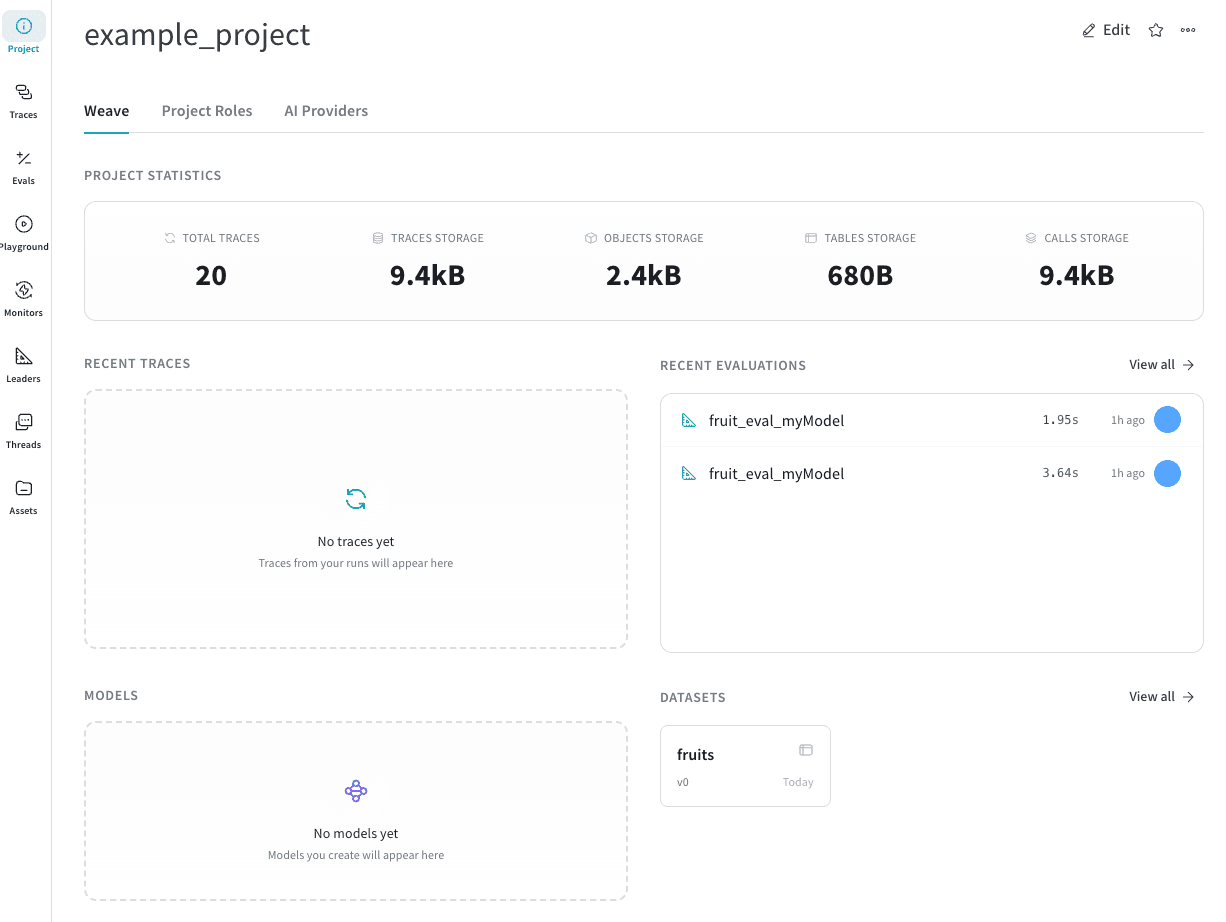
3. From the overview page, you can:
* Review your project's statistics, such as the number of traces logged to the project and how much storage the project uses.
* Navigate to traces, evaluations, and other resources using the sidebar.
* Navigate to recently logged traces, evaluations, models, and datasets.
 ## Delete a project
Deleting a project is permanent and removes all associated traces, evaluations, models, datasets, and other resources from your W\&B account.
To delete a project from your W\&B account:
1. Navigate to [wandb.ai](https://wandb.ai).
2. Select your project from the **Projects** sidebar. This opens the project's overview page, or the **Traces** page if you've already logged traces to the project.
3. Select the **Project** () button in the sidebar to open the project's overview page if it isn't already open.
4. Select the **action ()** menu and choose **Delete Project** from the list. This opens the **Delete project** modal dialog.
5. In the modal, enter the project name in the confirmation field and select **Delete**. W\&B permanently deletes the project from your account.
## Delete a project
Deleting a project is permanent and removes all associated traces, evaluations, models, datasets, and other resources from your W\&B account.
To delete a project from your W\&B account:
1. Navigate to [wandb.ai](https://wandb.ai).
2. Select your project from the **Projects** sidebar. This opens the project's overview page, or the **Traces** page if you've already logged traces to the project.
3. Select the **Project** () button in the sidebar to open the project's overview page if it isn't already open.
4. Select the **action ()** menu and choose **Delete Project** from the list. This opens the **Delete project** modal dialog.
5. In the modal, enter the project name in the confirmation field and select **Delete**. W\&B permanently deletes the project from your account.