> ## Documentation Index
> Fetch the complete documentation index at: https://docs.wandb.ai/llms.txt
> Use this file to discover all available pages before exploring further.
# Serverless Inference
> Use Serverless Inference with Weave to trace and monitor open source foundation model calls through the OpenAI-compatible API.
# Serverless Inference
*Serverless Inference* provides access to open source foundation models through W\&B Weave and an OpenAI-compliant API. This guide describes how to call Serverless Inference from the API and the Weave UI, and how to trace, evaluate, and monitor those calls with Weave. With Serverless Inference, you can:
* Develop AI applications and agents without signing up for a hosting provider or self-hosting a model.
* Try the supported models in the Weave Playground.
Serverless Inference credits are included with Free, Pro, and Academic plans for a limited time. Availability may vary for Enterprise. After credits are consumed:
* Free accounts must upgrade to a Pro plan to continue using Inference.
* Pro plan users are billed for Inference overages on a monthly basis, based on the model-specific pricing.
To learn more, see the [pricing page](https://wandb.ai/site/pricing/) and [Serverless Inference model costs](https://wandb.ai/site/pricing/inference).
Using Weave, you can trace, evaluate, monitor, and iterate on your Serverless Inference-powered applications.
| Model | Model ID (for API usage) | Types | Context Window | Parameters | Description |
| ---------------- | ----------------------------------------- | ------------ | -------------- | --------------------------- | --------------------------------------------------------------------------------------------------------------------- |
| DeepSeek R1-0528 | deepseek-ai/DeepSeek-R1-0528 | Text | 161K | 37B - 680B (Active - Total) | Optimized for precise reasoning tasks including complex coding, math, and structured document analysis. |
| DeepSeek V3-0324 | deepseek-ai/DeepSeek-V3-0324 | Text | 161K | 37B - 680B (Active - Total) | Robust Mixture-of-Experts model tailored for high-complexity language processing and comprehensive document analysis. |
| Llama 3.1 8B | meta-llama/Llama-3.1-8B-Instruct | Text | 128K | 8B (Total) | Efficient conversational model optimized for responsive multilingual chatbot interactions. |
| Llama 3.3 70B | meta-llama/Llama-3.3-70B-Instruct | Text | 128K | 70B (Total) | Multilingual model excelling in conversational tasks, detailed instruction-following, and coding. |
| Llama 4 Scout | meta-llama/Llama-4-Scout-17B-16E-Instruct | Text, Vision | 64K | 17B - 109B (Active - Total) | Multimodal model integrating text and image understanding, ideal for visual tasks and combined analysis. |
| Phi 4 Mini | microsoft/Phi-4-mini-instruct | Text | 128K | 3.8B (Active - Total) | Compact, efficient model ideal for fast responses in resource-constrained environments. |
This guide provides the following information:
* [Prerequisites](#prerequisites)
* [Additional prerequisites for using the API via Python](#additional-prerequisites-for-using-the-api-via-python)
* [API specification](#api-specification)
* [Endpoint](#endpoint)
* [Available methods](#available-methods)
* [Chat completions](#chat-completions)
* [List supported models](#list-supported-models)
* [Usage examples](#usage-examples)
* [UI](#ui)
* [Access the Inference service](#access-the-inference-service)
* [Try a model in the Playground](#try-a-model-in-the-playground)
* [Compare multiple models](#compare-multiple-models)
* [View billing and usage information](#view-billing-and-usage-information)
* [Usage information and limits](#usage-information-and-limits)
* [API errors](#api-errors)
## Prerequisites
Before you can access the Serverless Inference service through the API or the Weave UI, you must have the following:
1. A W\&B account. [Sign up for an account](https://app.wandb.ai/login?signup=true&_gl=1*1yze8dp*_ga*ODIxMjU5MTk3LjE3NDk0OTE2NDM.*_ga_GMYDGNGKDT*czE3NDk4NDYxMzgkbzEyJGcwJHQxNzQ5ODQ2MTM4JGo2MCRsMCRoMA..*_ga_JH1SJHJQXJ*czE3NDk4NDU2NTMkbzI1JGcxJHQxNzQ5ODQ2MTQ2JGo0NyRsMCRoMA..*_gcl_au*MTE4ODk1MzY1OC4xNzQ5NDkxNjQzLjk1ODA2MjQwNC4xNzQ5NTgyMTUzLjE3NDk1ODIxNTM.).
2. A W\&B API key. Create an API key at [User Settings](https://wandb.ai/settings).
3. A W\&B project.
4. If you're using the Inference service through Python, see [Additional prerequisites for using the API via Python](#additional-prerequisites-for-using-the-api-via-python).
### Additional prerequisites for using the API via Python
To use the Inference API through Python, first complete the general prerequisites. Then, install the `openai` and `weave` libraries in your local environment. The `openai` library provides the OpenAI-compatible client that you use to call the Inference endpoint, and the `weave` library lets you trace and evaluate those calls.
```bash theme={null}
pip install openai weave
```
The `weave` library is only required if you use Weave to trace your LLM applications. For information about getting started with Weave, see the [Weave Quickstart](/weave/quickstart).
For usage examples demonstrating how to use the Serverless Inference service with Weave, see the [API usage examples](#usage-examples).
## API specification
The following sections provide API specification information and API usage examples, so you can call the Inference service programmatically from your own application or scripts.
* [Endpoint](#endpoint)
* [Available methods](#available-methods)
* [Usage examples](#usage-examples)
### Endpoint
Access the Inference service through the following endpoint:
```plaintext theme={null}
https://api.inference.wandb.ai/v1
```
To access this endpoint, you must have a W\&B account with Inference service credits allocated, a valid W\&B API key, and a W\&B entity (also referred to as "team") and project. In the code samples in this guide, entity (team) and project are referred to as `/`.
### Available methods
The Inference service supports the following API methods:
* [Chat completions](#chat-completions)
* [List supported models](#list-supported-models)
#### Chat completions
The primary API method available is `/chat/completions`, which supports OpenAI-compatible request formats for sending messages to a supported model and receiving a completion. For usage examples demonstrating how to use the Serverless Inference service with Weave, see the [API usage examples](#usage-examples).
To create a chat completion, you need:
* The Inference service base URL `https://api.inference.wandb.ai/v1`
* Your W\&B API key ``
* Your W\&B entity and project names `/`
* The ID for the model you want to use, one of:
* `meta-llama/Llama-3.1-8B-Instruct`
* `deepseek-ai/DeepSeek-V3-0324`
* `meta-llama/Llama-3.3-70B-Instruct`
* `deepseek-ai/DeepSeek-R1-0528`
* `meta-llama/Llama-4-Scout-17B-16E-Instruct`
* `microsoft/Phi-4-mini-instruct`
```bash theme={null}
curl https://api.inference.wandb.ai/v1/chat/completions \
-H "Content-Type: application/json" \
-H "Authorization: Bearer " \
-H "OpenAI-Project: /" \
-d '{
"model": "",
"messages": [
{ "role": "system", "content": "You are a helpful assistant." },
{ "role": "user", "content": "Tell me a joke." }
]
}'
```
```python lines theme={null}
import openai
client = openai.OpenAI(
# The custom base URL points to Serverless Inference
base_url='https://api.inference.wandb.ai/v1',
# Create an API key at https://wandb.ai/settings
# Consider setting it in the environment as OPENAI_API_KEY instead for safety
api_key="",
# Team and project are required for usage tracking
project="/",
)
# Replace with any of the following values:
# meta-llama/Llama-3.1-8B-Instruct
# deepseek-ai/DeepSeek-V3-0324
# meta-llama/Llama-3.3-70B-Instruct
# deepseek-ai/DeepSeek-R1-0528
# meta-llama/Llama-4-Scout-17B-16E-Instruct
# microsoft/Phi-4-mini-instruct
response = client.chat.completions.create(
model="",
messages=[
{"role": "system", "content": ""},
{"role": "user", "content": ""}
],
)
print(response.choices[0].message.content)
```
#### List supported models
Use the API to query all available models and their IDs. This is useful for selecting models dynamically or inspecting what's available in your environment.
```bash theme={null}
curl https://api.inference.wandb.ai/v1/models \
-H "Content-Type: application/json" \
-H "Authorization: Bearer " \
-H "OpenAI-Project: /" \
```
```python lines theme={null}
import openai
client = openai.OpenAI(
base_url="https://api.inference.wandb.ai/v1",
api_key="",
project="/"
)
response = client.models.list()
for model in response.data:
print(model.id)
```
## Usage examples
The following sections provide several examples demonstrating how to use Serverless Inference with Weave. Start with the basic example to trace a single model call, then move on to the advanced example to evaluate and compare multiple models.
* [Basic example: Trace Llama 3.1 8B with Weave](#basic-example-trace-llama-31-8b-with-weave)
* [Advanced example: Use Weave Evaluations and Leaderboards with the Inference service](#advanced-example-use-weave-evaluations-and-leaderboards-with-the-inference-service)
### Basic example: Trace Llama 3.1 8B with Weave
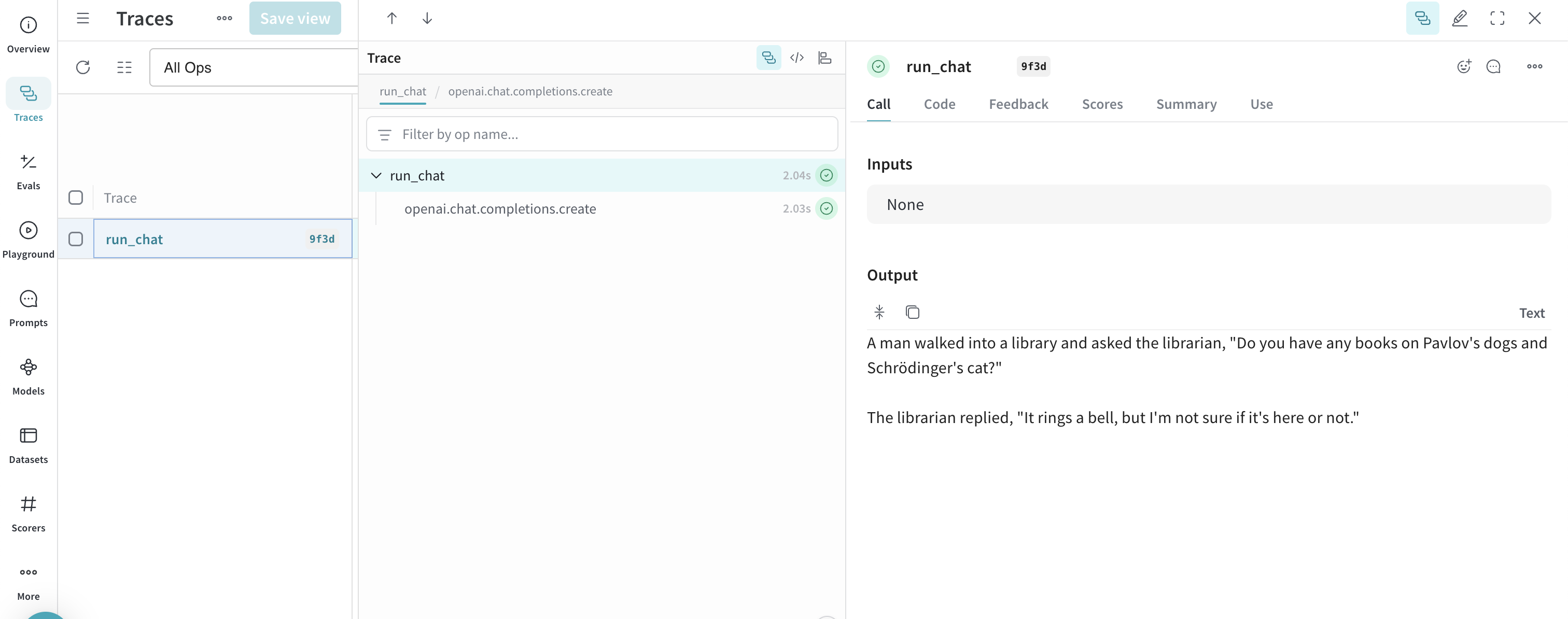
The following Python code sample shows how to send a prompt to the **Llama 3.1 8B** model using the Serverless Inference API and trace the call in Weave. Tracing lets you capture the full input and output of the LLM call, monitor performance, and analyze results in the Weave UI.
Learn more about [tracing in Weave](../tracking/tracing.mdx).
In this example:
* You define a `@weave.op()`-decorated function, `run_chat`, which makes a chat completion request using the OpenAI-compatible client.
* Weave records your traces and associates them with your W\&B entity and project `project="/"`.
* Weave automatically traces the function, logging its inputs, outputs, latency, and metadata (like model ID).
* The result prints in the terminal, and the trace appears in your **Traces** tab at [https://wandb.ai](https://wandb.ai) under the specified project.
To use this example, you must complete the [general prerequisites](#prerequisites) and [Additional prerequisites for using the API via Python](#additional-prerequisites-for-using-the-api-via-python).
```python lines theme={null}
import weave
import openai
# Set the Weave team and project for tracing
weave.init("/")
client = openai.OpenAI(
base_url='https://api.inference.wandb.ai/v1',
# Create an API key at https://wandb.ai/settings
api_key="",
# Required for W&B inference usage tracking
project="wandb/inference-demo",
)
# Trace the model call in Weave
@weave.op()
def run_chat():
response = client.chat.completions.create(
model="meta-llama/Llama-3.1-8B-Instruct",
messages=[
{"role": "system", "content": "You are a helpful assistant."},
{"role": "user", "content": "Tell me a joke."}
],
)
return response.choices[0].message.content
# Run and log the traced call
output = run_chat()
print(output)
```
After you run the code sample, the model response prints in the terminal and the call is logged as a Weave trace. To view the trace in Weave, click the link printed in the terminal (for example, `https://wandb.ai///r/call/01977f8f-839d-7dda-b0c2-27292ef0e04g`), or:
1. Navigate to [https://wandb.ai](https://wandb.ai).
2. Select the **Traces** tab to view your Weave traces.
Next, try the [advanced example](#advanced-example-use-weave-evaluations-and-leaderboards-with-the-inference-service) to evaluate and compare multiple models.
 ### Advanced example: Use Weave Evaluations and Leaderboards with the Inference service
Also, you can use Weave with the Inference service to [trace model calls](../tracking/tracing.mdx), [evaluate performance](../core-types/evaluations.mdx), and [publish a leaderboard](../core-types/leaderboards.mdx). The following Python code sample compares two models on a question-answer dataset.
To use this example, you must complete the [general prerequisites](#prerequisites) and [Additional prerequisites for using the API via Python](#additional-prerequisites-for-using-the-api-via-python).
```python lines theme={null}
import os
import asyncio
import openai
import weave
from weave.flow import leaderboard
from weave.trace.ref_util import get_ref
# Set the Weave team and project for tracing
weave.init("/")
dataset = [
{"input": "What is 2 + 2?", "target": "4"},
{"input": "Name a primary color.", "target": "red"},
]
@weave.op
def exact_match(target: str, output: str) -> float:
return float(target.strip().lower() == output.strip().lower())
class WBInferenceModel(weave.Model):
model: str
@weave.op
def predict(self, prompt: str) -> str:
client = openai.OpenAI(
base_url="https://api.inference.wandb.ai/v1",
# Create an API key at https://wandb.ai/settings
api_key="",
# Required for W&B inference usage tracking
project="/",
)
resp = client.chat.completions.create(
model=self.model,
messages=[{"role": "user", "content": prompt}],
)
return resp.choices[0].message.content
llama = WBInferenceModel(model="meta-llama/Llama-3.1-8B-Instruct")
deepseek = WBInferenceModel(model="deepseek-ai/DeepSeek-V3-0324")
def preprocess_model_input(example):
return {"prompt": example["input"]}
evaluation = weave.Evaluation(
name="QA",
dataset=dataset,
scorers=[exact_match],
preprocess_model_input=preprocess_model_input,
)
async def run_eval():
await evaluation.evaluate(llama)
await evaluation.evaluate(deepseek)
asyncio.run(run_eval())
spec = leaderboard.Leaderboard(
name="Inference Leaderboard",
description="Compare models on a QA dataset",
columns=[
leaderboard.LeaderboardColumn(
evaluation_object_ref=get_ref(evaluation).uri(),
scorer_name="exact_match",
summary_metric_path="mean",
)
],
)
weave.publish(spec)
```
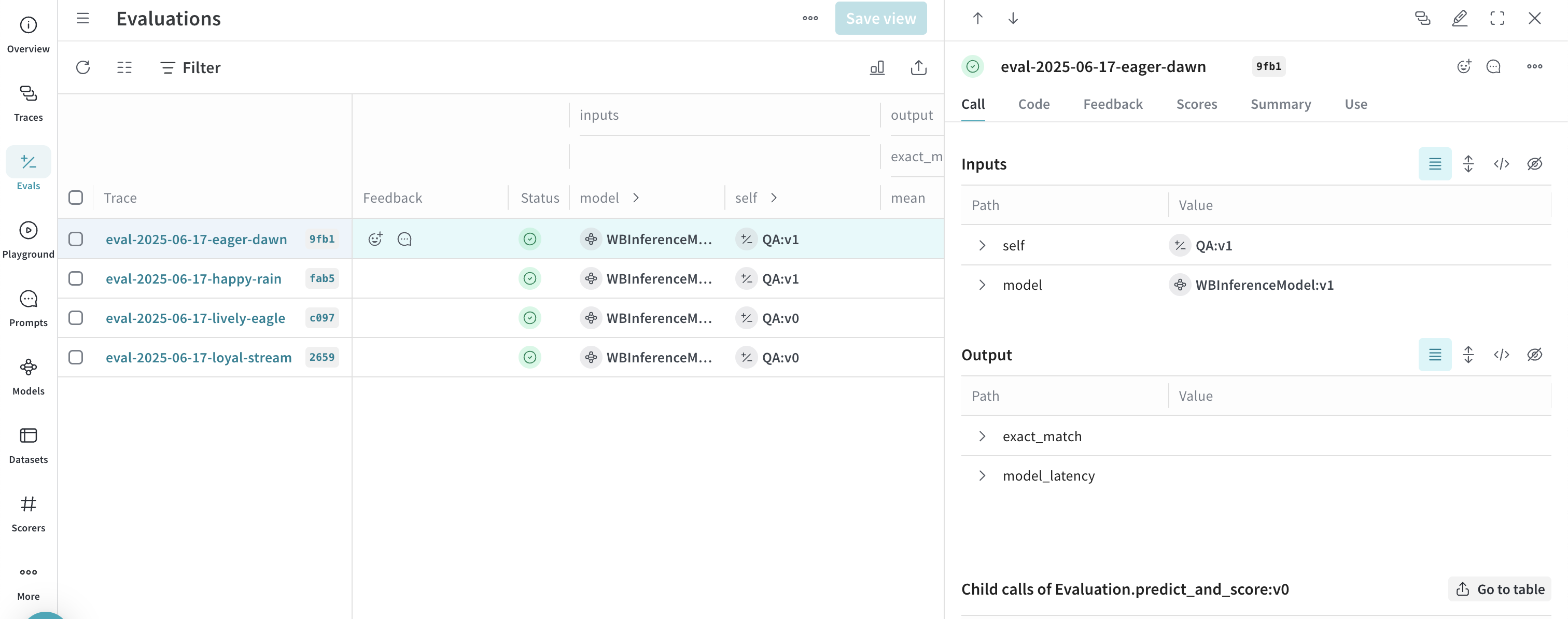
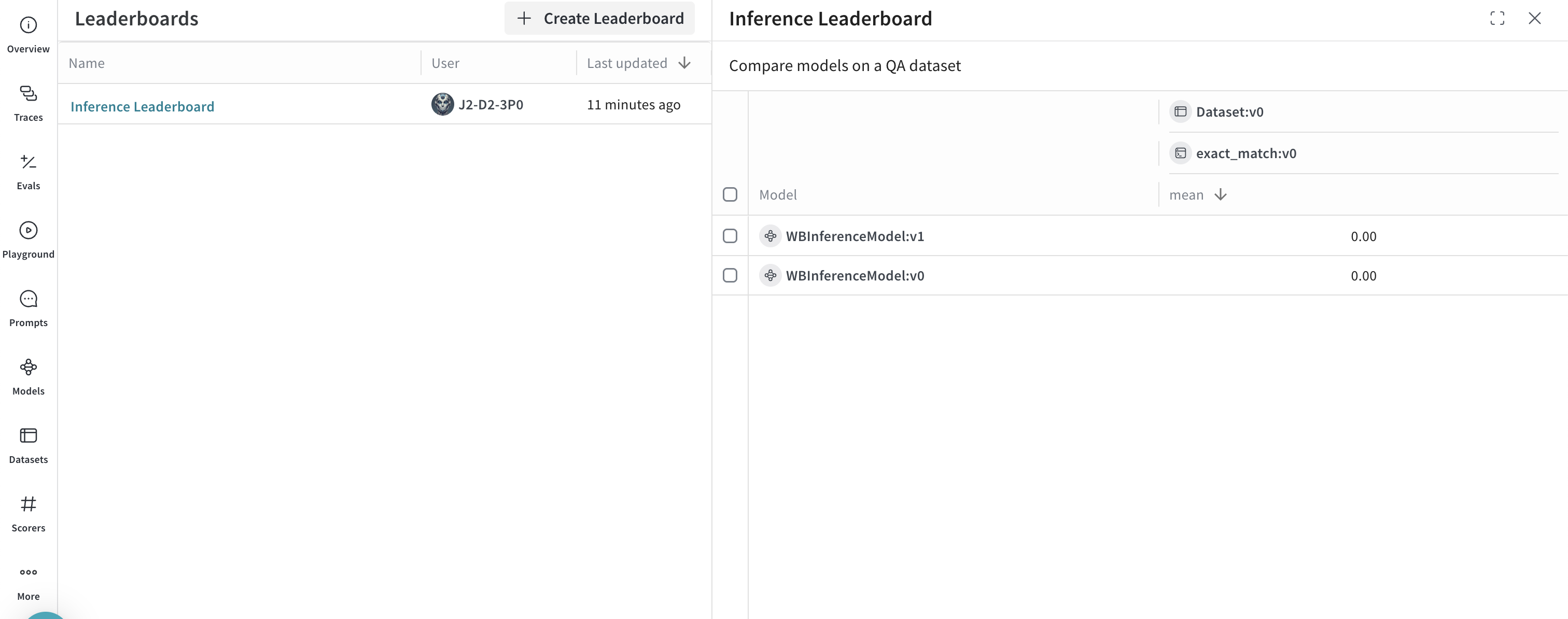
After you run the preceding code sample, Weave publishes the evaluation results, traces, and a leaderboard comparing the two models to your W\&B project. To view the published results, navigate to your W\&B account at [https://wandb.ai/](https://wandb.ai/) and:
* Navigate to the **Traces** tab to [view your traces](../tracking/tracing.mdx).
* Navigate to the **Evals** tab to [view your model evaluations](../core-types/evaluations.mdx).
* Navigate to the **Leaders** tab to [view the generated leaderboard](../core-types/leaderboards.mdx).
### Advanced example: Use Weave Evaluations and Leaderboards with the Inference service
Also, you can use Weave with the Inference service to [trace model calls](../tracking/tracing.mdx), [evaluate performance](../core-types/evaluations.mdx), and [publish a leaderboard](../core-types/leaderboards.mdx). The following Python code sample compares two models on a question-answer dataset.
To use this example, you must complete the [general prerequisites](#prerequisites) and [Additional prerequisites for using the API via Python](#additional-prerequisites-for-using-the-api-via-python).
```python lines theme={null}
import os
import asyncio
import openai
import weave
from weave.flow import leaderboard
from weave.trace.ref_util import get_ref
# Set the Weave team and project for tracing
weave.init("/")
dataset = [
{"input": "What is 2 + 2?", "target": "4"},
{"input": "Name a primary color.", "target": "red"},
]
@weave.op
def exact_match(target: str, output: str) -> float:
return float(target.strip().lower() == output.strip().lower())
class WBInferenceModel(weave.Model):
model: str
@weave.op
def predict(self, prompt: str) -> str:
client = openai.OpenAI(
base_url="https://api.inference.wandb.ai/v1",
# Create an API key at https://wandb.ai/settings
api_key="",
# Required for W&B inference usage tracking
project="/",
)
resp = client.chat.completions.create(
model=self.model,
messages=[{"role": "user", "content": prompt}],
)
return resp.choices[0].message.content
llama = WBInferenceModel(model="meta-llama/Llama-3.1-8B-Instruct")
deepseek = WBInferenceModel(model="deepseek-ai/DeepSeek-V3-0324")
def preprocess_model_input(example):
return {"prompt": example["input"]}
evaluation = weave.Evaluation(
name="QA",
dataset=dataset,
scorers=[exact_match],
preprocess_model_input=preprocess_model_input,
)
async def run_eval():
await evaluation.evaluate(llama)
await evaluation.evaluate(deepseek)
asyncio.run(run_eval())
spec = leaderboard.Leaderboard(
name="Inference Leaderboard",
description="Compare models on a QA dataset",
columns=[
leaderboard.LeaderboardColumn(
evaluation_object_ref=get_ref(evaluation).uri(),
scorer_name="exact_match",
summary_metric_path="mean",
)
],
)
weave.publish(spec)
```
After you run the preceding code sample, Weave publishes the evaluation results, traces, and a leaderboard comparing the two models to your W\&B project. To view the published results, navigate to your W\&B account at [https://wandb.ai/](https://wandb.ai/) and:
* Navigate to the **Traces** tab to [view your traces](../tracking/tracing.mdx).
* Navigate to the **Evals** tab to [view your model evaluations](../core-types/evaluations.mdx).
* Navigate to the **Leaders** tab to [view the generated leaderboard](../core-types/leaderboards.mdx).
 ## UI
The following sections describe how to use the Inference service from the W\&B UI. Before you can access the Inference service through the UI, complete the [prerequisites](#prerequisites).
### Access the Inference service
You can access the Inference service through the Weave UI from the following locations:
* [Direct link](#direct-link)
* [From the Inference tab](#from-the-inference-tab)
* [From the Playground tab](#from-the-playground-tab)
#### Direct link
Navigate to [https://wandb.ai/inference](https://wandb.ai/inference).
#### From the Inference tab
1. Navigate to your W\&B account at [https://wandb.ai/](https://wandb.ai/).
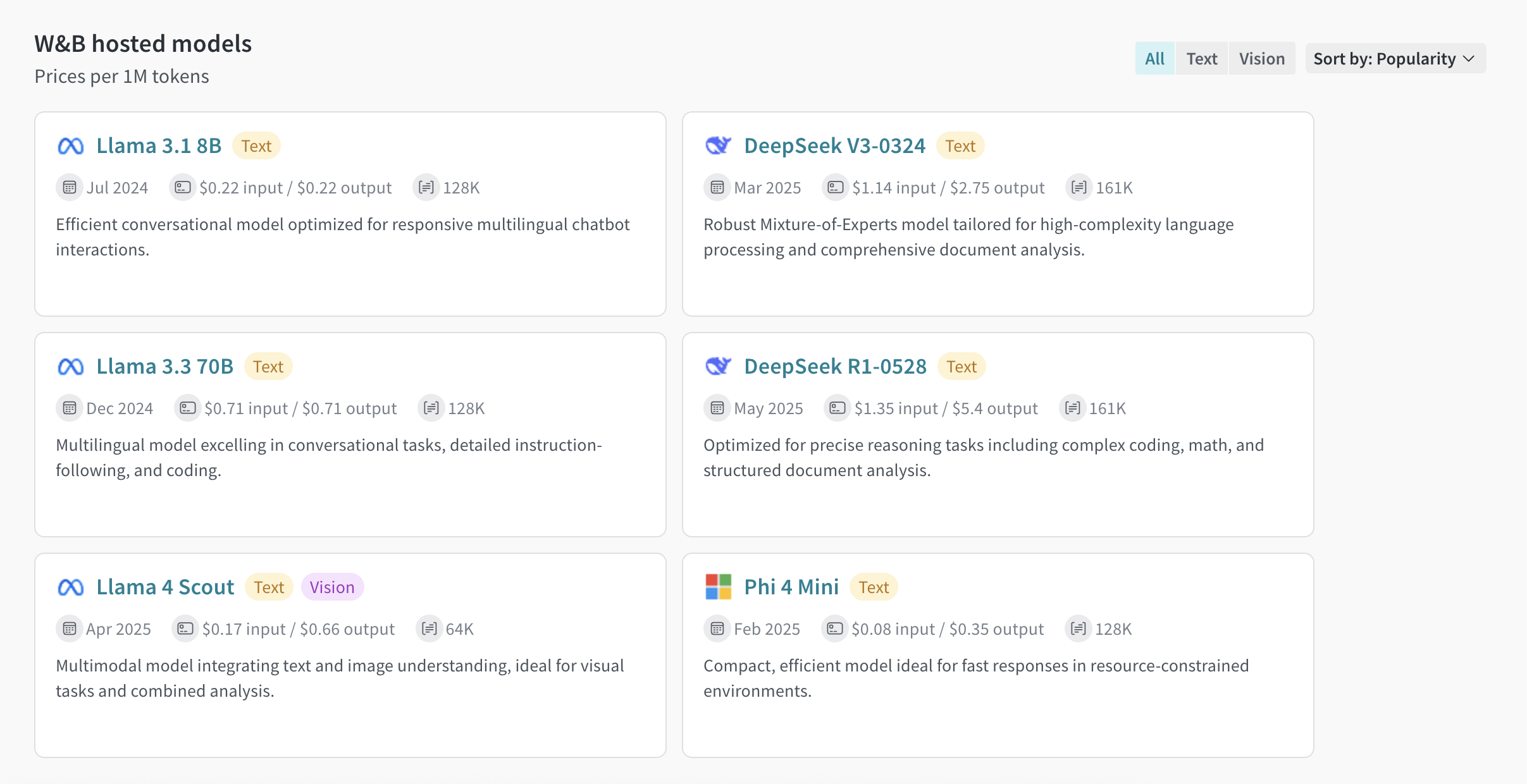
2. From the left sidebar, select **Inference**. A page with available models and model information displays.
## UI
The following sections describe how to use the Inference service from the W\&B UI. Before you can access the Inference service through the UI, complete the [prerequisites](#prerequisites).
### Access the Inference service
You can access the Inference service through the Weave UI from the following locations:
* [Direct link](#direct-link)
* [From the Inference tab](#from-the-inference-tab)
* [From the Playground tab](#from-the-playground-tab)
#### Direct link
Navigate to [https://wandb.ai/inference](https://wandb.ai/inference).
#### From the Inference tab
1. Navigate to your W\&B account at [https://wandb.ai/](https://wandb.ai/).
2. From the left sidebar, select **Inference**. A page with available models and model information displays.
 #### From the Playground tab
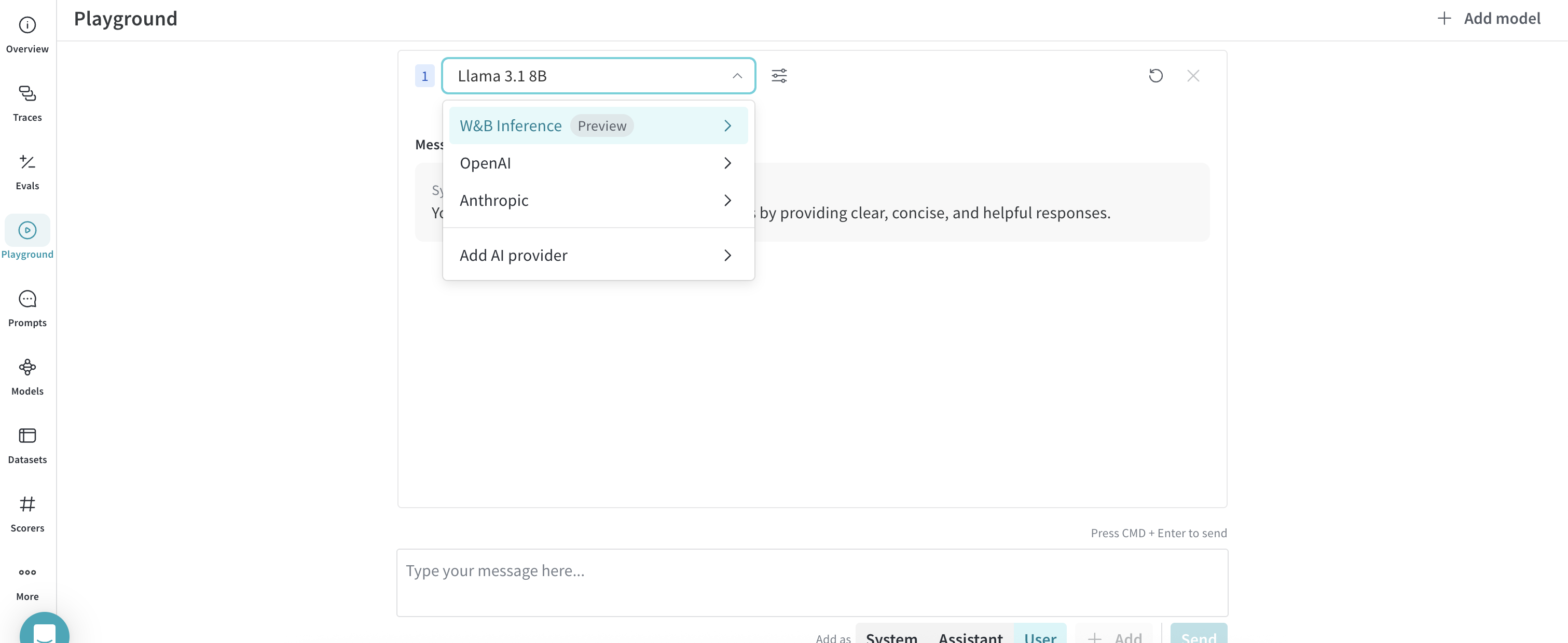
1. From the left sidebar, select **Playground**. The Playground chat UI displays.
2. From the LLM dropdown list, hover over **Serverless Inference**. A dropdown with available Serverless Inference models displays to the right.
3. From the Serverless Inference models dropdown, you can:
* Click the name of any available model to [try it in the Playground](#try-a-model-in-the-playground).
* [Compare one or more models in the Playground](#compare-multiple-models).
#### From the Playground tab
1. From the left sidebar, select **Playground**. The Playground chat UI displays.
2. From the LLM dropdown list, hover over **Serverless Inference**. A dropdown with available Serverless Inference models displays to the right.
3. From the Serverless Inference models dropdown, you can:
* Click the name of any available model to [try it in the Playground](#try-a-model-in-the-playground).
* [Compare one or more models in the Playground](#compare-multiple-models).
 ### Try a model in the Playground
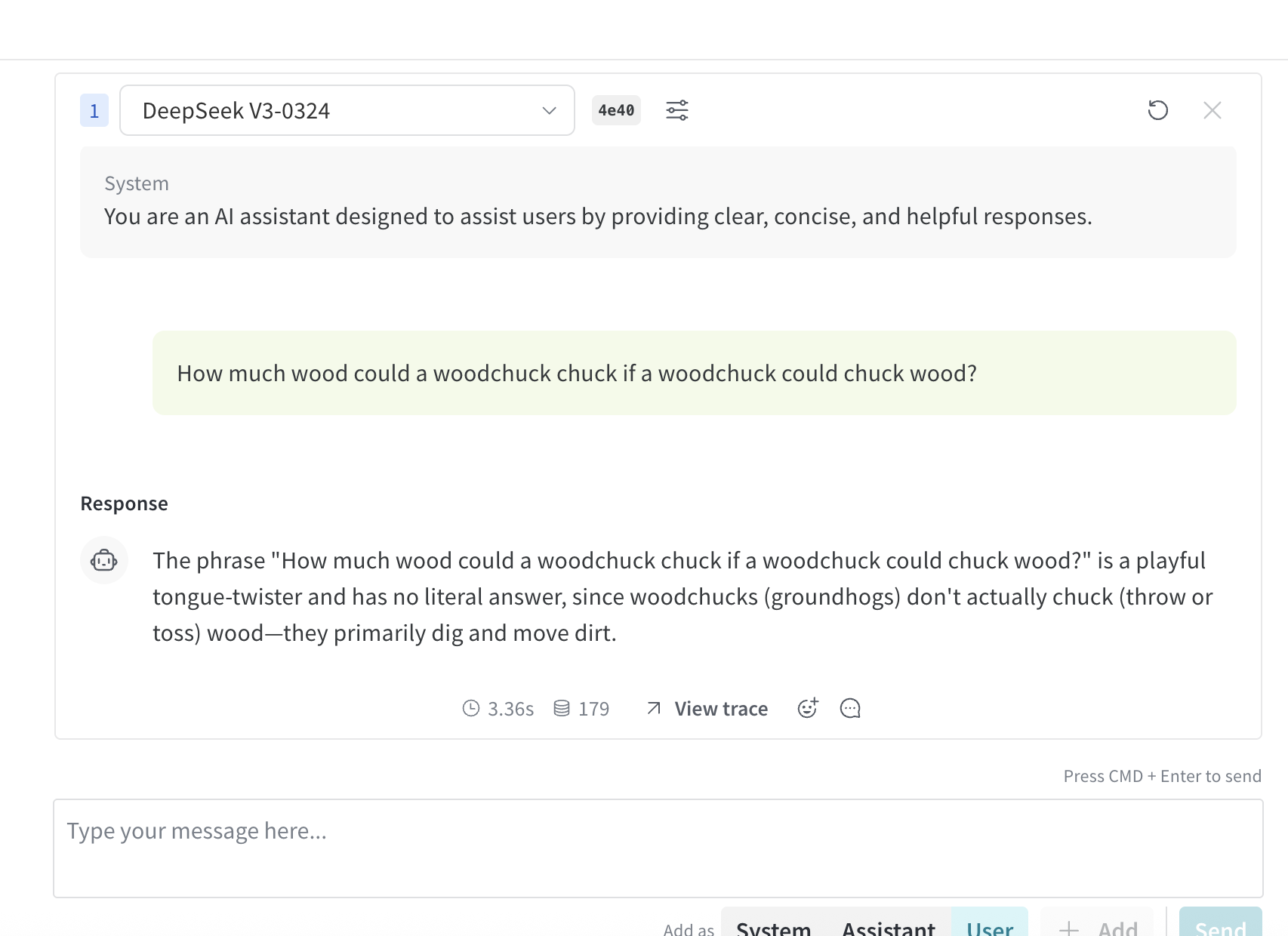
After you've [selected a model using one of the access options](#access-the-inference-service), you can try the model in Playground. The following actions are available:
* [Customize model settings and parameters](../tools/playground#customize-settings)
* [Add, retry, edit, and delete messages](../tools/playground#message-controls)
* [Save and reuse a model with custom settings](../tools/playground#saved-models)
* [Compare multiple models](#compare-multiple-models)
### Try a model in the Playground
After you've [selected a model using one of the access options](#access-the-inference-service), you can try the model in Playground. The following actions are available:
* [Customize model settings and parameters](../tools/playground#customize-settings)
* [Add, retry, edit, and delete messages](../tools/playground#message-controls)
* [Save and reuse a model with custom settings](../tools/playground#saved-models)
* [Compare multiple models](#compare-multiple-models)
 ### Compare multiple models
You can compare multiple Inference models in the Playground. Access the Compare view from two different locations:
* [Access the Compare view from the Inference tab](#access-the-compare-view-from-the-inference-tab)
* [Access the Compare view from the Playground tab](#access-the-compare-view-from-the-playground-tab)
#### Access the Compare view from the Inference tab
1. From the left sidebar, select **Inference**. A page with available models and model information displays.
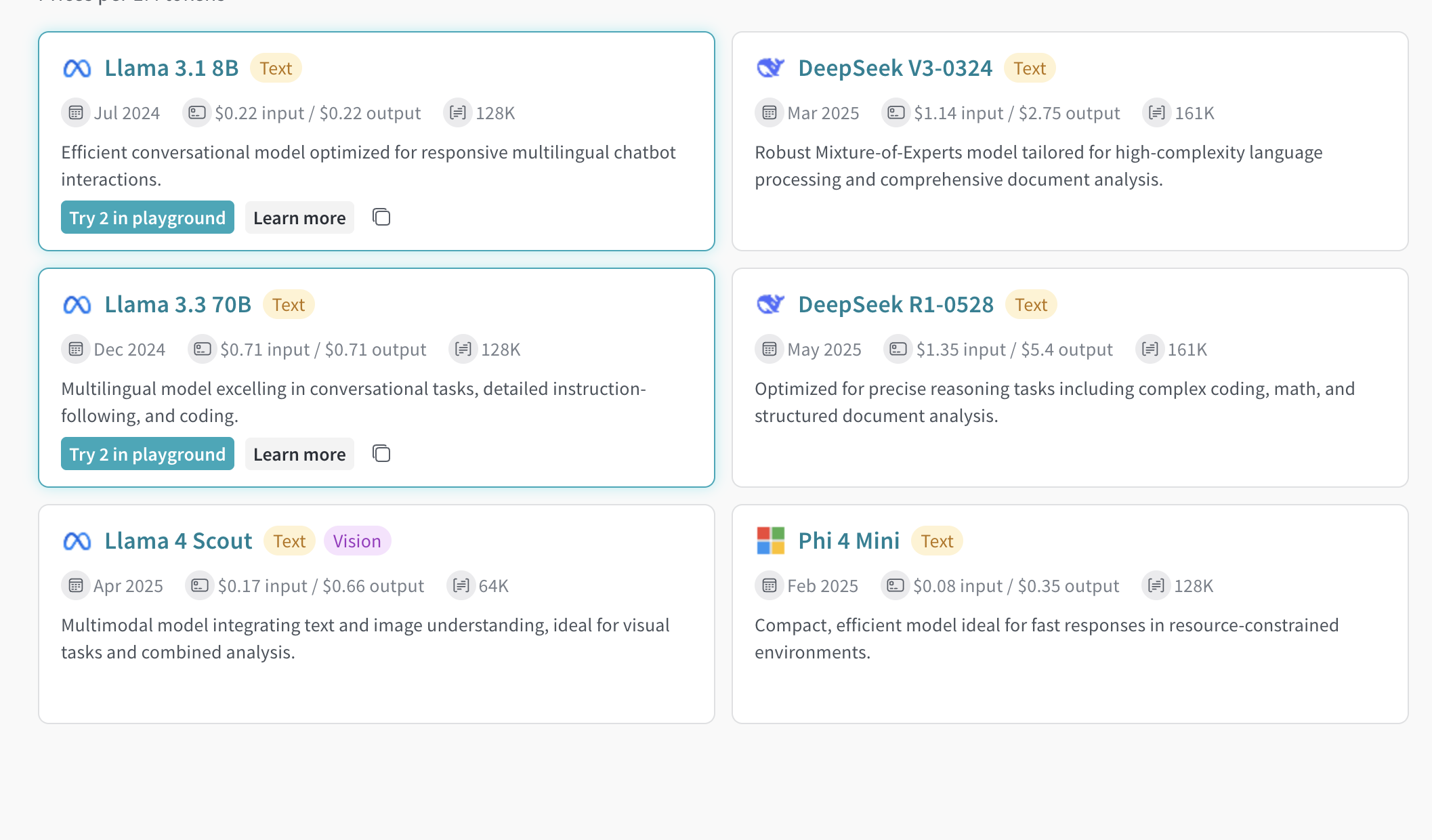
2. To select models for comparison, click anywhere on a model card (except for the model name). The border of the model card highlights in blue to indicate the selection.
3. Repeat step 2 for each model you want to compare.
4. In any of the selected cards, click the **Compare N models in the Playground** button (`N` is the number of models you're comparing. For example, when you select 3 models, the button displays as **Compare 3 models in the Playground**). The comparison view opens.
Now, you can compare models in the Playground, and use any of the features described in [Try a model in the Playground](#try-a-model-in-the-playground).
### Compare multiple models
You can compare multiple Inference models in the Playground. Access the Compare view from two different locations:
* [Access the Compare view from the Inference tab](#access-the-compare-view-from-the-inference-tab)
* [Access the Compare view from the Playground tab](#access-the-compare-view-from-the-playground-tab)
#### Access the Compare view from the Inference tab
1. From the left sidebar, select **Inference**. A page with available models and model information displays.
2. To select models for comparison, click anywhere on a model card (except for the model name). The border of the model card highlights in blue to indicate the selection.
3. Repeat step 2 for each model you want to compare.
4. In any of the selected cards, click the **Compare N models in the Playground** button (`N` is the number of models you're comparing. For example, when you select 3 models, the button displays as **Compare 3 models in the Playground**). The comparison view opens.
Now, you can compare models in the Playground, and use any of the features described in [Try a model in the Playground](#try-a-model-in-the-playground).
 #### Access the Compare view from the Playground tab
1. From the left sidebar, select **Playground**. The Playground chat UI displays.
2. From the LLM dropdown list, hover over **Serverless Inference**. A dropdown with available Serverless Inference models displays to the right.
3. From the dropdown, select **Compare**. The **Inference** tab displays.
4. To select models for comparison, click anywhere on a model card (except for the model name). The border of the model card highlights in blue to indicate the selection.
5. Repeat step 4 for each model you want to compare.
6. In any of the selected cards, click the **Compare N models in the Playground** button (`N` is the number of models you're comparing. For example, when you select 3 models, the button displays as **Compare 3 models in the Playground**). The comparison view opens.
Now, you can compare models in the Playground, and use any of the features described in [Try a model in the Playground](#try-a-model-in-the-playground).
### View billing and usage information
Organization admins can track current Inference credit balance, usage history, and upcoming billing (if applicable) directly from the W\&B UI:
1. In the W\&B UI, navigate to the W\&B **Billing** page.
2. In the bottom right corner, the Inference billing information card displays. From here, you can:
* Click the **View usage** button in the Inference billing information card to view your usage over time.
* If you're on a paid plan, view your upcoming inference charges.
Visit the [Inference pricing page for a breakdown of per-model pricing](https://wandb.ai/site/pricing/inference).
## Usage information and limits
The following sections describe important usage information and limits, including geographic restrictions, concurrency limits, and pricing. Familiarize yourself with this information before using the service.
### Geographic restrictions
The Inference service is only accessible from supported geographic locations. For more information, see the [Terms of Service](https://docs.coreweave.com/docs/policies/terms-of-service/terms-of-use#geographic-restrictions).
### Concurrency limits
To ensure fair usage and stable performance, the Serverless Inference API enforces rate limits at the user and project level. These limits help:
* Prevent misuse and protect API stability.
* Ensure access for all users.
* Manage infrastructure load effectively.
If a rate limit is exceeded, the API returns a `429 Concurrency limit reached for requests` response. To resolve this error, reduce the number of concurrent requests.
### Pricing
For model pricing information, visit [https://wandb.ai/site/pricing/inference](https://wandb.ai/site/pricing/inference).
## API errors
The following table lists errors that the Inference API can return, along with their causes and recommended solutions.
| Error Code | Message | Cause | Solution |
| ---------- | --------------------------------------------------------------------------- | -------------------------------------------------------------------------------------- | ------------------------------------------------------------------------------------------------ |
| 401 | Invalid Authentication | Invalid authentication credentials, or your W\&B project entity or name are incorrect. | Ensure the correct API key is being used, or that your W\&B project name and entity are correct. |
| 403 | Country, region, or territory not supported | Accessing the API from an unsupported location. | See [Geographic restrictions](#geographic-restrictions). |
| 429 | Concurrency limit reached for requests | Too many concurrent requests. | Reduce the number of concurrent requests. |
| 429 | You exceeded your current quota, please check your plan and billing details | Out of credits or reached monthly spending cap. | Purchase more credits or increase your limits. |
| 500 | The server had an error while processing your request | Internal server error. | Retry after a brief wait and contact support if it persists. |
| 503 | The engine is currently overloaded, please try again later | Server is experiencing high traffic. | Retry your request after a short delay. |
#### Access the Compare view from the Playground tab
1. From the left sidebar, select **Playground**. The Playground chat UI displays.
2. From the LLM dropdown list, hover over **Serverless Inference**. A dropdown with available Serverless Inference models displays to the right.
3. From the dropdown, select **Compare**. The **Inference** tab displays.
4. To select models for comparison, click anywhere on a model card (except for the model name). The border of the model card highlights in blue to indicate the selection.
5. Repeat step 4 for each model you want to compare.
6. In any of the selected cards, click the **Compare N models in the Playground** button (`N` is the number of models you're comparing. For example, when you select 3 models, the button displays as **Compare 3 models in the Playground**). The comparison view opens.
Now, you can compare models in the Playground, and use any of the features described in [Try a model in the Playground](#try-a-model-in-the-playground).
### View billing and usage information
Organization admins can track current Inference credit balance, usage history, and upcoming billing (if applicable) directly from the W\&B UI:
1. In the W\&B UI, navigate to the W\&B **Billing** page.
2. In the bottom right corner, the Inference billing information card displays. From here, you can:
* Click the **View usage** button in the Inference billing information card to view your usage over time.
* If you're on a paid plan, view your upcoming inference charges.
Visit the [Inference pricing page for a breakdown of per-model pricing](https://wandb.ai/site/pricing/inference).
## Usage information and limits
The following sections describe important usage information and limits, including geographic restrictions, concurrency limits, and pricing. Familiarize yourself with this information before using the service.
### Geographic restrictions
The Inference service is only accessible from supported geographic locations. For more information, see the [Terms of Service](https://docs.coreweave.com/docs/policies/terms-of-service/terms-of-use#geographic-restrictions).
### Concurrency limits
To ensure fair usage and stable performance, the Serverless Inference API enforces rate limits at the user and project level. These limits help:
* Prevent misuse and protect API stability.
* Ensure access for all users.
* Manage infrastructure load effectively.
If a rate limit is exceeded, the API returns a `429 Concurrency limit reached for requests` response. To resolve this error, reduce the number of concurrent requests.
### Pricing
For model pricing information, visit [https://wandb.ai/site/pricing/inference](https://wandb.ai/site/pricing/inference).
## API errors
The following table lists errors that the Inference API can return, along with their causes and recommended solutions.
| Error Code | Message | Cause | Solution |
| ---------- | --------------------------------------------------------------------------- | -------------------------------------------------------------------------------------- | ------------------------------------------------------------------------------------------------ |
| 401 | Invalid Authentication | Invalid authentication credentials, or your W\&B project entity or name are incorrect. | Ensure the correct API key is being used, or that your W\&B project name and entity are correct. |
| 403 | Country, region, or territory not supported | Accessing the API from an unsupported location. | See [Geographic restrictions](#geographic-restrictions). |
| 429 | Concurrency limit reached for requests | Too many concurrent requests. | Reduce the number of concurrent requests. |
| 429 | You exceeded your current quota, please check your plan and billing details | Out of credits or reached monthly spending cap. | Purchase more credits or increase your limits. |
| 500 | The server had an error while processing your request | Internal server error. | Retry after a brief wait and contact support if it persists. |
| 503 | The engine is currently overloaded, please try again later | Server is experiencing high traffic. | Retry your request after a short delay. |