> ## Documentation Index
> Fetch the complete documentation index at: https://docs.wandb.ai/llms.txt
> Use this file to discover all available pages before exploring further.
# Groq
> Track and monitor Groq LPU inference with Weave, capturing model calls, performance metrics, and function chains for LLM applications.
 Do you want to experiment with Groq models on Weave without any setup? Try the [LLM Playground](../tools/playground).
[Groq](https://groq.com/) is an AI infrastructure company that delivers fast AI inference. The LPU Inference Engine by Groq is a hardware and software platform built for compute speed, quality, and energy efficiency. Weave automatically tracks and logs Groq chat completion calls.
This page explains how to use Weave to trace Groq chat completion calls, wrap your own functions as Weave ops, and organize your experiments using `Model` objects.
## Tracing
It's important to store traces of language model applications in a central location, both during development and in production. These traces can help you debug your application and serve as a dataset to improve it.
Weave automatically captures traces for [Groq](https://groq.com/). To start tracking, call `weave.init(project_name="")` and use the library as normal. Replace values enclosed in `<>` with your own.
```python lines theme={null}
import os
import weave
from groq import Groq
weave.init(project_name="groq-project")
client = Groq(
api_key=os.environ.get("GROQ_API_KEY"),
)
chat_completion = client.chat.completions.create(
messages=[
{
"role": "user",
"content": "Explain the importance of fast language models",
}
],
model="llama3-8b-8192",
)
```
|
Do you want to experiment with Groq models on Weave without any setup? Try the [LLM Playground](../tools/playground).
[Groq](https://groq.com/) is an AI infrastructure company that delivers fast AI inference. The LPU Inference Engine by Groq is a hardware and software platform built for compute speed, quality, and energy efficiency. Weave automatically tracks and logs Groq chat completion calls.
This page explains how to use Weave to trace Groq chat completion calls, wrap your own functions as Weave ops, and organize your experiments using `Model` objects.
## Tracing
It's important to store traces of language model applications in a central location, both during development and in production. These traces can help you debug your application and serve as a dataset to improve it.
Weave automatically captures traces for [Groq](https://groq.com/). To start tracking, call `weave.init(project_name="")` and use the library as normal. Replace values enclosed in `<>` with your own.
```python lines theme={null}
import os
import weave
from groq import Groq
weave.init(project_name="groq-project")
client = Groq(
api_key=os.environ.get("GROQ_API_KEY"),
)
chat_completion = client.chat.completions.create(
messages=[
{
"role": "user",
"content": "Explain the importance of fast language models",
}
],
model="llama3-8b-8192",
)
```
|  |
| ----------------------------------------------------------------------------------------------------------------------------------------------------------------------------------------------------------------------------------------------------------------------------------------------------------------------------------------------------------------------------------------------------------------------------------------------------------------------------------------------------------------------------------------------------------------------------------------------------------------------------------------------------------------------------------------------------------------------------------------------------------------------------------------------------------------------------------------------------------------------------------------------------------------------------------------------------------------------------------------------------------------------------------------------------------------------------------------------------------------------------------------------------------------------------------------------------------------------------------------------------------------------------------------------------------------------------------------------------------------------------------------------------------------------------------------------------------------------------------------------------------------------------------------------------------------------------------------------------------------------------------------------------------------------------------------------------------------------------------------------------- |
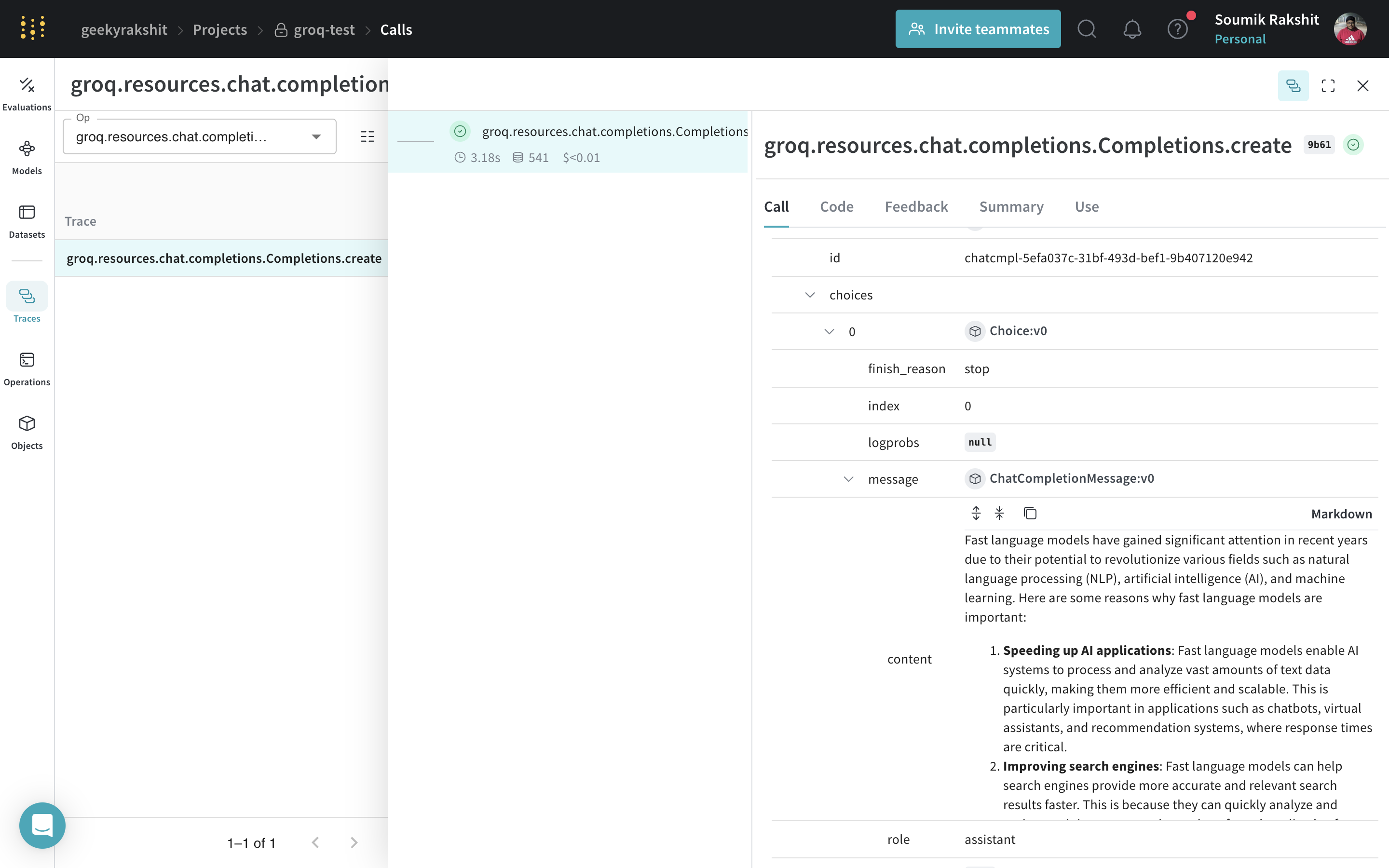
| Weave now tracks and logs all LLM calls made through the Groq library. You can view the traces in the Weave web interface. |
## Track your own ops
Wrap a function with `@weave.op` to capture inputs, outputs, and app logic so you can debug how data flows through your app. You can deeply nest ops and build a tree of functions that you want to track. This also automatically versions code as you experiment to capture ad-hoc details that haven't been committed to git.
Create a function decorated with [`@weave.op`](/weave/guides/tracking/ops).
In the following example, the `recommend_places_to_visit` function is wrapped with `@weave.op` and recommends places to visit in a city.
```python lines theme={null}
import os
import weave
from groq import Groq
weave.init(project_name="groq-test")
client = Groq(
api_key=os.environ.get("GROQ_API_KEY"),
)
@weave.op()
def recommend_places_to_visit(city: str, model: str="llama3-8b-8192"):
chat_completion = client.chat.completions.create(
messages=[
{
"role": "system",
"content": "You are a helpful assistant meant to suggest places to visit in a city",
},
{
"role": "user",
"content": city,
}
],
model="llama3-8b-8192",
)
return chat_completion.choices[0].message.content
recommend_places_to_visit("New York")
recommend_places_to_visit("Paris")
recommend_places_to_visit("Kolkata")
```
|
|
| ----------------------------------------------------------------------------------------------------------------------------------------------------------------------------------------------------------------------------------------------------------------------------------------------------------------------------------------------------------------------------------------------------------------------------------------------------------------------------------------------------------------------------------------------------------------------------------------------------------------------------------------------------------------------------------------------------------------------------------------------------------------------------------------------------------------------------------------------------------------------------------------------------------------------------------------------------------------------------------------------------------------------------------------------------------------------------------------------------------------------------------------------------------------------------------------------------------------------------------------------------------------------------------------------------------------------------------------------------------------------------------------------------------------------------------------------------------------------------------------------------------------------------------------------------------------------------------------------------------------------------------------------------------------------------------------------------------------------------------------------------- |
| Weave now tracks and logs all LLM calls made through the Groq library. You can view the traces in the Weave web interface. |
## Track your own ops
Wrap a function with `@weave.op` to capture inputs, outputs, and app logic so you can debug how data flows through your app. You can deeply nest ops and build a tree of functions that you want to track. This also automatically versions code as you experiment to capture ad-hoc details that haven't been committed to git.
Create a function decorated with [`@weave.op`](/weave/guides/tracking/ops).
In the following example, the `recommend_places_to_visit` function is wrapped with `@weave.op` and recommends places to visit in a city.
```python lines theme={null}
import os
import weave
from groq import Groq
weave.init(project_name="groq-test")
client = Groq(
api_key=os.environ.get("GROQ_API_KEY"),
)
@weave.op()
def recommend_places_to_visit(city: str, model: str="llama3-8b-8192"):
chat_completion = client.chat.completions.create(
messages=[
{
"role": "system",
"content": "You are a helpful assistant meant to suggest places to visit in a city",
},
{
"role": "user",
"content": city,
}
],
model="llama3-8b-8192",
)
return chat_completion.choices[0].message.content
recommend_places_to_visit("New York")
recommend_places_to_visit("Paris")
recommend_places_to_visit("Kolkata")
```
|  |
| --------------------------------------------------------------------------------------------------------------------------------------------------------------------------------------------------------------------------------------------------------------------------------------------------------------------------------------------------------------------------------------------------------------------------------------------------------------------------------------------------------------------------------------------------------------------------------------------------------------------------------------------------------------------------------------------------------------------------------------------------------------------------------------------------------------------------------------------------------------------------------------------------------------------------------------------------------------------------------------------------------------------------------------------------------------------------------------------------------------------------------------------------------------------------------------------------------------------------------------------------------------------------------------------------------------------------------------------------------------------------------------------------------------------------------------------------------------------------------------------------------------------------------------------------------------------------------------------------------------------------------------------------------------------------------------------------------------------------------------------------- |
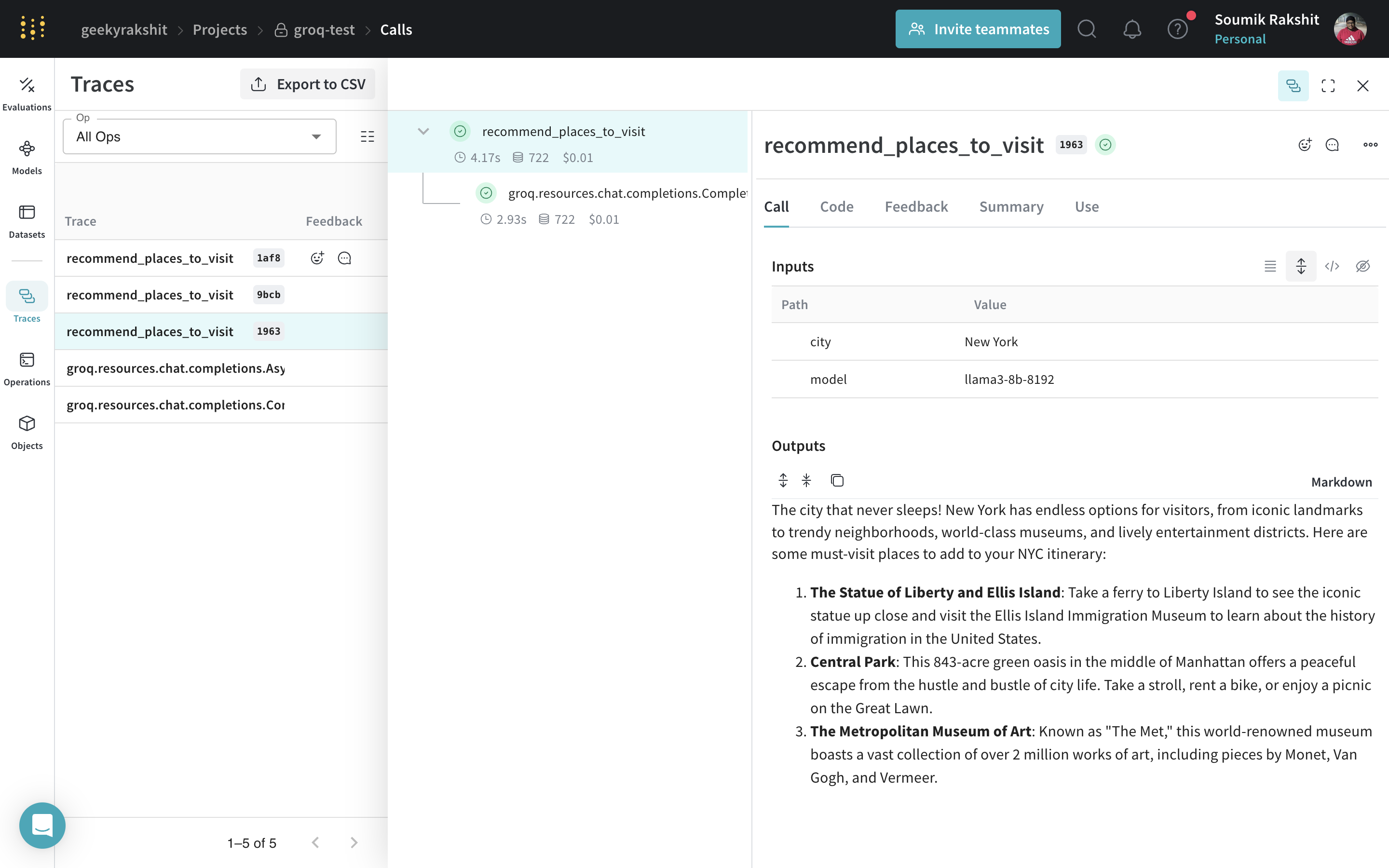
| Decorate the `recommend_places_to_visit` function with `@weave.op` to trace its inputs, outputs, and all internal LM calls made inside the function. |
## Create a `Model` for easier experimentation
Organizing experimentation is difficult when there are many moving pieces. By using the [`Model`](../core-types/models) class, you can capture and organize the experimental details of your app like your system prompt or the model you're using. This helps organize and compare different iterations of your app.
In addition to versioning code and capturing inputs and outputs, [`Model`](../core-types/models)s capture structured parameters that control your application's behavior, helping you find what parameters worked best. You can also use Weave Models with `serve`, and [`Evaluation`](../core-types/evaluations)s.
In the following example, you can experiment with `GroqCityVisitRecommender`. Every time you change one of these, you get a new *version* of `GroqCityVisitRecommender`.
```python lines theme={null}
import os
from groq import Groq
import weave
class GroqCityVisitRecommender(weave.Model):
model: str
groq_client: Groq
@weave.op()
def predict(self, city: str) -> str:
system_message = {
"role": "system",
"content": """
You are a helpful assistant meant to suggest places to visit in a city
""",
}
user_message = {"role": "user", "content": city}
chat_completion = self.groq_client.chat.completions.create(
messages=[system_message, user_message],
model=self.model,
)
return chat_completion.choices[0].message.content
weave.init(project_name="groq-test")
city_recommender = GroqCityVisitRecommender(
model="llama3-8b-8192", groq_client=Groq(api_key=os.environ.get("GROQ_API_KEY"))
)
print(city_recommender.predict("New York"))
print(city_recommender.predict("San Francisco"))
print(city_recommender.predict("Los Angeles"))
```
|
|
| --------------------------------------------------------------------------------------------------------------------------------------------------------------------------------------------------------------------------------------------------------------------------------------------------------------------------------------------------------------------------------------------------------------------------------------------------------------------------------------------------------------------------------------------------------------------------------------------------------------------------------------------------------------------------------------------------------------------------------------------------------------------------------------------------------------------------------------------------------------------------------------------------------------------------------------------------------------------------------------------------------------------------------------------------------------------------------------------------------------------------------------------------------------------------------------------------------------------------------------------------------------------------------------------------------------------------------------------------------------------------------------------------------------------------------------------------------------------------------------------------------------------------------------------------------------------------------------------------------------------------------------------------------------------------------------------------------------------------------------------------- |
| Decorate the `recommend_places_to_visit` function with `@weave.op` to trace its inputs, outputs, and all internal LM calls made inside the function. |
## Create a `Model` for easier experimentation
Organizing experimentation is difficult when there are many moving pieces. By using the [`Model`](../core-types/models) class, you can capture and organize the experimental details of your app like your system prompt or the model you're using. This helps organize and compare different iterations of your app.
In addition to versioning code and capturing inputs and outputs, [`Model`](../core-types/models)s capture structured parameters that control your application's behavior, helping you find what parameters worked best. You can also use Weave Models with `serve`, and [`Evaluation`](../core-types/evaluations)s.
In the following example, you can experiment with `GroqCityVisitRecommender`. Every time you change one of these, you get a new *version* of `GroqCityVisitRecommender`.
```python lines theme={null}
import os
from groq import Groq
import weave
class GroqCityVisitRecommender(weave.Model):
model: str
groq_client: Groq
@weave.op()
def predict(self, city: str) -> str:
system_message = {
"role": "system",
"content": """
You are a helpful assistant meant to suggest places to visit in a city
""",
}
user_message = {"role": "user", "content": city}
chat_completion = self.groq_client.chat.completions.create(
messages=[system_message, user_message],
model=self.model,
)
return chat_completion.choices[0].message.content
weave.init(project_name="groq-test")
city_recommender = GroqCityVisitRecommender(
model="llama3-8b-8192", groq_client=Groq(api_key=os.environ.get("GROQ_API_KEY"))
)
print(city_recommender.predict("New York"))
print(city_recommender.predict("San Francisco"))
print(city_recommender.predict("Los Angeles"))
```
|  |
| --------------------------------------------------------------------------------------------------------------------------------------------------------------------------------------------------------------------------------------------------------------------------------------------------------------------------------------------------------------------------------------------------------------------------------------------------------------------------------------------------------------------------------------------------------------------------------------------------------------------------------------------------------------------------------------------------------------------------------------------------------------------------------------------------------------------------------------------------------------------------------------------------------------------------------------------------------------------------------------------------------------------------------------------------------------------------------------------------------------------------------------------------------------------------------------------------------------------------------------------------------------------------------------------------------------------------------------------------------------------------------------------------------------------------------------------------------------------------------------------------------------------------------------------------------------------------------------------------------------------------------------------------------------------------------------------------------------------------------------------------- |
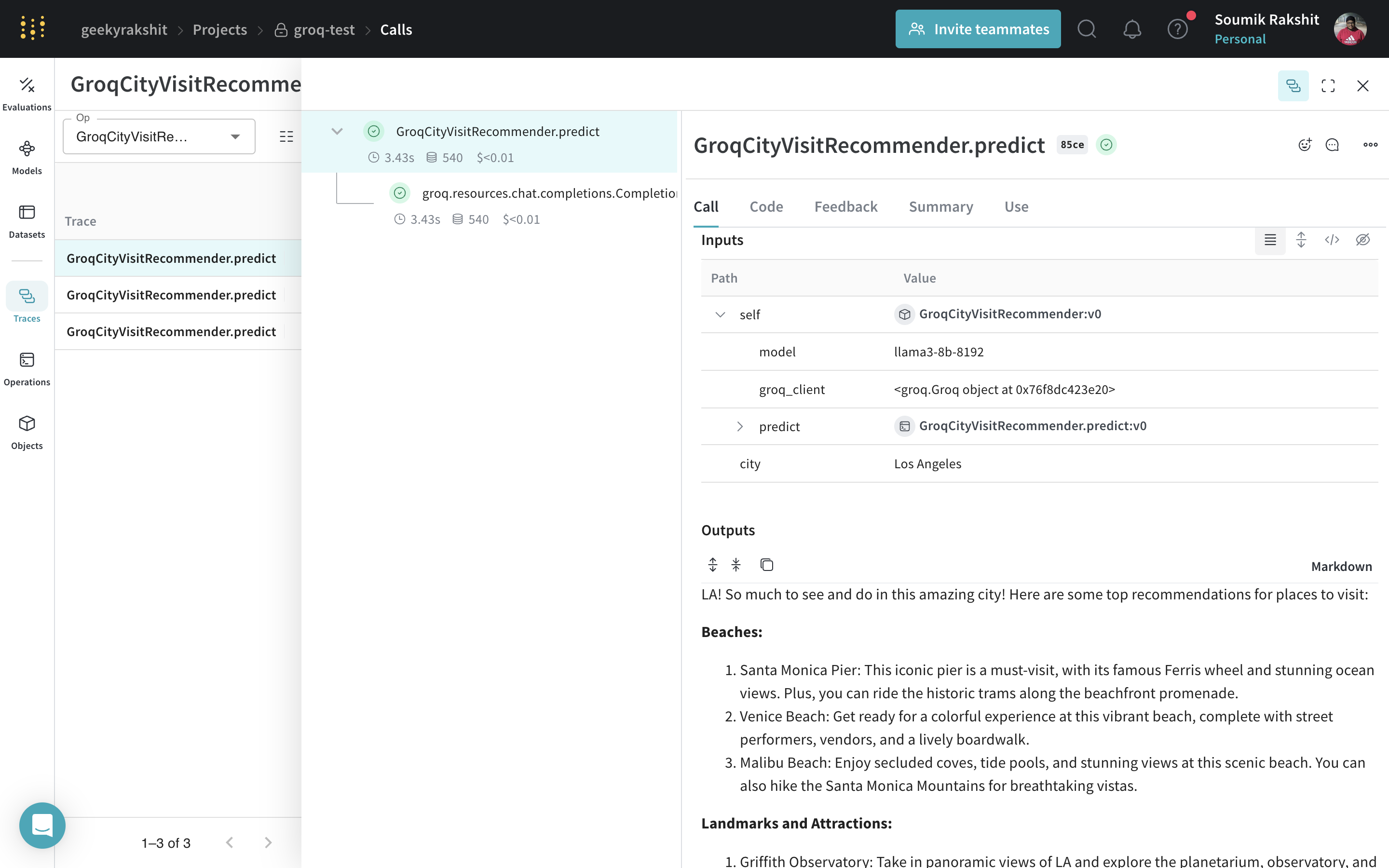
| Trace and version your calls using a [`Model`](../core-types/models). |
### Serve a Weave Model
After you have a versioned `Model`, you can deploy it as a service for testing or downstream applications. Given a Weave reference to any `weave.Model` object, you can spin up a FastAPI server and [serve](https://docs.wandb.ai/weave/guides/tools/serve) it.
| [
|
| --------------------------------------------------------------------------------------------------------------------------------------------------------------------------------------------------------------------------------------------------------------------------------------------------------------------------------------------------------------------------------------------------------------------------------------------------------------------------------------------------------------------------------------------------------------------------------------------------------------------------------------------------------------------------------------------------------------------------------------------------------------------------------------------------------------------------------------------------------------------------------------------------------------------------------------------------------------------------------------------------------------------------------------------------------------------------------------------------------------------------------------------------------------------------------------------------------------------------------------------------------------------------------------------------------------------------------------------------------------------------------------------------------------------------------------------------------------------------------------------------------------------------------------------------------------------------------------------------------------------------------------------------------------------------------------------------------------------------------------------------- |
| Trace and version your calls using a [`Model`](../core-types/models). |
### Serve a Weave Model
After you have a versioned `Model`, you can deploy it as a service for testing or downstream applications. Given a Weave reference to any `weave.Model` object, you can spin up a FastAPI server and [serve](https://docs.wandb.ai/weave/guides/tools/serve) it.
| [ ](https://wandb.ai/geekyrakshit/groq-test/weave/objects/GroqCityVisitRecommender/versions/6O1xPTJ9yFx8uuCjJAlI7KgcVYxXKn7JxfmVD9AQT5Q) |
| ----------------------------------------------------------------------------------------------------------------------------------------------------------------------------------------------------------------------------------------------------------------------------------------------------------------------------------------------------------------------------------------------------------------------------------------------------------------------------------------------------------------------------------------------------------------------------------------------------------------------------------------------------------------------------------------------------------------------------------------------------------------------------------------------------------------------------------------------------------------------------------------------------------------------------------------------------------------------------------------------------------------------------------------------------------------------------------------------------------------------------------------------------------------------------------------------------------------------------------------------------------------------------------------------------------------------------------------------------------------------------------------------------------------------------------------------------------------------------------------------------------------------------------------------------------------------------------------------------------------------------------------------------------------------------------------------------------------------------------------------------------------------------------------------------------------------------------------------------------------------- |
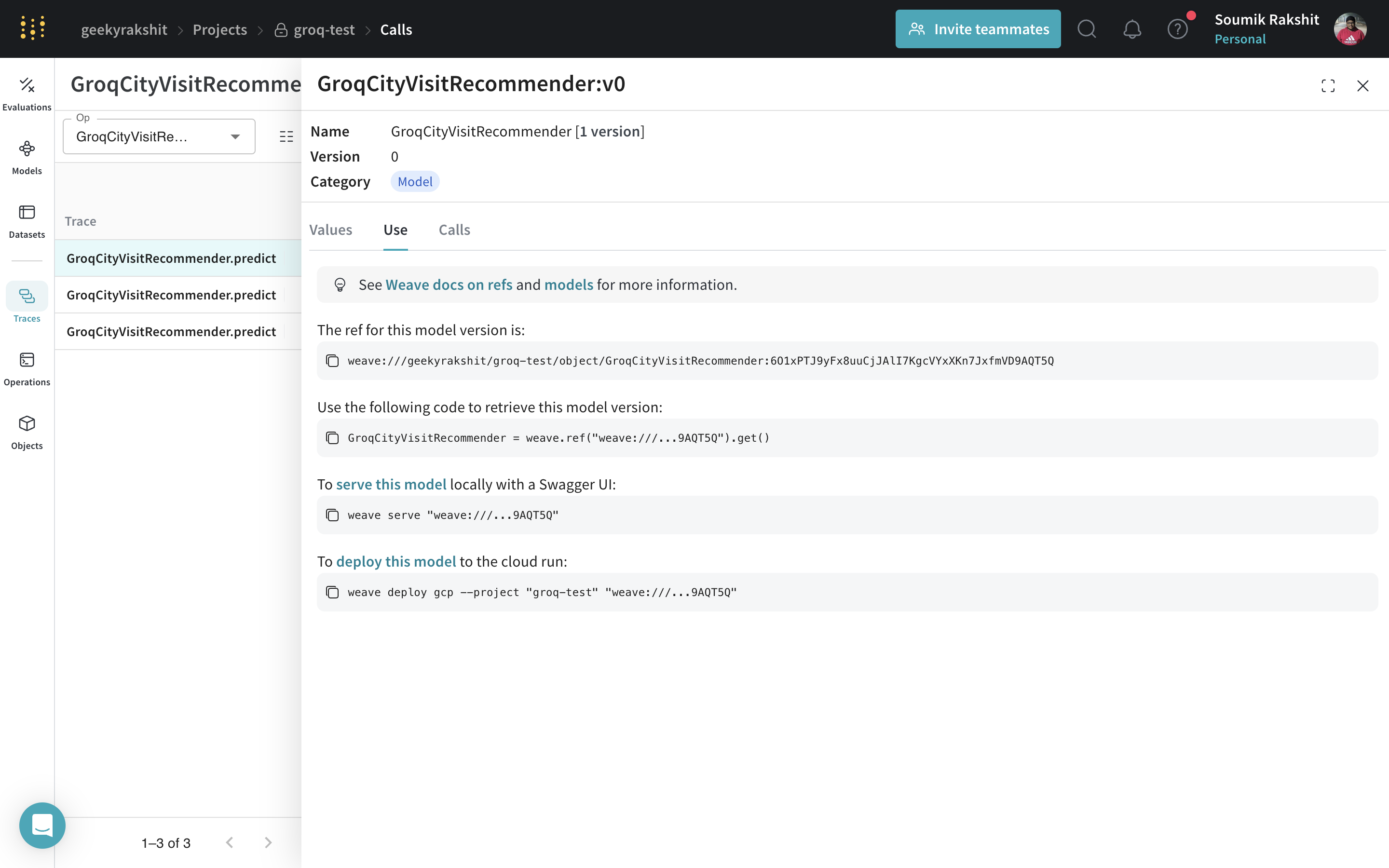
| You can find the Weave reference of any `weave.Model` by navigating to the model and copying it from the UI. |
Serve your model with the following command in the terminal:
```shell theme={null}
weave serve weave://your_entity/project-name/YourModel:
```
](https://wandb.ai/geekyrakshit/groq-test/weave/objects/GroqCityVisitRecommender/versions/6O1xPTJ9yFx8uuCjJAlI7KgcVYxXKn7JxfmVD9AQT5Q) |
| ----------------------------------------------------------------------------------------------------------------------------------------------------------------------------------------------------------------------------------------------------------------------------------------------------------------------------------------------------------------------------------------------------------------------------------------------------------------------------------------------------------------------------------------------------------------------------------------------------------------------------------------------------------------------------------------------------------------------------------------------------------------------------------------------------------------------------------------------------------------------------------------------------------------------------------------------------------------------------------------------------------------------------------------------------------------------------------------------------------------------------------------------------------------------------------------------------------------------------------------------------------------------------------------------------------------------------------------------------------------------------------------------------------------------------------------------------------------------------------------------------------------------------------------------------------------------------------------------------------------------------------------------------------------------------------------------------------------------------------------------------------------------------------------------------------------------------------------------------------------------- |
| You can find the Weave reference of any `weave.Model` by navigating to the model and copying it from the UI. |
Serve your model with the following command in the terminal:
```shell theme={null}
weave serve weave://your_entity/project-name/YourModel:
```