> ## Documentation Index
> Fetch the complete documentation index at: https://docs.wandb.ai/llms.txt
> Use this file to discover all available pages before exploring further.
# DSPy
> Use Weave to automatically track and log calls made using DSPy modules and functions
export const GitHubLink = ({url}) =>
GitHub source
;
export const ColabLink = ({url}) =>
Try in Colab
;
[DSPy](https://dspy.ai) is a framework for algorithmically optimizing language model (LM) prompts and weights, especially when you use LMs one or more times within a pipeline. W\&B Weave automatically tracks and logs calls made with DSPy modules and functions. This guide shows you how to enable Weave tracing for DSPy programs, track custom modules and signatures, and capture traces from DSPy optimizers and evaluations. With these traces, you can debug, analyze, and improve your DSPy applications.
## Traces
This section shows you how to enable automatic tracing of DSPy calls in Weave. Store traces of language model applications in a central location, both during development and in production. These traces are useful for debugging and as a dataset that helps you improve your application.
Weave automatically captures traces for [DSPy](https://dspy.ai). To start tracking, call `weave.init(project_name="[YOUR-WANDB-PROJECT-NAME]")` and use the library as normal. Replace `[YOUR-OPENAI-API-KEY]` with your OpenAI API key and `[YOUR-WANDB-PROJECT-NAME]` with your W\&B project name.
```python lines theme={null}
import os
import dspy
import weave
os.environ["OPENAI_API_KEY"] = "[YOUR-OPENAI-API-KEY]"
weave.init(project_name="[YOUR-WANDB-PROJECT-NAME]")
lm = dspy.LM('openai/gpt-4o-mini')
dspy.configure(lm=lm)
classify = dspy.Predict("sentence -> sentiment")
classify(sentence="it's a charming and often affecting journey.")
```
[](https://wandb.ai/geekyrakshit/dspy-project/weave/calls)
With tracing enabled, Weave logs every LM call your DSPy program makes to your Weave project, where you can inspect inputs, outputs, and metadata.
## Track your own DSPy modules and signatures
Beyond built-in calls, Weave also traces the custom modules and signatures you define. A `Module` is the building block with learnable parameters for DSPy programs that abstracts a prompting technique. A `Signature` is a declarative specification of input/output behavior of a DSPy `Module`. Weave automatically tracks all built-in and custom `Signature` and `Module` objects in your DSPy programs. Replace `[YOUR-OPENAI-API-KEY]` with your OpenAI API key and `[YOUR-WANDB-PROJECT-NAME]` with your W\&B project name.
```python lines theme={null}
import os
import dspy
import weave
os.environ["OPENAI_API_KEY"] = "[YOUR-OPENAI-API-KEY]"
weave.init(project_name="[YOUR-WANDB-PROJECT-NAME]")
class Outline(dspy.Signature):
"""Outline a thorough overview of a topic."""
topic: str = dspy.InputField()
title: str = dspy.OutputField()
sections: list[str] = dspy.OutputField()
section_subheadings: dict[str, list[str]] = dspy.OutputField(
desc="mapping from section headings to subheadings"
)
class DraftSection(dspy.Signature):
"""Draft a top-level section of an article."""
topic: str = dspy.InputField()
section_heading: str = dspy.InputField()
section_subheadings: list[str] = dspy.InputField()
content: str = dspy.OutputField(desc="markdown-formatted section")
class DraftArticle(dspy.Module):
def __init__(self):
self.build_outline = dspy.ChainOfThought(Outline)
self.draft_section = dspy.ChainOfThought(DraftSection)
def forward(self, topic):
outline = self.build_outline(topic=topic)
sections = []
for heading, subheadings in outline.section_subheadings.items():
section, subheadings = (
f"## {heading}",
[f"### {subheading}" for subheading in subheadings],
)
section = self.draft_section(
topic=outline.title,
section_heading=section,
section_subheadings=subheadings,
)
sections.append(section.content)
return dspy.Prediction(title=outline.title, sections=sections)
draft_article = DraftArticle()
article = draft_article(topic="World Cup 2002")
```
[](https://wandb.ai/geekyrakshit/dspy-project/weave/calls)
## Optimize and evaluate your DSPy program
Weave also captures traces for DSPy optimizers and evaluation calls, which you can use to improve and evaluate your DSPy program's performance on a development set. Replace `[YOUR-OPENAI-API-KEY]` with your OpenAI API key and `[YOUR-WANDB-PROJECT-NAME]` with your W\&B project name.
```python lines theme={null}
import os
import dspy
import weave
os.environ["OPENAI_API_KEY"] = "[YOUR-OPENAI-API-KEY]"
weave.init(project_name="[YOUR-WANDB-PROJECT-NAME]")
def accuracy_metric(answer, output, trace=None):
predicted_answer = output["answer"].lower()
return answer["answer"].lower() == predicted_answer
module = dspy.ChainOfThought("question -> answer: str, explanation: str")
optimizer = dspy.BootstrapFewShot(metric=accuracy_metric)
optimized_module = optimizer.compile(
module, trainset=SAMPLE_EVAL_DATASET, valset=SAMPLE_EVAL_DATASET
)
```
[](https://wandb.ai/geekyrakshit/dspy-project/weave/calls)
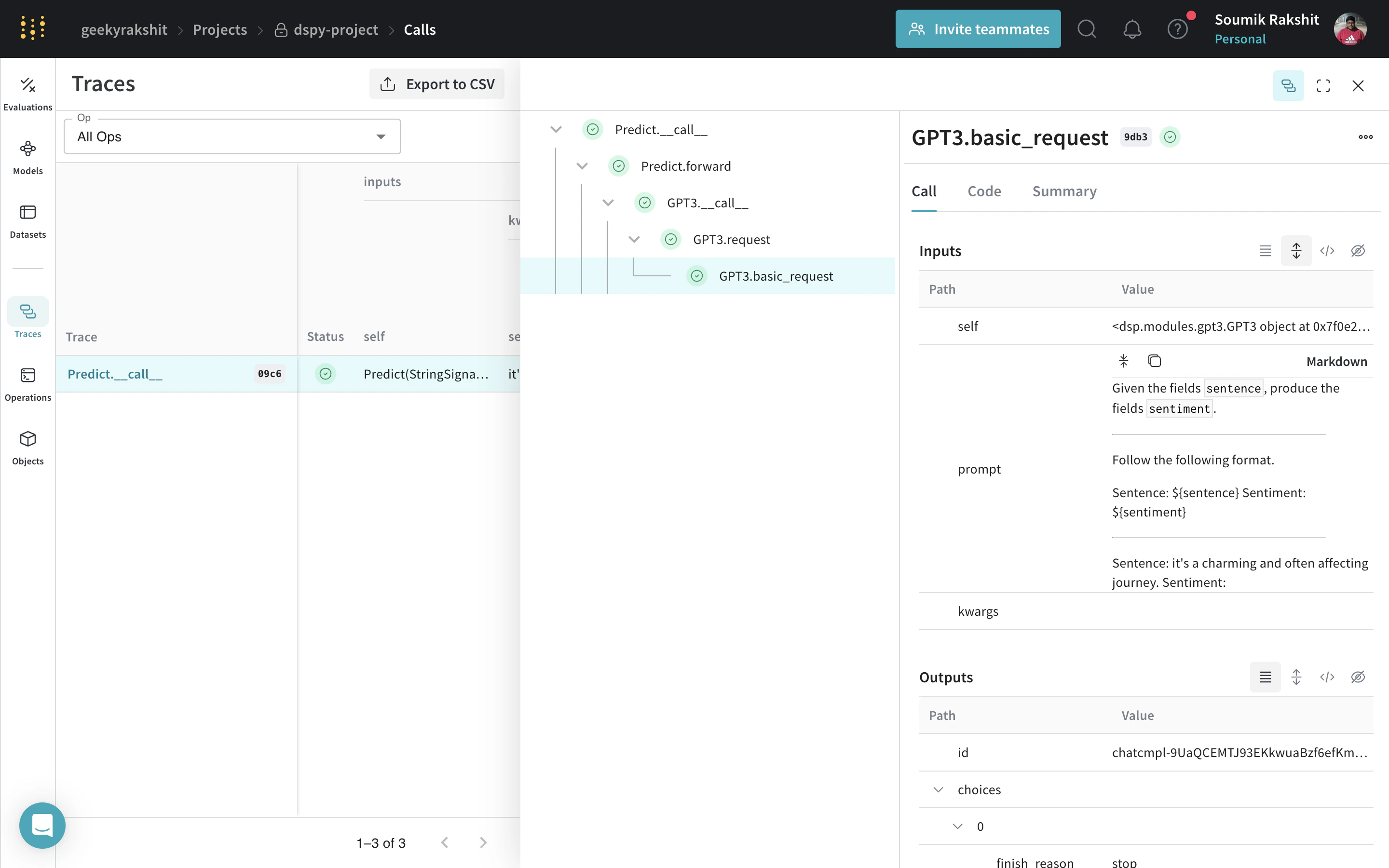 ](https://wandb.ai/geekyrakshit/dspy-project/weave/calls)
With tracing enabled, Weave logs every LM call your DSPy program makes to your Weave project, where you can inspect inputs, outputs, and metadata.
## Track your own DSPy modules and signatures
Beyond built-in calls, Weave also traces the custom modules and signatures you define. A `Module` is the building block with learnable parameters for DSPy programs that abstracts a prompting technique. A `Signature` is a declarative specification of input/output behavior of a DSPy `Module`. Weave automatically tracks all built-in and custom `Signature` and `Module` objects in your DSPy programs. Replace `[YOUR-OPENAI-API-KEY]` with your OpenAI API key and `[YOUR-WANDB-PROJECT-NAME]` with your W\&B project name.
```python lines theme={null}
import os
import dspy
import weave
os.environ["OPENAI_API_KEY"] = "[YOUR-OPENAI-API-KEY]"
weave.init(project_name="[YOUR-WANDB-PROJECT-NAME]")
class Outline(dspy.Signature):
"""Outline a thorough overview of a topic."""
topic: str = dspy.InputField()
title: str = dspy.OutputField()
sections: list[str] = dspy.OutputField()
section_subheadings: dict[str, list[str]] = dspy.OutputField(
desc="mapping from section headings to subheadings"
)
class DraftSection(dspy.Signature):
"""Draft a top-level section of an article."""
topic: str = dspy.InputField()
section_heading: str = dspy.InputField()
section_subheadings: list[str] = dspy.InputField()
content: str = dspy.OutputField(desc="markdown-formatted section")
class DraftArticle(dspy.Module):
def __init__(self):
self.build_outline = dspy.ChainOfThought(Outline)
self.draft_section = dspy.ChainOfThought(DraftSection)
def forward(self, topic):
outline = self.build_outline(topic=topic)
sections = []
for heading, subheadings in outline.section_subheadings.items():
section, subheadings = (
f"## {heading}",
[f"### {subheading}" for subheading in subheadings],
)
section = self.draft_section(
topic=outline.title,
section_heading=section,
section_subheadings=subheadings,
)
sections.append(section.content)
return dspy.Prediction(title=outline.title, sections=sections)
draft_article = DraftArticle()
article = draft_article(topic="World Cup 2002")
```
[
](https://wandb.ai/geekyrakshit/dspy-project/weave/calls)
With tracing enabled, Weave logs every LM call your DSPy program makes to your Weave project, where you can inspect inputs, outputs, and metadata.
## Track your own DSPy modules and signatures
Beyond built-in calls, Weave also traces the custom modules and signatures you define. A `Module` is the building block with learnable parameters for DSPy programs that abstracts a prompting technique. A `Signature` is a declarative specification of input/output behavior of a DSPy `Module`. Weave automatically tracks all built-in and custom `Signature` and `Module` objects in your DSPy programs. Replace `[YOUR-OPENAI-API-KEY]` with your OpenAI API key and `[YOUR-WANDB-PROJECT-NAME]` with your W\&B project name.
```python lines theme={null}
import os
import dspy
import weave
os.environ["OPENAI_API_KEY"] = "[YOUR-OPENAI-API-KEY]"
weave.init(project_name="[YOUR-WANDB-PROJECT-NAME]")
class Outline(dspy.Signature):
"""Outline a thorough overview of a topic."""
topic: str = dspy.InputField()
title: str = dspy.OutputField()
sections: list[str] = dspy.OutputField()
section_subheadings: dict[str, list[str]] = dspy.OutputField(
desc="mapping from section headings to subheadings"
)
class DraftSection(dspy.Signature):
"""Draft a top-level section of an article."""
topic: str = dspy.InputField()
section_heading: str = dspy.InputField()
section_subheadings: list[str] = dspy.InputField()
content: str = dspy.OutputField(desc="markdown-formatted section")
class DraftArticle(dspy.Module):
def __init__(self):
self.build_outline = dspy.ChainOfThought(Outline)
self.draft_section = dspy.ChainOfThought(DraftSection)
def forward(self, topic):
outline = self.build_outline(topic=topic)
sections = []
for heading, subheadings in outline.section_subheadings.items():
section, subheadings = (
f"## {heading}",
[f"### {subheading}" for subheading in subheadings],
)
section = self.draft_section(
topic=outline.title,
section_heading=section,
section_subheadings=subheadings,
)
sections.append(section.content)
return dspy.Prediction(title=outline.title, sections=sections)
draft_article = DraftArticle()
article = draft_article(topic="World Cup 2002")
```
[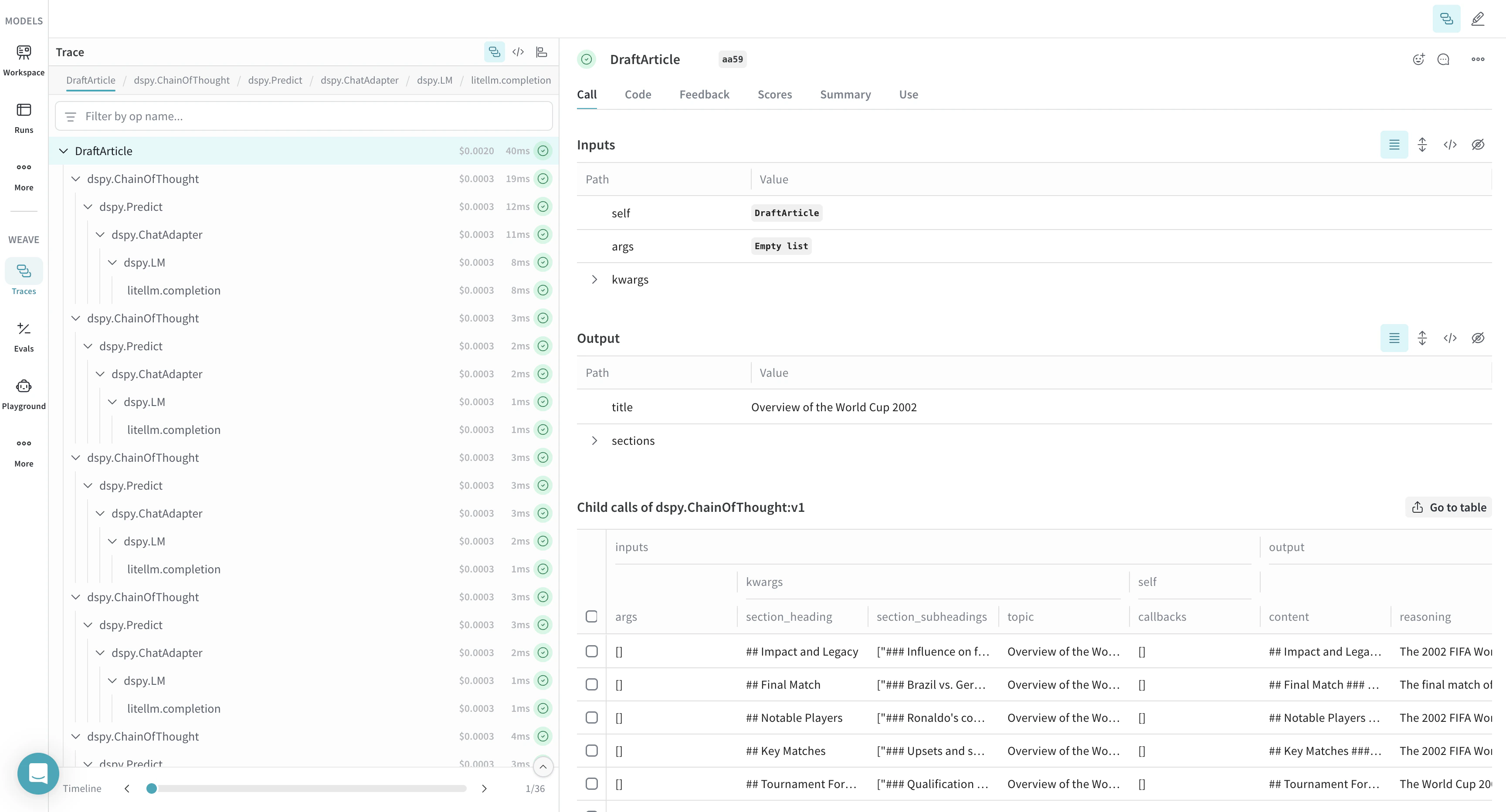 ](https://wandb.ai/geekyrakshit/dspy-project/weave/calls)
## Optimize and evaluate your DSPy program
Weave also captures traces for DSPy optimizers and evaluation calls, which you can use to improve and evaluate your DSPy program's performance on a development set. Replace `[YOUR-OPENAI-API-KEY]` with your OpenAI API key and `[YOUR-WANDB-PROJECT-NAME]` with your W\&B project name.
```python lines theme={null}
import os
import dspy
import weave
os.environ["OPENAI_API_KEY"] = "[YOUR-OPENAI-API-KEY]"
weave.init(project_name="[YOUR-WANDB-PROJECT-NAME]")
def accuracy_metric(answer, output, trace=None):
predicted_answer = output["answer"].lower()
return answer["answer"].lower() == predicted_answer
module = dspy.ChainOfThought("question -> answer: str, explanation: str")
optimizer = dspy.BootstrapFewShot(metric=accuracy_metric)
optimized_module = optimizer.compile(
module, trainset=SAMPLE_EVAL_DATASET, valset=SAMPLE_EVAL_DATASET
)
```
[
](https://wandb.ai/geekyrakshit/dspy-project/weave/calls)
## Optimize and evaluate your DSPy program
Weave also captures traces for DSPy optimizers and evaluation calls, which you can use to improve and evaluate your DSPy program's performance on a development set. Replace `[YOUR-OPENAI-API-KEY]` with your OpenAI API key and `[YOUR-WANDB-PROJECT-NAME]` with your W\&B project name.
```python lines theme={null}
import os
import dspy
import weave
os.environ["OPENAI_API_KEY"] = "[YOUR-OPENAI-API-KEY]"
weave.init(project_name="[YOUR-WANDB-PROJECT-NAME]")
def accuracy_metric(answer, output, trace=None):
predicted_answer = output["answer"].lower()
return answer["answer"].lower() == predicted_answer
module = dspy.ChainOfThought("question -> answer: str, explanation: str")
optimizer = dspy.BootstrapFewShot(metric=accuracy_metric)
optimized_module = optimizer.compile(
module, trainset=SAMPLE_EVAL_DATASET, valset=SAMPLE_EVAL_DATASET
)
```
[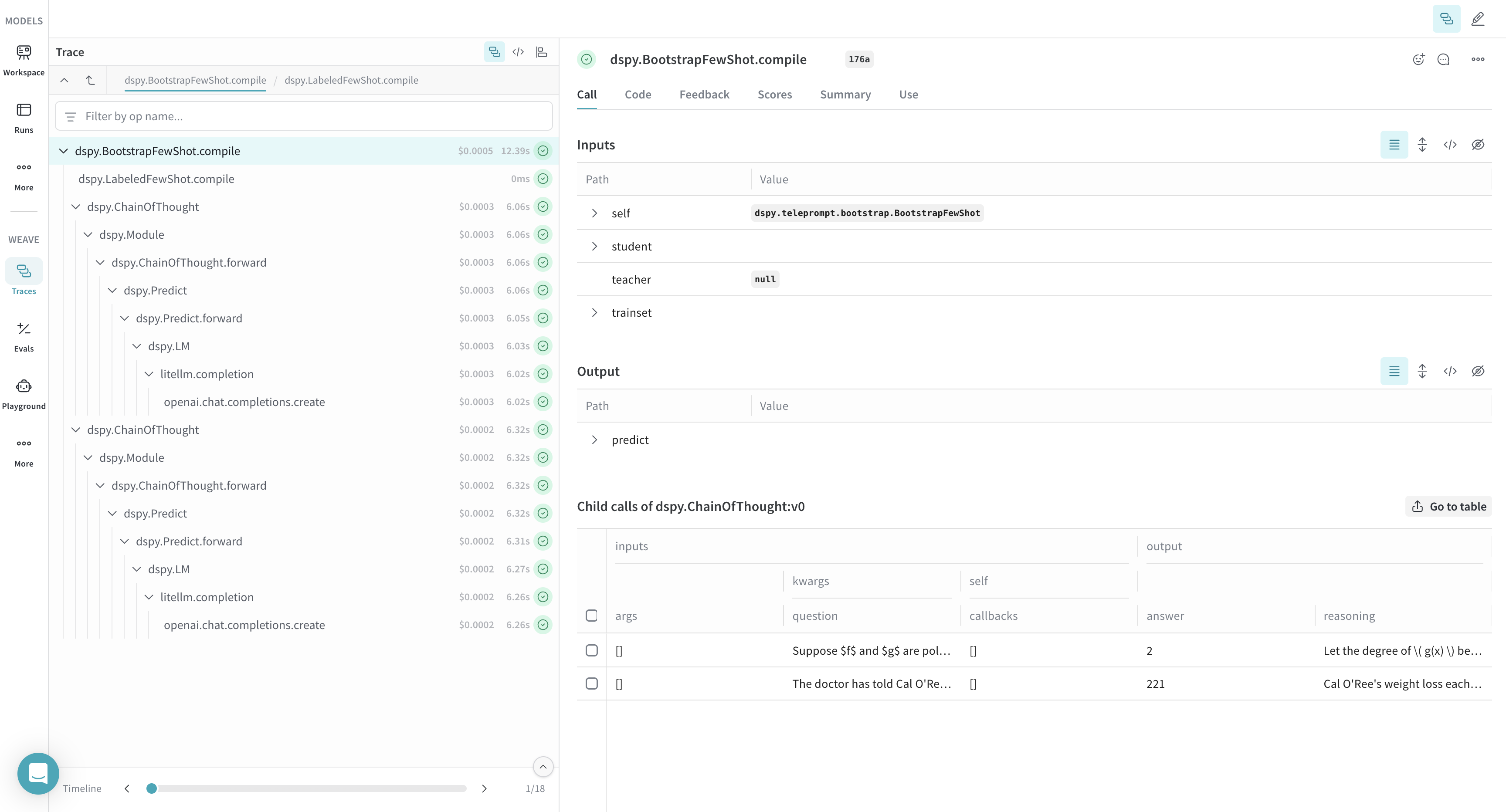 ](https://wandb.ai/geekyrakshit/dspy-project/weave/calls)